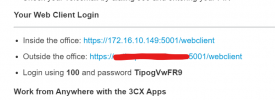
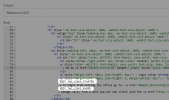
This will happen if you use the same FQDN for ina and out of office, if you check the Email Template there is an 'if' statement, if two links exist.Thanks for the reply @NickD_3CX!
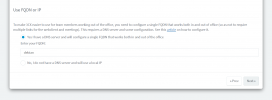
Interestingly enough, on one of my 3CX instances hosted in a VPS, I never got to see that 2nd image during setup. The Inside of Office, or as I've now learned, "%%WEBCLIENTURL%% is the public IP of the instance.
Is that normal behavior, maybe during a NAT check during install or something?

Ahh okay!! I remember on this instance we are talking about I did match the FQDN of the Debian install to what I knew I was going to be using for a 3CX FQDN. Is that a bad practice?This will happen if you use the same FQDN for ina and out of office, if you check the Email Template there is an 'if' statement, if two links exist.
View attachment 24395
This is something that is determined depending on your choices during the installation.
Essentially you told 3CX that your 3CX FQDN is resolvable inside and outside the LAN by doing this (Split DNS).Ahh okay!! I remember on this instance we are talking about I did match the FQDN of the Debian install to what I knew I was going to be using for a 3CX FQDN. Is that a bad practice?
Correct me if I'm wrong. But it the same FQDN resolves both inside and outside of the "office" why does 3CX by default break them out in the email that way. In our case our "inside office" is the public IP of the hosted instance and the "outside office" is the FQDN (resolved to the same IP).Essentially you told 3CX that your 3CX FQDN is resolvable inside and outside the LAN by doing this (Split DNS).
If you have Split DNS, then no, it's not bad practice, it's what you should do.
I suppose you could do this also if your 3CX is Hosted, because even if it isn't correct, you don't care because you will never have a client contacting your 3CX with its Local IP.
By the time that, during the installation, you didn't put the exact same FQDN in both public FQDN and as the internal FQDN (if you choose the Local DNS option), then you will get two lines in the email when using the default settings.Correct me if I'm wrong. But it the same FQDN resolves both inside and outside of the "office" why does 3CX by default break them out in the email that way. In our case our "inside office" is the public IP of the hosted instance and the "outside office" is the FQDN (resolved to the same IP).
Shouldn't they be the same? Isn't that the point of the If statement you were mentioning?
I see. Is there any way to change those settings after the fact? Or should we just change the email template?By the time that, during the installation, you didn't put the exact same FQDN in both public FQDN and as the internal FQDN (if you choose the Local DNS option), then you will get two lines in the email when using the default settings.
3CX does some internal settings during installation that control this.
No, you cannot change this after the fact. You would need to take a backup without License Key and FQDN, uninstall, re-install and restore the backup, and this time during the installation enter both FQDNs as I explained.I see. Is there any way to change those settings after the fact? Or should we just change the email template?
Founded in 2005, when VoIP was an emerging technology, 3CX has gone on to establish itself as a global leader in business communications.