Presence

Status
Not open for further replies.

hellascom

Silver Partner
Advanced Certified
Joined
Apr 6, 2009
Messages
13
Reaction score
1
Hello,

We have on my installation BRIDGE over tunnel this working correctly, on Presence we have enabled " Publish Information " with selected group and on Receive Information add remote FQDN same setup have and on other site of bridge but on 3CX Panel not showed the remote information of presece why wrong ?
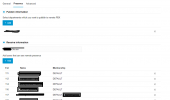
Screenshot 2024-06-30 221626.png
 
Mostly this means that there is connectivity or DNS issue.
Can you please try instead of the FQDN's to use the public ip's for the bridge?
 
Hello,

I trying to add IP address and shown below message " Enter a valid domain address, including a port if required "
 
Which https port you are using?
 
I use only FQDN now and not show any error but no working.
When try to add before FQDN https:// or http:// show same message.
When trying to change the IP, it is also the same.
 
You are using https port 5001 or 443?
 
443
 
Just to clarify the bridge is connected but only presence is not working?
 
The bridge working correctly
The presence not working.
 
Both PBX are in the same version and build?
 
Yes, last 20.0.2.708
 
Is there any error in the event log?
 
No error
 
If you disable the tunnel connection the issue remain?
 
The presence no working.
 
Can you please create a support ticket so we can further?
 
Now on event log show this error

Registration at My Bridge has failed. Destination (sip:127.0.0.1:5080;lr) is not reachable, DNS error resolving FQDN, or service is not available.
 
This seems to be related with your DNS.
Are you using the Google DNS as primary for both installations?
 
Allready created ticket 2072050

Close this thread.
 
Status
Not open for further replies.

Forum statistics

Threads
112,276
Messages
591,639
Members
165,393
Latest member
Carlos - EC Mates