Providing company information

Jinko

Customer
Joined
Mar 3, 2026
Messages
17
Reaction score
3
Hi,

The ai agent cannot provide email adresses of the company when i create a knowledge source with document, email of service department [email protected]

it will stop talking..


when a customer calls and wants to know where to send a email to,, the ai agent should provide "some" emails.

is there a way that the ai agent can create a ticket?
 
Hi,

You might need to amend the Agent Instructions, letting it know that emails (or a specific email) can be provided, either listed in the instructions or from a knowledge source.


There is no direct way for ai agents to create a ticket. Some solutions exist like having them transfer to a CFD that creates the ticket, or some users have made their own solutions by grabbing the agent's call recordings/transcriptions out of band and creating tickets via that.
 
Okay, can you share a sample tekst how to let the ai agent know to use the email.

When I tried adding like: you cannot transfer calls after 05:00pm it won’t listen to that too
 
I am having a similar issue. I am trying to have the AI quote labor rates. I uploaded a .doc file with our labor rates and it would not give out that information. If I add it to the company description it will give out the rate but I am limited to the number of characters allowed in the company description. What do I need to do to have it use the knowledge source?
 
Hi Team,
These are very interesting cases.
From what you described, it seems that you are uploading a document containing company data, but the issue likely occurs during the retrieval stage.

If the information works when placed in the Company Description but not when stored in the Knowledge Source, it usually means that the retrieval step is not matching the caller’s question with the stored embeddings. So testing it in the Company Description was actually a very good diagnostic step.

It also depends heavily on how the information is written in the document. Knowledge sources generally perform much better when the content is written in natural language, rather than in database-style records or short fragments.

For example, instead of writing:


try writing something like:

Customers can send service requests to [email protected].

This provides more context and improves the chances that the retrieval system will match the caller’s question with the relevant information.

Regarding the email case

I am almost 100% sure that the prompt may be designed not to expose email addresses by default, since emails can sometimes be treated as confidential information.

A few things to check:

  • Make sure the "Confidentiality Mode" option is disabled.
  • Ensure that the Agent Instructions explicitly allow the agent to provide company contact information, such as email addresses or pricing details.
  • If the instructions do not clearly allow this, the model may intentionally avoid sharing that information. In this case, the prompt should be adjusted to explicitly permit the agent to provide company email addresses when customers ask for them.

Regarding the labor rate example

For this type of information, I would recommend formatting the content using Markdown.
For example, create a file such as labor_rates.md and structure it clearly:

# Labor Rates
Our standard labor rate is $120 per hour.
If a customer asks about labor pricing, inform them that the current labor rate is $120 per hour.

Language models tend to work very well with plain text and Markdown formats, especially when the information is clearly structured.

Very interested to help you guys solve this. Mind you, Ive seen our knowledge base answer much more complex answers than what you are trying to do here. The embeddings model of openai is excellent and designed for the masses. Your scenarios must work.
Try these tips and if you fail, let us know.
God bless
 
@jim@valley-tel - as commented here, for such info plain text seems to work best, no chance of formating getting in the way.
 
  • Like
Reactions: accentlogic
And a short demo:
 
And a short demo:
Thank you for that video. I am following your procedure verbatim and I am still receiving incorrect results.
1773248066121.png
1773248108609.png
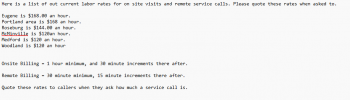
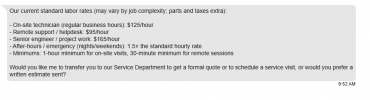
Here is a screen shot of what was uploaded to the knowledge source and here is the chat with the "made up" rates. What could be the cause of this? When I ask the AI where it is getting this information it tell me it is coming from the knowledge source.
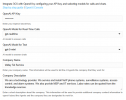
Here is the current models being used.
1773248290609.png
Thank you for the information you have provided so far. What are the next steps to resolve this issue?

Jim
 
I wouldn't mention the rates in the company description, that is at a higher level - leave it to the description of that knowledge source only.

Also, see if you can try other, non-mini models for Text.
 
  • Like
Reactions: Evolute IT

Forum statistics

Threads
112,025
Messages
590,368
Members
164,978
Latest member
FringeIT-Eric