• We do not provide troubleshooting help for unsupported phones. Please try with a supported phone.
  • V20 Update 10 Alpha 2 Learn more

Provisioning a polycom vvx601

Status
Not open for further replies.

bennuss1

Customer
Joined
Aug 12, 2020
Messages
24
Reaction score
0
i am trying to figure out how to provision a polycom vvx 601. It is on the same lan and subnet as the 3cx install.
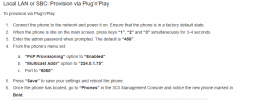
601.PNG The method that is listed doesnt seem to exist. i dont have a setting PNP provisioning .
Do I set method to HTTP or HTTPs or TFTP
 
Did you do the steps before that as far as upgrading the firmware and factory resetting?
 
Did you do the steps before that as far as upgrading the firmware and factory resetting?
Yes it is upgraded and factory reset. Those settings dont seem to exist. What server type do I need to put it on?
 
Well if you can't find that setting you could go a little farther down that guide to the Manual Provisioning steps and follow them, but set it as local LAN and HTTP
 
Ok. but trying to figure out the faster way. I have 50 phones to provision. Does anyone know the settings?
 
That is the settings on 3CX. I am asking what are the settings on the phone.
I know how to setup option 66 . My issue is setting the correct settings on the phone so that it sends therequest to the DHCP server
 
Perhaps you should re-read the article I linked.
 
Looked at it . It doesnt say anything about what the settings need to be on the phone
 
So it seems you aren't understanding how DHCP Option 66 works. As you mentioned, you have 50 phones so it seems unlikely you want to touch each and every phone. That's where DHCP Option 66 comes in. The phones read the DHCP Option 66 and thus get the settings they need.
 
My understanding is that the phone needs to be set for http provisioning first. Am I wrong about that? The default on polycoms seems to be ftp
 
1621991458297.png

1621991470395.png

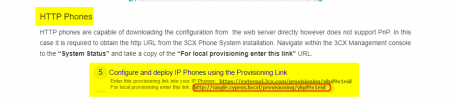
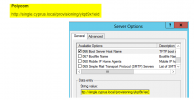
The guide is old but the process is still basically the same. Take the provisioning URL from the management console and put that in DHCP Option 66
 
i get that.and i know how to set that up. does the phone need to be set to http provisioning or it will automatically change from ftp when it sees the server is http based. i know on the yealink the default is http but on tye polycom it is ftp.
 
Hi @bennuss1

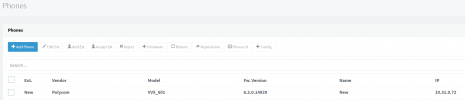
I just went through the steps of setting up a VV601 and I am able to get to the PnP provisioning screen using the instructions and make the phone appear in 3CX.
1622008201868.png

I can only speculate at this point, that you either missed a step, or you have the wrong firmware (and thus no PnP option in the menus yet).

You will have to do this step on all 50 phones though manually, that's just how Polycom works. The option @cobaltit suggested means that:

a) assuming you are on the right firmware
b) assuming all phones are factory reset
c) and assuming you have DHCP Option 66 available to you

..you may then massively provision all the phones at the site which is way easier and also means that if you have to reset them in the future, they will quickly autoprovision upon startup with no need for you to touch anything.


This still requires some work though:
  1. You have to manually add a phone to each extension and provide its MAC address
  2. You need to then copy the provisioning link, and assign it on your DHCP server

In answer to your question, no the phone does not need to be set up in HTTP mode, Option 66 works without this requirement.
 
If you have a picture of where on the phone i can select "PnP Provisioning" that would be very helpful. I updated to the latest firmware by logging into the phone's ip and going to update and selecting the latest firmware since i didnt see one that matched the one you have listed under firmware updates. I assumed the 3cx page wasnt updated .

Do I ave to manually add each phones mac address to the 3cx system or if i use option 66 it will pop up in the 3cx web interface like yealinks do?
 
If you have a picture of where on the phone i can select "PnP Provisioning" that would be very helpful. I updated to the latest firmware by logging into the phone's ip and going to update and selecting the latest firmware since i didnt see one that matched the one you have listed under firmware updates. I assumed the 3cx page wasnt updated .

Alright, in this case lets get you on the right firmware and take it from there.

Following our guide here you will notice on step 5 it instructs you to go to our firmware page and see what the latest version is for your specific model (6.3.0.14929). Then, from the phone's web UI you can select that version specifically and phone will install it.

Important Note: Polycom has 2 different types of firmware so if you have what they call OBI firmware, you will have to visit their support site to switch from OBi to UCS firmware.
 
  • Like
Reactions: jed
So i found pnp provisioning when i logged into the phone's web interface. Its under settings -provisioning server - sip plug n play.
So it worked if i manually enter the mac address into 3cx and add it to an ext . It provisions properly ( For some reason it shows up as unprovisioned)
Do i have to manually enter all 50 mac addresses ? unlike the yealink that the phones show up in bold and then you can just assign them.
Also when i try to add line keys it says they arent supported in legacy devices. i thought the 601 arent legacy. only the 600's
 
Hi,

They are both legacy phones, but 600 is also end of life (ie. no further updates from manufacturer).

You don't have to manually enter the MAC address. If they appeared in bold under your phones section, then simply follow the instructions here, Step 3
https://www.3cx.com/sip-phones/polycom-vvx/


What firmware version is the phone showing now?
 
Status
Not open for further replies.

Forum statistics

Threads
112,147
Messages
590,961
Members
165,167
Latest member
Finatra.us