Provisioning of Grandstream GXP2130 works, GXP2135 fails

Status
Not open for further replies.

IFAdmin

Customer
Intermediate Cert.
Joined
Sep 17, 2020
Messages
13
Reaction score
3
Hi there,

I have a bit of curious problem, running two instances of 3CX (standard at home and professional at work) with grandstream phones.
I have the GXP2130 at home and the GXP2135 at work.

I can provision the GXP 2130 at both instances, whereas provisioning of the GXP 2135 fails in both instances - although they are connected to the same switch and I compared the configuration in the web interface. Even three factory resets of the GXP2135 did not help.

So the problem can't be in the 3CX (if the GXP2130 works), at most at the available firmware files?

Is there some kind of log I can evaluate?
 
Hi,
yes the 3CX is on V16 und GXP2135 is on 1.0.11.6 (guess, 10. was a mistake?).

Interestingly, the (working) GXP2130 is on 1.0.9.69...
 
Oh, yes, of course,

  • 3CX Version, Pro Annual, 16.0.641
  • Server OS, Debian Stretch (3CX Debian Build/OS Image)
  • Is the 3CX Server Hosted and where? Virtual root server, dedicated IP, hosted at Hetzner (Germany)
  • IP Phone Make/Model/Firmware Grandstream GXP2135, Firmware 1.0.11.6 (two pieces with same behaviour)
  • Provisioning Method: Local / VPN / STUN / SBC 3CX-SBC (extern)
  • Trunk Provider or Gateway Make/Model Trunk at Ecotel and Easybell (both Germany)
  • Has the Firewall Checker passed: YES
  • Are custom Phone Templates being used: NO
 
Phones not provisioning are behind an SBC ? are they seen Bold in PBX console ?
 
Ok I can confirm that my 2135 will provision just fine on SBC so I suggest the following:

1. Try to add the provisioning URL manually and see if it will work.

2. If not, then reset the phone and start a packet capture on it. After this, reprovision it from the management console and after it fails download the PCAP file and analyze it.
 
Hi,
thanks for replay, so...

Phones not provisioning are behind an SBC ? are they seen Bold in PBX console ?
Hmm, what else should I use? LAN if 3CX is running at a hosting site? I used the same config which worked for the 2130... :confused:
Where can I find the PBX Console?

Ok I can confirm that my 2135 will provision just fine on SBC so I suggest the following:

1. Try to add the provisioning URL manually and see if it will work.

2. If not, then reset the phone and start a packet capture on it. After this, reprovision it from the management console and after it fails download the PCAP file and analyze it.

1. Where can I add the URL manually?

2. If I capture the packages, at the 2130 I get some TLSv1.2-Packages, on the 2135 I don't see them, so there's something different between those phones...
 
1. Also check whether the "Disable SIP Notify" is set to yes when you reset your phone. When you set it to YES it might autoprovision successfully in your next attempt, without the need to add the URL.

2. The URL can be added manually here.
1600348930476.png


For Wireshark troubleshooting:
========================
You should see a NOTIFY message (use the filter sip.CSeq.method==NOTIFY) going from the IP of your SBC to the IP of your phone. This tells the phone "go to this URL and autoconfigure yourself"

Then you should see the phone IP running a DNS lookup for your FQDN and the DNS server replies with the correct public IP of your PBX (hopefully)

After this, you will see a TLS connection from the IP of the phone, to the public IP of your PBX. If this connection does not stop with a TLS warning/error then hopefully the phone should be able to download its configuration and provision itself.
 
Thanks a lot.
After resetting the phone the fifth time, it works for the first one; let's try the second...
 
  • Like
Reactions: JohnS_3CX
Ok, second phone is working, too.

(Un-)register to queues is working, available/dnd is working; the only thing which seems not to work is the BLF: I configured BLF thru 3CX web interface an see the names on the phone display; but they are gray with a question mark on the avatar...
 
Well done IFadmin,good job. :)
What did you set on those BLFs ? is it possible to do a screen copy of BLF settings (hide sensitives infos)
 
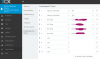
Unfortunately, it's in German - hopefully, it's not a big problem.

So, the first two keys are working, but key 3-6 only appear gray on the phone and do not function as expected (i.e., dial the number when pressed).


screenshot-blf.png
 
did you tried to set BLF from console and not from Webclient ?
 
Once you set the BLF settings from the webclient or management console, the phone needs to reprovision in order to load them. For most phones, a reboot should take care of this, or it can be done manually from the management console's Phones section by selecting your phone and pressing the reprovision button (phone must already appear there as registered)
 
Thanks for the reply.
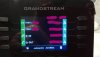
Reprovision seems to work, since the shown names/extensions on the phone alter, if I change them. Unfortunately, they're still gray on the phone and the buttons don't work as you can see on the right side.

IMG_20200922_094354700.jpg
 
No one? Or should I open a new Thread for this issue?
 
No one? Or should I open a new Thread for this issue?
Actually, I would open a ticket with Grandstream as well.

GXP on 3CX via SBC normally works pretty well. BLF issues are mostly firmware problems.
 
  • Like
Reactions: IFAdmin
Status
Not open for further replies.

Latest Posts

Forum statistics

Threads
111,964
Messages
590,000
Members
164,869
Latest member
hpgitsupport