Provisioning Yealink SIP-T60P to version 16

Status
Not open for further replies.

Kane Wong

Free User
Joined
Oct 13, 2018
Messages
233
Reaction score
9
Hi;
When I used the Yealink phone template Yealink T28 for version 15.x, I can use my Yealink SIP-T60P but when I test it with my new installation version 16 (latest), I am not able to register the this phone to my server. Any suggestion that I can try to make it work?
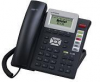
 
Never mind. It is working now, I am still using T28 to support the legacy Yealink phone SIP-T60P.
 
Hi cobaltit;

No, it is SIP-T60P, a very old Yealink phone, I think, at least 6 or 7 years old.

This is the firmware used by the phone
Firmware Version 60.61.135.6
Hardware Version 11.0.0.4

This is not listed in the 3CX supported phone but I am using T28 template to work with it, I can make call and go to the voice mail, the general basic function.
 
Is this it?

13892

Had to dig for that. Glad you got it working because I can't even find that on Yealink's site.
 
Is this it?

View attachment 13892

Had to dig for that. Glad you got it working because I can't even find that on Yealink's site.
Yes. This is the one. The only draw back is that you will see the UNPROVISIONED status on 3CX console but I don't care as long as it can dial and pick the calls.
 
Hi Kane,

You can manually register a device even without a template.

Compatibility is not guaranteed but you can at least do basic calls.

Username = %extension number%
Register Name = %Authentication ID%
Password = %Password%

Just add your server port and IP so it knows where to connect
 
Hi Kane,

You can manually register a device even without a template.

Compatibility is not guaranteed but you can at least do basic calls.

Username = %extension number%
Register Name = %Authentication ID%
Password = %Password%

Just add your server port and IP so it knows where to connect
Hi John;
To manuall register the phone, I do not need pre-select the phone type from "Phones Provisioning" tab on console, I just enter username, register name, and the password directly on the Yealink phone console page, is that what you mean?
 
You do not need to pre-select the phone. Preselecting the phone will allow a provision file to be generated, but manual provisioning does not use that.
 
Exactly, the system only needs the credentials to be correct in order to allow you to register, so you do not even need to add a device.

If its a standard SIP phone you will at least be able to make calls, but if you have features that don't work you are better off just getting a supported phone and calling it a day.
 
Status
Not open for further replies.

Forum statistics

Threads
111,935
Messages
589,823
Members
164,816
Latest member
natedog