Solved Recording Remaining Space not working

Status
Not open for further replies.

penfold15

SMB User
Basic Certified
Joined
Apr 12, 2019
Messages
28
Reaction score
3
Hi All,

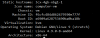
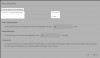
The management console is not displaying the remaining space on the recordings section, it just shows as -
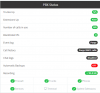
1606998434112.png

The drives are mounted and the correct usable space is shown when using df -h on the command line. Recordings work fine but just stop when it runs out of space, no notifications as it cannot see the space remaining.

How do I get 3cx to see the space remaining?
 
is this a standard license or pro and above?
 
Have you done the normal troubleshooting such as rebooting PBX?

have you played with permissions on the server?

Can you check the permissions of the recordings folder?
 
Server is up to date and has been rebooted several times. Permissions on the folder is set to phonesystem for owner and group
 
Hi @penfold15

1607440438634.png

This shows how many MBs of space is used by recordings.

The above screenshot means that on this system, out of the quota of 5GB that I defined, I currently have 3.5MB of recordings stored.

So it should not show the remaining space. In your case, it implies that there are no recordings currently stored so you get a "-"

1607440642666.png
 
Hi,

Thank you for the reply.

The problem is there are plenty of recordings that are stored, around 123GB worth

1607441121807.png

However for some reason 3cx does not recognise this.
 
Was the recordings location changed throughout the lifetime of your PBX?

Or did you start with a blank drive that has been progressively filling up?
 
Was the recordings location changed throughout the lifetime of your PBX?

Or did you start with a blank drive that has been progressively filling up?

Hi

Its been set the same all along
 
How about the rights of the recordings location?

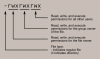
Keep in mind that the linux user called "phonesystem" is the one who will be doing the writing and reading, so ensure that this user has full rights on the recordings folder otherwise the service cannot function as intended.

For example in my system the recordings are stored here:
/var/lib/3cxpbx/Instance1/Data/Recordings

So when I run the command ls -ld /var/lib/3cxpbx/Instance1/Data/Recordings

I get this:

drwx r-x r-x 2 phonesystem phonesystem 4096 Sep 21 12:35 /var/lib/3cxpbx/Instance1/Data/Recordings
1607442516327.png

Which indicates that the owner is phonesystem, the group is phonesystem and the rights are read/write/xecute for the owner (As they should be in our case)
 
Hi,

I get the following result

1607444663345.png

Sorry my earlier screenshot was wrong, I cropped the wrong part, the total space should show as below

1607444709665.png

Thank you for your help
 
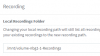
Ok and in your management console is this the path you defined for recordings like this?
1607504878685.png
 
Yes that is correct. All recordings save without an issue, playback and download as normal. It just doesn't recognise the space used.
 
Lets also check the following:

1. Log in using Chrome, incognito window. Does it still show "-" ?

2. Go to Recordings, click Location, see whether you enabled Archive Schedule Policy. Archived recordings have a little book icon next to them, and will now show as part of your HDD quota.

3. Restart all your services to force the system to re-count the space used by recordings.

4. What kind of storage is mounted under /mnt ? A regular hard disk?
 
Hi All,

I have the same issue the management console is not displaying the remaining space on the recordings


section, it just shows -/90.0 3cx error.PNG
 
Lets also check the following:

1. Log in using Chrome, incognito window. Does it still show "-" ?

2. Go to Recordings, click Location, see whether you enabled Archive Schedule Policy. Archived recordings have a little book icon next to them, and will now show as part of your HDD quota.

3. Restart all your services to force the system to re-count the space used by recordings.

4. What kind of storage is mounted under /mnt ? A regular hard disk?

Hi,

Thank your assistance with this

1) I have tried this and its still the same

2) Archive is not enabled

3) Done, several times, aswell as server restarts

4) Network based SSD Storage
 
4) Network based SSD Storage

Some more details please? Network based storage needs to be mounted as a block-level device (like iSCSI).

It cannot be an NFS/SMB style mount otherwise there is a risk of data integrity (many recordings might have missing content or be zero size)
 
Hi,

I have requested this information from the data centre, they have replied as follows

" Our cloud server volumes are mounted as block level via iscsi. they are not Mounted via NFS/SM "
 
  • Like
Reactions: JohnS_3CX
Excellent, please send me the output that I have also requested via PM so we can inspect the recordings folder.
 
Status
Not open for further replies.

Forum statistics

Threads
111,974
Messages
590,081
Members
164,899
Latest member
mazet