Solved Recordings filtering not really working (v18)

Status
Not open for further replies.

Parslej

Forum User
Joined
Jun 16, 2021
Messages
62
Reaction score
18
Acording info I read in guide I should be able to filter recordings by any value included in output file name.

My example file name looks like that:
6712-6781_20220322094059(613).wav

But if I put any value from that string (eg 202203) search engine returns me nothing...
Only filtering by caller's name works

How to get this working ?
/tested in botr aps and via webbrowser/
 
Acording info I read in guide I should be able to filter recordings by any value included in output file name
Which guide are you referring to?

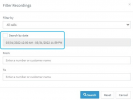
If what you want is to filter by date/time, you can do that in the Management Console >> Reporting >> Recordings section by clicking the "Filter" button:
1648550981984.png
 
If what you want is to filter by date/time, you can do that in the Management Console >> Reporting >> Recordings section by clicking the "Filter" button:

I need that for regular user, so has to be done from app / webclient, not management console as this (I believe) should be reserved for PBX admins

Is this possible ?
 
Hi @Parslej,

No, you'll need to search for the number / name etc. The file name isn't searchable.
 
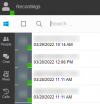
If you search the name or number of the caller, you'll find it pretty easy to navigate as it has the dates below the call recordings:

1648561287345.png
 
If you search the name or number of the caller, you'll find it pretty easy to navigate as it has the dates below the call recordings:

View attachment 29081


I know but this is for Internal Audit purposes. They wanted to filter specific date range, not callers.
This is a bit pain considering hundreds of records to browse...

BTW I dont understand why this was done in easiest way, a little more efffort might satisfy 90% of such needs
Eg if there will be an option to add some wildcard (eg %) to filter file names - no addtional windows / dialogs might be needed

Eg User might put something like that: %6781_202203%
below should be returned:

6712-6781_20220322094059(613).wav
 
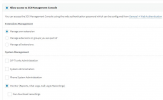
Only way to do this would be by providing an extension with Management Console access as mentioned above.

Providing only the below rights:

1648625960002.png


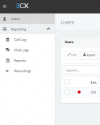
will give the extension the following access in the Management Console:

1648625969058.png

Note: Do bear in mind that the user will be able to see ALL call logs/chat logs/recordings.
 
Thanks. I didnt know I can give user limited access to console
Hope this will address all needs.
 
  • Like
Reactions: ChrisC_3CX
You're very welcome!

Hope so too! I'll be marking this as solved for now so please do let us know if you need anything else!
 
Status
Not open for further replies.

Forum statistics

Threads
111,974
Messages
590,081
Members
164,899
Latest member
mazet