Recordings Permission

Status
Not open for further replies.

KarstenWeidinger

Advanced Certified
Joined
Dec 9, 2022
Messages
5
Reaction score
0
Hello,

We have to grant the access to download the call recordings for multiple users.
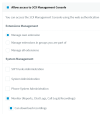
1670587041886.png

But if we enable the option like above, it will grant them also access to alter the "Recording Quota Options", what is of course not wanted.
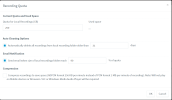
1670587131130.png

What is the supposed way to achieve this? Access the call recordings, but not the quota settings.

Best regards
Karsten
 
Hi Karsten,

You can give access to recordings without giving access to the management console like this :
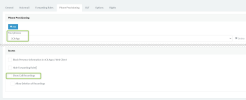
On management console > phone provisioning > select "3CX App" > scroll down to "Access" > tick "Show call recordings"

1670590559729.png
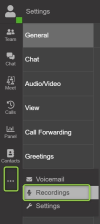
On web extension you will be able to download recordings here :
1670590826922.png
 
But it will show the own recordings only, right?
Not the recordings of colleagues, which is needed.
 
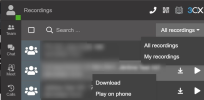
In "recordings" from the webclient/desktop app, you will be able to classify by "All recordings" and "My recordings".
1670593665755.png
 
  • Like
Reactions: KarstenWeidinger
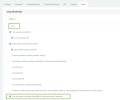
Also in the "rights" of the extension, tick "Can see group recordings (Available in Professional and Enterprise)"
In this way, you will be able to see from "all recordings" tab (desktop app/webclient > recordings) recordings of your group.

1670595240184.png
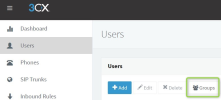
If you want to see recordings from another group, you will have to add your extension in a different group here :

1670595644455.png
 
  • Like
Reactions: KarstenWeidinger
Thank you very much!

I just found the second (most important) part myself!

/resolved
 
Status
Not open for further replies.

Forum statistics

Threads
111,974
Messages
590,081
Members
164,899
Latest member
mazet