Registration failed on Siemens Gigaset A580IP

Status
Not open for further replies.

Raf Wenger

Customer
Joined
Apr 5, 2010
Messages
22
Reaction score
0
Hi
I'm having trouble registering this new Gigaset A580IP with the 3CX Phone System (v9 SP2).
I can successfully register a dozen handsets on the same 3CX server (Linksys, YeaLink, Snom), so I guess my 3Cx phone system is configured properly.

I can however register the Gigaset A580IP successfully with a VOIP provider, but not with my internal 3CX PBX.
At one stage, while the extension status was showing "Not registered", I was able to make an internal call from the A580IP but could not receive call on it (it went straight to voicemail).

I've checked the 3CX system logs and only found the following line (ext 833 is the A580IP, 192.168.1.99 is my 3CX server)
15:30:29.018 [CM503016]: Call(6): Attempt to reach <sip:[email protected]> failed. Reason: Not Registered

I've read on this forums that other users managed to register that phone successfully. Any help would be greatly appreciated.
By the way, I am using the latest firmware available for the A580IP (022230000000 / 047.00)

Thanks!
Raf
 
Hi All.
Anyone with a working setup for the A580ip phone, could you let me have the settings, I can make internal calls but recieve Voip Status 404 message when trying to make external calls.
 
Hi Andy,
I had that problem too...

Make sure the RTP ports of the A580IP and the 3CX PBX are identical.

On the A580IP:
Telephony > Advanced Settings > RTP Port

On 3CX PBX:
Settings > Network > Port > Ports to use for internal leg of Voip provider calls

Hope this helps.
Cheers
Raf
 
Hi Raf thanks for the reply,
I made the changes but still have the same issue.. I set the A580IP to the same ports as the 3cx: 7000-7499
could i trouble you for your working setup.?

Cheers
 
No worries.
Can't seem to attach file to this post, so you can get it from my public dropbox folder:

http://dl.dropbox.com/u/4575313/Gigaset%20A580IP%20config.pdf

Cheers
Raf
 
Hi there. I've had a similar issue with my 470 IP together with the V9 of 3CX. Couldn't find any solution to these problems.
Then recently I've changed to V10 RC and all issues were resolved.
 
Great Job Raf,
my setup was the same but for the dtmf send settings, under Telephony-Advanced
Much appreciated, All working now.
 
Please can You help me . I've the same problem with the same telephone . Ca n anyone help me. I've controlled the rtp port and are the same. Or anyone like Raf wenger can send me a copy of nice configuration? :S
 
It's always better to begin your own thread , rather than re-opening one from a number of years ago.

I'm using several C610A-IP bases, so I'm not sure if the menu set-up is exactly the same as on your model, it is probably similar though. As I recall, I left most of the settings in the Advanced VoIP settings in default. If you want to list what setting you have, I can compare it to mine.

What issues are you actually having with the phones?
 
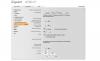
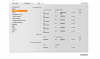
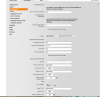
Thanks Leejors. Here is my configuration
 

Attachments

  • Screenshot_1.png
    Screenshot_1.png
    88.8 KB · Views: 2,481
  • Screenshot_2.png
    Screenshot_2.png
    76.5 KB · Views: 2,479
  • Screenshot_3.png
    Screenshot_3.png
    68.7 KB · Views: 2,473
On the Settings/Connections page. I have the server IP in the Domain setting as well. So it is in there 3 times, on that page. You do not have to enable STUN as the phone appears to be located on the same LAN as the server. I would set the Registration refresh time at something just under 1800 seconds (30 minutes), say 1700. 60 seconds is far too often.

On the Settings/Advanced VoIP settings page, I have DTMF set to Auto (If your current settings work, then don't change it)
I have ..Use the R key for transfer, set to yes.

You can define the choice of target address in the SIP protocol.
Find target addr. automatically: Yes No
Derive target address:
from the SIP URL
from the SIP contact header


I'm not certain on the wording or your menu, my selections (above) are in bold, they may or may not work for you.

The remaining menu is as follows:

Listen ports for VoIP connections

Use random ports: Yes No

SIP port: - 5060- (5076) greyed out
RTP port: - 5004-5020

Music on hold

Yes No

 
Thank you very much . Resolved the problem was that in domain i must insert again the ip address . When I insert in it registered normaly.

:D
 
I sort of figured that that was the problem. It took me a few minutes to realise that the server IP had to go in three places.
The phone was designed for use with external VoIP providers and offers the needed "settings flexibility" for that.
 
Status
Not open for further replies.

Members Online Now

No members online now.

Forum statistics

Threads
111,835
Messages
589,289
Members
164,665
Latest member
dominik.pepel