Remote Configuration Grandstream GXP1628

Status
Not open for further replies.

VOIPSupport

Customer
Joined
Mar 18, 2019
Messages
10
Reaction score
0
Hi All,

We have a Physical Grandstream phone which is in a remote branch that we are trying to configure.
There is no site to site VPN between branches so this is connecting via WAN.
From the remote site we are able to use the 3CX Softphone fine but having difficulties to configure the physical phone.

In the extension I have the following setup.
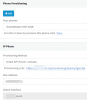
9880

I am not sure if I need to make a change to the STUN server in the parameter settings?
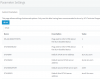
9881

I can see a warning in the log which is

9882

However when I paste that in the remote site computer which is connected to the phone nothing happens just get a generic 404 page can not be displayed.

Does anyone have any ideas on what the issue could be?
 
Hi All,

We have a Physical Grandstream phone which is in a remote branch that we are trying to configure.
There is no site to site VPN between branches so this is connecting via WAN.
From the remote site we are able to use the 3CX Softphone fine but having difficulties to configure the physical phone.

In the extension I have the following setup.

View attachment 9880

I am not sure if I need to make a change to the STUN server in the parameter settings?
View attachment 9881

I can see a warning in the log which is
View attachment 9882

However when I paste that in the remote site computer which is connected to the phone nothing happens just get a generic 404 page can not be displayed.

Does anyone have any ideas on what the issue could be?

It looks like that phone may already be on the STUN server. You cannot enter that link into a web browser you need to enter it into the GUI of the phones auto provisioning section.

If you enter the link then the phone should grab its provisioning file from 3CX.
 
Hi Rhys,
Thanks for that.
We did that buy didn't do much even after restart. So stumped at what it could be.
9884
 
Hi Rhys,
Thanks for that.
We did that buy didn't do much even after restart. So stumped at what it could be.
View attachment 9884

After the url is inputted (by the way, be sure to remove https:// and the .xml part of the link), try to click "Provision" in the upper right corner.
 
Hi Frederick,
Yes I removed the Https:// and the .xml
There is no provisioning button on the upper right hand corner. There was a save and apply at the bottom of the screen which I have done still not getting anything. Status on the Account just shows down.
Not sure if the phone itself to have any logs to see what its trying to do.
 
What firmware version are the phones running, and have you tried being patient? I've seen Grandstream phones take like 10-15 minutes to provision. I'd give up and then come back and they'd be working.
 
Hi cobaltit,
Its on the latest firmware.
Yes we have had this setup for over a week.
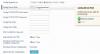
I've been looking at the template for the grandstream and saw that it has the below.
I think after the provisioning link I need to put port number?

9895
 
Port number is needed if not 80/443 (ie: 5000/5001).
Doesn't the 1628 support RPS?
 
@craigreilly

In one of the earlier posts there is an error with RPS.
 
So there are two steps here, provisioning and then registration. Account down could be a registration problem if 'Disallow use outside of LAN' is checked. If you want to verify the config file you would paste the provisioning path in the browser and then add 'cfgMACADDRESS.xml . I believe it is case sensitive and should be lower case. A typo in the MAC address could also be the issue if this is a brand new phone giving you the RPS error.
 
@craigreilly
Thanks I did try the port numbers still no luck

@cobaltit
The disallow from LAN tick has been removed from the get go (3+ weeks)
MAC address is correct confirmed it a few times with a photo from the device
The phone isn't getting provisioning from our server so I am not sure how the xml will help?
 
The point is to determine where the problem is. So we want to make sure that 3CX is generating the config file and that it is accessible from that site. Trying it from the browser will confirm both of those.
 
So the bottom one should work. Make sure the mac address is lower case, no spaces or colons. If that doesn't work it sounds like it's not generating the config file which would definitely stop your provisioning.
 
Status
Not open for further replies.

Forum statistics

Threads
111,916
Messages
589,722
Members
164,787
Latest member
IWalter