Ring Group - External Calls

Status
Not open for further replies.

siscom

Customer
Basic Certified
Joined
Jul 14, 2009
Messages
237
Reaction score
37
Good Morning Colleagues
I hope you are safe and doing good. I have ring group where i configure this ring group to go to external number if 3CX extension(s) in ring group not answer or not available.

When 3CX start to dial the external number , 3CX automatically puts the caller on hold for almost 15 seconds either the external number answered or not . In those 15 seconds , what the caller heard is the configured Music on Hold . The called external number can pickup the call and try to talk to the caller but the caller didn't hear anything till the 15 seconds finished . After that , 3CX automatically connect the two parties.

How can i disable this ? What i need is that 3CX don't put the caller on hold at all so the caller can hear the call status (either the called number is busy or hear the progress ring or hear the called person from the beginning)

How can i achieve the above ?

Best Regards
 
Good Morning Leejor
Kindly find the below information:

  • 3CX Version, Professional Annual 16.0.655
  • Server OS, Windows 10
  • Is the 3CX Server Hosted and where? NO
  • IP Phone Make/Model/Firmware 3CX SoftPhone
  • Provisioning Method: Local / VPN / STUN / SBC Local
  • Trunk Provider or Gateway Make/Model Generic Third Party Gateway - Manufacturer Voptech
  • Has the Firewall Checker passed: NO
  • Are custom Phone Templates being used: NO

Best Regards
 
Since you seem to be using a gateway rather than a VoIP provider, I would check the 3CX Activity Log for one of these calls. Note the time the call began, and the time the call was passed onto the gateway. Was this 15 seconds? If you replace the outside number with that of an internal extension, and try a call, does it ring the extension immediately if there is no answer on the ring group?
 
What you've posted had a lot of private information, you really need to remove it. If you want to post a log, post the Activity log only. and remove any private information.

This refers to an older version (not sure why it hasn't been updated on the 3CX site), but you'll get the idea of what it looks like.

https://www.3cx.com/blog/docs/3cx-server-activity-log/
 
Hello Leejor
Thanks for your email . I have followed the below guide (which didn't list how to remove private information)

https://www.3cx.com/docs/collecting-logs-for-3cx-support/

so what i understand that what is sent by me is related only to our case not any other calls . After i restart the “3CX PhoneSystem 01 Configuration Server” service, I only made one call to simulate the issue i have.


I checked the link you sent to me and what i understand from it that it contains the option to make filtration to the output so which filtration you need me to do (to remove also private information) before send you new file after regenerate the issue again ?


Best Regards
 
The option to filter is helpful if you are doing testing during a busy time, when there are a lot of other calls. Given this is a call to a ring group and not involving a single extension, if you choose to filter, then using the ring group number, or trunk number might be a good starting point. The idea is to see what happens during those 15 seconds after there is no answer in the ring group. Is the call sent to the gateway immediately, but for some reason the gateway is causing a delay. Normally a call doesn't just sit there for 15 seconds doing nothing as if 3CX has inserted a "pause" in events.

...and I meant that you should remove your previous attachment from the post.
 
Hi Leejor
I have regenerated the issue and attached the output related to the issue from activity log after filter by ring group number which is 800.

Thx in advanced.

Best Regards
 

Attachments

Well, it is a start, but unfortunately does not show the call proceeding to the outside trunk.
There is a delay at this point..

12/30/2020 11:16:46 AM - Call(C:1), Ivr:800 on exit: DlgInfo(1-1146/Terminated / R)
12/30/2020 11:16:46 AM - Call(C:1), Ivr:800 on entry: DlgInfo(1-1146/Confirmed / R)
12/30/2020 11:16:46 AM - Notify dialog-info: Ivr:800: sip:[email protected]:5483;rinstance=b50c99440681549a, Call(C:1)
12/30/2020 11:16:46 AM - L:1.2[Ivr:800] cannot be partner
12/30/2020 11:16:32 AM - Stop call record for leg L:1.2[Ivr:800]
12/30/2020 11:16:32 AM - Call transfer requested on Leg L:1.2[Ivr:800]; subscr.

And... I'm not certain what the cannot be partner is all about. But, the log is not showing the call being presented to the ring group members (which will be a delay while it awaits an answer), and then routes the call to the gateway. I also notice that there appears to be call recording involved.
 
Good Morning Leejor
Thanks for your valuable replay . Please find my below notes:
  1. I have regenerated the issue again and attached with this replay Activity log filtered by Main Trunk Number (10000).
  2. You are right . The call didn't presented to any ring group members as there is only one member in this group which was offline so call processed immediately to external number.
  3. The main trunk number to our gateway is 10000 , The external number is 19777 , The main IVR number is 800 , The call is initiated - as a test - from internal extension 001.
Thanks in advance.

Best Regards
 

Attachments

In the initial post you said this involved a ring group, now it seems it goes through an IVR, then a ring group?

The activity log that you posted shows an outgoing call from extension 001 to 19777. The interesting part is that there is an Invite at 10:27:18 , a 183 Session Progress at 10:27:20 (two seconds later), but then a 200 OK at 10:27:32, 12 seconds later. It would appear that, for some reason there is a 12 second delay in your gateway. This could be a setting to do with the outpulsing of (I'm assuming DTMF) digits, or an internal dialplan.
 
Good Morning Leejor
Thanks for your valuable replay . Yes your investigation is 100% correct . There was 12 seconds delay through the gateway and once reduced to 1 second , The call connected immediately.

What make me confused that this is the default setting for this gateway and this issue didn't appears at all when internal extension wants to make external call (In this case , There is no delay in gateway in spite of the fact that answer delay for 12 seconds configured on gateway).

But when the call go to IVR then ring group then forwarded to the same external number , The delay occurs and i need to reduce answer delay at gateway to 1 seconds as i described above.

Do you have any idea for the reason for that ?

Best Regards
 
I'm assuming because the call is going to the IVR first, 3CX is keeping it "on hold" (listening to music) until such time as there is a "connection", which, in this case, is probably the 200 OK message.
 
  • Like
Reactions: siscom
Good Morning Leejor
Very much appreciated your great support and thanks for the time you spent helping me to find the root cause for this issue.

I will do more investigation and will revert back to you if any further support required in this case.

Again thanks so much.

Best Regards
 
You might want to see if the gateway has any internal logs, to help determine why the delay, in processing the call. The first thing that comes to mind is a default dialplan in the gateway that may be waiting for additional digits as you appear to be only sending 5. However, even a delay of that sort is usually only about 5 seconds long, but the DTMF out-pulsing time may account for some of the remaining time.
 
Good Morning Leejor
Thanks for your notes . I will consider it in my investigation and i will share with you the results once investigation done.

Thanks so much.

Best Regards
 
Good Morning Leejor
I hope you are doing good . I did some investigation as follow:

1) Call 1: This call initiated by internal extension (002) to main IVR (800) . The external number is 19777 . In this call , I set the delay at gateway to 12 seconds as default and for sure the issue appears as expected.
2) Call 2: This call initiated by internal extension (002) to the external number (19777) . I set the delay at gateway to 12 seconds as default and also as expected , the issue didn't happen , no delay and i can hear the called party from the beginning of the call.
3) Call 3: This call initiated by internal extension (002) to main IVR (800) . The external number is 19777 . In this call , I set the delay at gateway to 1 second . The issue appears with delay 1 second only


I checked the activity logs for both calls and i would like to share with you the below:
  • For Call 1 & Call 3 , and after the message " got EarlyMedia Recv 183/INVITE " , You can still find other messages appeared in activity log related to SDP , call is connected , SDP status established and other details related to the call till the caller choose to end the call.
  • For Call 2 , and after the message " got EarlyMedia Recv 183/INVITE " ,No more messages appears at activity log and the next messages all related to end the call.

I think this is the only difference between calls1&3 from one side and call 2 from the other side at activity log. Do you have any idea why this is happening? Is this the reason for the delay happened when call from Internal Extension ==> IVR ==> Ring Group ==> External number and didn't happen when calling the external number directly from internal extension ?

Thanks in advance

Best Regards
 

Attachments

Not having used a Voptech gateway before, I'm not the best persion to diagnose what may be an internal gateway issue. Have you attempted to use the log, or syslog system, built into the gateway, to see how it handles the call in the different scenarios?

I set the delay at gateway to 12 seconds
What option is this, and why would you intentionality introduce a delay, on outbound calls?
 
Good Afternoon Leejor
Thanks for your replay . I have done some investigation from the gateway side related to Call 1 , Call 2 & Call 3 and i would like to share with you my below notes:

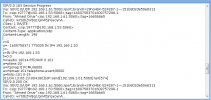
  • For Calls 1 & 3 , 3CX sends "SIP/2.0 183 Session Progress" then there is delay for 12 seconds before 3CX sends "SIP/2.0 200 OK" . Kindly check the first snapshot.
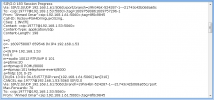
  • For Call 2 , 3CX sends "SIP/2.0 183 Session Progress" but 3CX didn't send "SIP/2.0 200 OK" . What is send after that is SIP message to cancel the call once the caller hang.
Attached also the description for the two configuration areas responsible for the delay at Voptech gateway side with their description.

Kindly find my below notes:
  • For Call 2 , The 2 parameters has no effect and the caller can hear the called party from the beginning of the call..
  • For Calls 1 & 3 , either "Connect Signal Delay" selected / not selected , the delay at gateway affected with the value i input at "Answer Delay" . This value can be 1 second although it is listed that its range between 10 to 60 seconds.

I think you are right and i may need to consult Voptech.

Thanks so much for your continuous help , advices , support.

Best Regards
 

Attachments

  • Call 1 - Voptech.png
    Call 1 - Voptech.png
    18.9 KB · Views: 1
  • Call 2 - Voptech.png
    Call 2 - Voptech.png
    18.5 KB · Views: 1
  • Connect Signal Delay - Voptech.png
    Connect Signal Delay - Voptech.png
    12.5 KB · Views: 1
  • Answer Delay.png
    Answer Delay.png
    10.2 KB · Views: 1
Last edited:
  • For Calls 1 & 3 , 3CX sends "SIP/2.0 183 Session Progress" then there is delay for 12 seconds before 3CX sends "SIP/2.0 200 OK" . Kindly check the first snapshot.
  • For Call 2 , 3CX sends "SIP/2.0 183 Session Progress" but 3CX didn't send "SIP/2.0 200 OK" . What is send after that is SIP message to cancel the call once the caller hang.
When 3CX initiates the call (sends an Invite), then it is the other end (your gateway) that sends the 183 and 200, not 3CX, see the chart here...

https://en.wikipedia.org/wiki/File:Message_Sequence_Chart_-_SIP_1.png

The Connect Signal Delay (in my opinion), should be set to Unselected, and the Answer delay set to a minimum, 1 or 2 seconds. In the gateways that I have dealt with, where there is no current reversal, for answer supervision being used, the gateway will send a 200 when the line is seized. At that point, audio is cut through and you can actually hear (faintly) the out-pulsing of digits. As I said, you will have to attempt to look at the log files, in the gateway to determine what it is waiting for, before sending the 200 message back to 3CX
 
Status
Not open for further replies.

Latest Posts

Forum statistics

Threads
111,990
Messages
590,161
Members
164,925
Latest member
batarong