Ring Group Out of Hours

Status
Not open for further replies.

Scott EIT

Bronze Partner
Basic Certified
Joined
Jan 29, 2019
Messages
209
Reaction score
18
Not sure if this is possible or not. I have a ring group who during normal working hours have a divert setup when unavailable to a digital receptionist message. This ring group has different office hours than the rest of the business and so I've configured the extensions to be unavailable during these times. Problem I have is the busy message kicks in when the extensions are unavailable. I need to have a different message saying the department is closed. Is there any way to configure this?

Basically, if someone calls during 9am and 4pm, if there's nobody available to answer the call the busy message is played. If someone calls the department after 4pm I need a different message saying the department is closed to kick in.

Is this possible?
 
You may need to pass the call through a dummy extension before the ring group, then make use of the forwarding/hours options associated with that extension. After 4, the call can then be sent to an IVR, or voicemail box to play a message, and, perhaps offer other options.
 
  • Like
Reactions: Scott EIT
You may need to pass the call through a dummy extension before the ring group, then make use of the forwarding/hours options associated with that extension. After 4, the call can then be sent to an IVR, or voicemail box to play a message, and, perhaps offer other options.

Thanks for the quick response Leejor. Can you expand on how I'd go about that? Sorry if I'm being dense!
 
An extension has a multitude of call forward options and you can use those to send the calls...wherever.

https://www.3cx.com/docs/manual/pbx-extension-management/#h.9yxv8i6pczil

So...during the daytime, they can be sent to the ring group, which, if not answered, is sent to the appropriate destination, voicemail, IVR, etc, with the desired message. After hours the dummy extension can send the call off to , again, an IVR (or voicemail), with a different message.
 
I know how to configure extensions forward options but how do I configure the ring group's hours of availability?
 
.
 
Last edited:
Hi,
Leejor explain in previous answer, this is the dummy extension on which you set the hours and not in the ring group. this extension is set with specific hours like you said 9 am to 4 pm (working hours, available status) and forwarding calls to your ring group,

Out of office hours you just need to create new ivr with message ''office closed" , so extension is in NPD status and you forward to this new IVR, that's all.
 
  • Like
Reactions: Scott EIT
An extension has a multitude of call forward options and you can use those to send the calls...wherever.

https://www.3cx.com/docs/manual/pbx-extension-management/#h.9yxv8i6pczil

So...during the daytime, they can be sent to the ring group, which, if not answered, is sent to the appropriate destination, voicemail, IVR, etc, with the desired message. After hours the dummy extension can send the call off to , again, an IVR (or voicemail), with a different message.
Hi,
Leejor explain in previous answer, this is the dummy extension on which you set the hours and not in the ring group. this extension is set with specific hours like you said 9 am to 4 pm (working hours, available status) and forwarding calls to your ring group,

Out of office hours you just need to create new ivr with message ''office closed" , so extension is in NPD status and you forward to this new IVR, that's all.

Sorry, just had a chance to pick up on this again. I've set the dummy ext up with its own hours configured. The calls are forwarded to the proper ring group during opening hours but don't appear to be forwarding to the IVR when out of hours. Calls continue to forward to the ring group.

Am I right in thinking I need to set the "away" status to forward to the IVR on the dummy ext? I'm not sure what NPD status is? What am I missing?
 
Hi Scott,

The dummy extension needs to have Auto Switching enabled I believe in your case, so you can use the AWAY status when out of office to send to the IVR with the message, and the AVAILABLE status to send it to your ring group.


Edit: DND, not AWAY as I said originally. The auto switch profiles just FYI are as below:

AVAILABLE = In Office hours
DND = Out of Office hours
AWAY = Break Time
 
Last edited:
  • Like
Reactions: Scott EIT
Hi Scott,

The dummy extension needs to have Auto Switching enabled I believe in your case, so you can use the AWAY status when out of office to send to the IVR with the message, and the AVAILABLE status to send it to your ring group

Autoswitch is enabled and the hours configured.
 
Definitely appears to be an issue with the dummy extension's auto switch configuration not working. If I dial the dummy extension directly outwith the opening hours it still passes the call to the ring group it's configured to forward to whilst "Available" rather than forwarding the call to the IVR I've set it to whilst "Away".

Anyone know any reason for the auto switch configuration not working on a dummy extension?
 
How are you sure is not working? did you check status extension when out of office hours? if status is on NPD and not available it works. So problem may be not there
 
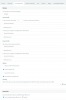
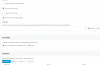
In your dummy extension's Forwarding Rules, while "Available" status is selected it should look like this:
10136


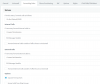
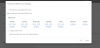
The Auto Switch should be on and the hours should look like this when you click the configure button next to Auto Switch:

10135


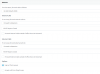
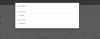
In the "Do not Disturb" profile (sorry I mentioned AWAY last time, that was my mistake) it should point towards your Message Handler IVR that says the "Sorry we are closed.." message

10137

You can check the auto switching worked by going to your extensions section after the office closes, selecting your dummy ext. and clicking Status on top. It should show that it's in DND thus confirming auto switching works.
 
  • Like
Reactions: Scott EIT
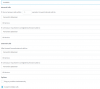
I have both "Away" and "DND" set correctly. Status is showing as "Available" outwith office hours.

During office hours works perfectly well.

10142

10143

10144

10145

10146
 
Looking good Scott. To test it now, set status to DND, then change the time for Today so it will be in office hours in 5 minutes from your current time, and watch it change automatically.

Correct your hours when you are done testing, and set it manually to DND so come Monday morning at 9 o'clock it will become Available automatically.
 
Looking good Scott. To test it now, set status to DND, then change the time for Today so it will be in office hours in 5 minutes from your current time, and watch it change automatically.

Correct your hours when you are done testing, and set it manually to DND so come Monday morning at 9 o'clock it will become Available automatically.

Does it require manually setting to DND all the time?
 
Nope, not at all. I was just suggesting it as a verification test for you but it if works fine now there's no need to do anything else.
 
Nope, not at all. I was just suggesting it as a verification test for you but it if works fine now there's no need to do anything else.

That's the problem though, the extension remains available after 4pm.
 
Can you run a manual test to see if it switches?
 
OK, just turned 4pm and the message is now playing, so good news! However, the status of the extension still shows as available.? o_O

I'm happy it's now doing what I need it to do. Just hope it comes back up on Monday!

Thanks for everyone's input. Much appreciated!!
 
Status
Not open for further replies.

Latest Posts

Forum statistics

Threads
111,918
Messages
589,738
Members
164,793
Latest member
Sense-IT-Mike