Ring Group Problem

Status
Not open for further replies.

Massimo Tribolati

Joined
Jun 21, 2017
Messages
6
Reaction score
0
Hi all,

I've got a problem with ring groups in last version of 3cx.
This is the scenario: I would like that any incoming call will be routed, first of all, to a single extension (lobby) and, in case of no response in 30 seconds, all the other extensions had to ring.
So I've created 2 ring groups:
- Ring Group 80 that contains only extension 61
- Ring Group 81 that contains ALL the other extensions EXCEPT 61 (62, 63, 64, 65, 66 and 67)
RG 80 is configured that, in case of no response, the call has to be passed to RG 81.

The problem is that, when a call arrives, all the extensions start to ring. After 30 seconds, extension 61 stops to ring and the other continue.
Seems like the RG 80 has all the extensions but is not like this!
Anyone can help me?
Thanks
Massimo
 
@Massimo Tribolati ,

Instead of using a ring group for only one extension should select the did to ring only 61 and if no answer / busy (according to.your need) forward the call to ring group 81 where extension 61 is not listed.

Good luck
 
@Massimo Tribolati ,

Instead of using a ring group for only one extension should select the did to ring only 61 and if no answer / busy (according to.your need) forward the call to ring group 81 where extension 61 is not listed.

Good luck
Hi Daktur and thank you for your time.
I've followed your idea but the problem still remains identical.
 
Hi Massimo,

Are you able to post screenshots of your two ring group configurations?
 
The problem is that, when a call arrives, all the extensions start to ring. After 30 seconds, extension 61 stops to ring and the other continue.

If you are sending the call only to Ext 61 and the others are ringing at the same time BEFORE you have specified that the call forward on to that ring-group, then , check the 3CX Activity Log (right after one of these calls) for the reason, for this behaviour. You must have something else set, that will explain this.
 
Hi Massimo,

Are you able to post screenshots of your two ring group configurations?
Hi pact,

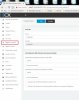
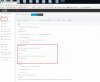
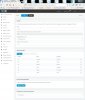
here are the printscreen.
Now I've changed the configuration following daktur advice, so I've got only 1 ring group. The problem is still the same.
Thanks
 

Attachments

  • 01 - Inbound Rule.jpg
    01 - Inbound Rule.jpg
    102.4 KB · Views: 10
  • 02 - Forward Rules.jpg
    02 - Forward Rules.jpg
    190 KB · Views: 11
  • 03 - Ring Group.jpg
    03 - Ring Group.jpg
    137.8 KB · Views: 8
If you are sending the call only to Ext 61 and the others are ringing at the same time BEFORE you have specified that the call forward on to that ring-group, then , check the 3CX Activity Log (right after one of these calls) for the reason, for this behaviour. You must have something else set, that will explain this.
Hi leenor,

checking the activity log what happens is that both Ext. 61 and RG 81 are called together.

Thanks
 
A single Extension (not part of a ring group) and a ring group will not simultaneously ring unless you have routed the calls to them, somewhere. DID routing? Go back and check all of the "rules" you have created.
 
@Massimo Tribolati

After reviewing your screen shot seem the DID is not properly configured and that what is causing the problem.

Try setting the DID as *75609131 and it think the issue should be solved other than that, when other extensions, not 61, ring do you see the ring group showing on the screen? If not it means they are ringing individually and not through the group.

Hope you can solve it !
 
A single Extension (not part of a ring group) and a ring group will not simultaneously ring unless you have routed the calls to them, somewhere. DID routing? Go back and check all of the "rules" you have created.
The only DID i've created is the one I've posted
 
@Massimo Tribolati

After reviewing your screen shot seem the DID is not properly configured and that what is causing the problem.

Try setting the DID as *75609131 and it think the issue should be solved other than that, when other extensions, not 61, ring do you see the ring group showing on the screen? If not it means they are ringing individually and not through the group.

Hope you can solve it !
On the screen I see the caller id, not the Ring Group ID.
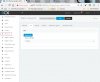
How I have to set the DID as *75609131? I've set in SIP TRUNK as you can see in the attachment, but that doesn't resolved the issue.
Thanks
 

Attachments

  • 04 - sip trunk.jpg
    04 - sip trunk.jpg
    74 KB · Views: 8
@Massimo Tribolati ,

Now you have to reconfigure the DID to ring only in extension 61 and the other configuration should remain the same.

It should work now, if you have any further questions you can send me an inbox :)
 
Status
Not open for further replies.

Forum statistics

Threads
111,864
Messages
589,460
Members
164,704
Latest member
cdl1