Routing Calls To Extension On Different Days

Status
Not open for further replies.

325ci

Customer
Joined
Jun 24, 2011
Messages
8
Reaction score
0
Our 3CX is currently working great for in office and out of office with digital receptionist and ringing to correct ring groups and everything.
What i need to do is;

Out Of Office - Saturday- Sunday ( this is getting handled ) 801

In Office Monday - Tuesday - Friday ; (extension 800)
Digital receptionist to pick up on the extensions and call to go to a ring group.

In office Wednesday - Thursday 9:30 / 16:30 ;
Digital receptionist to still pick up but on the extensions ; call to go to a different ring group.

I have created another virtual extension ( 804 ; added the wed-thurs ring group )
Created another 805 digital receptionist ( and added extensions to 804 )
Then Added inbound rule for wed-thurs office hours and added the inbound call to go to 805.

When i try to call in; it is overriding the inbound rule and going to 800 receptionist on wed - thursday. on wed - thursday it should go to 805

How can i achieve this ? Where am i doing wrong ?
 
Hello... Based upon what you said, and what I know about v18 Legacy Admin... At lot of us are hoping that v20 Admin replacement (looks like the current Web Client) has more call routing options based upon time of day but that functionality does not exist today; as far as I know.

First, you have a global by day of the week setting for a range of time that define the in-office hours. At the time of a phone call the phone system then determines the state of in or out of office based upon what is NOT in-office-hours when compared to the current time.

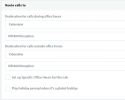
Next, the in-office status call routing path is assigned to any extension (including IVRs) and separately out-office status is assigned a call routing path as shown below. These settings are in the SIP Tunk or Inbound Rules for a DID. See graphic below...

1705018979551.png

Therefore, call routing is rigid and can be only one of two choices and does not change based upon the day of the week. The mere fact that you created additional IVRs they are not used unless they referenced in the SIP Trunk or Inbound Rules here or other call routing directions.

Now after saying the above, the only option that might work is to use the 3CX Call Flow Designer. I've not really looked at this in quite some time thus your mileage may vary.
 
Last edited:
  • Like
Reactions: 325ci
I will re-look at that but yes the Call Flow Designer looked too complicated for me but if thats the only choice i will start learning.

Sip trunk and inbound rules; i have choosen the in office and gave the extension to ring on those specific days, but it will not overweite the global in office settings
 
Sip trunk and inbound rules; i have choosen the in office and gave the extension to ring on those specific days, but it will not overwrite the global in office settings

I'm not sure if this will help you (I am programmer so I think this way); 3CX is an application with a Database.

[NB: This may not be the exact way it works but this should be close]

Again, for v18 but using not using the Web Client, you store the office hours into a table in the database with for each day of the week this is just information to make a routing decision but is NOT associated with any extension.

Next, you define the IVR (which is a virtual extension) and associate it with a message playback and keypad menu options which is also stored in another table in the Database. However, the IVR does nothing unless you invoke transfer a call to this extension from a SIP Tunk, Inbound Rule or from other place to routes to route call.

While both of these items that are stored in the database are not related to each other at all.

The only place these are related is when a call is routed to an IVR, Inbound Rule or a few or other places; then a code up the looks up the hours to make a call routing choice -- route call based on the in-office extension or out-office extension. It is only at this spot in the call routing decision that the relationship between the office hour schedule and the IVR use of the data the two tables stored in the Database.
 
CFD is the answer for base routings like this, and its incredibly easy to set up based on Date/Time.

Once the call comes in you can play the prompt you seem to play in the digital receptionist to transfer to the desired ringgroup after completion of the prompt.
 
  • Like
Reactions: Evolute IT
CFD is the answer for base routings like this, and its incredibly easy to set up based on Date/Time.

Once the call comes in you can play the prompt you seem to play in the digital receptionist to transfer to the desired ringgroup after completion of the prompt.

looks like i need to learn how to do cfd. Thanks
 
Status
Not open for further replies.

Forum statistics

Threads
111,973
Messages
590,071
Members
164,892
Latest member
Phone1stStop