


- Joined
- Dec 19, 2019
- Messages
- 48
- Reaction score
- 10
I cannot figure this issue out - Salesforce is journaling some 3cx calls in Activity and not others and it's because the GET request cannot find some numbers that are present and should be fine.
I have run verbose logging and investigated the 3cxSystemService.log file and have discovered the following:-
The problem with the non-journaling of activity for certain numbers, is ultimately and logically, due to a no-match (empty id), even though I know for absolute certain, that the GET request appears to be looking for the correct last 7 digits of an existing Account and Contact 'Phone' field number.
Not only but also, the duplicate error handler can successfully find the very same Phone number for a New contact name that it successfully creates, straight after not successfully finding the number in Contact, Lead, or Account Phone number. Bizarrely it cannot look up the very same contact 'New' That it creates from the number it just couldn't find, and has therefore created. So I know there must be a fundamental problem, and not with anything I am doing. Perhaps its certain numbers, but we cannot yet pin down which types of numbers it can find and which it cannot.
For an example of a record in SF that I have been working with, there is a Phone field entry both in the Account object Phone number field, which is not hidden (so no error), and also the number I am attempting to have found is also there in SF under the Contact object also in the Phone field. Whether I remove the number from the Account Phone field or not so as to remove a duplicate, it makes no difference, and I would not expect it to.
Salesforce does correctly create a NEW contact first name when it doesn't successfully find the number being looked up with the GET request, and then when I search the number in Salesforce it then shows the New contact is there.
The 3CX Integration -> Run Test, where you type in the number, also successfully finds the duplicate and gives me the error warning message in red at the top, so the duplicate finder part of the SQL query is finding the New Contact the query (INSERT) itself adds, but the actual matching SQL is not finding it. I cannot figure out where the problem may lie as the GET request looks fine in the V2 Template, and also looks fine in the 3CXSystemService.log , and lastly is also fine in the 3CX Integration test harness, in the CRM Tab.
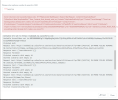
See the attached screenshot, that the number being called does indeed exist as a duplicate when it has not found the number under Contact, Lead or Account, because it shows the error and you can then also see 3CX's Salesforce query below then cannot find the very same contact it has just found the duplicate for and, (empty id).
Please help as I'm pretty sure this is a bug somewhere.
Kind regards,
Oliver
I have run verbose logging and investigated the 3cxSystemService.log file and have discovered the following:-
The problem with the non-journaling of activity for certain numbers, is ultimately and logically, due to a no-match (empty id), even though I know for absolute certain, that the GET request appears to be looking for the correct last 7 digits of an existing Account and Contact 'Phone' field number.
Not only but also, the duplicate error handler can successfully find the very same Phone number for a New contact name that it successfully creates, straight after not successfully finding the number in Contact, Lead, or Account Phone number. Bizarrely it cannot look up the very same contact 'New' That it creates from the number it just couldn't find, and has therefore created. So I know there must be a fundamental problem, and not with anything I am doing. Perhaps its certain numbers, but we cannot yet pin down which types of numbers it can find and which it cannot.
For an example of a record in SF that I have been working with, there is a Phone field entry both in the Account object Phone number field, which is not hidden (so no error), and also the number I am attempting to have found is also there in SF under the Contact object also in the Phone field. Whether I remove the number from the Account Phone field or not so as to remove a duplicate, it makes no difference, and I would not expect it to.
Salesforce does correctly create a NEW contact first name when it doesn't successfully find the number being looked up with the GET request, and then when I search the number in Salesforce it then shows the New contact is there.
The 3CX Integration -> Run Test, where you type in the number, also successfully finds the duplicate and gives me the error warning message in red at the top, so the duplicate finder part of the SQL query is finding the New Contact the query (INSERT) itself adds, but the actual matching SQL is not finding it. I cannot figure out where the problem may lie as the GET request looks fine in the V2 Template, and also looks fine in the 3CXSystemService.log , and lastly is also fine in the 3CX Integration test harness, in the CRM Tab.
See the attached screenshot, that the number being called does indeed exist as a duplicate when it has not found the number under Contact, Lead or Account, because it shows the error and you can then also see 3CX's Salesforce query below then cannot find the very same contact it has just found the duplicate for and, (empty id).
Please help as I'm pretty sure this is a bug somewhere.
Kind regards,
Oliver
Attachments
Last edited:


