SBC for v18: Always Connected

N_G

Founder
Joined
Jun 6, 2006
Messages
4,857
Reaction score
9,291
The new SBC for v18 has been released. Get it now for increased reliability with the new reconnect feature, as well as the ability to bulk update SBCs via the Instance Manager.

Reconnect: Instant recovery from internet failure​

When the internet connection goes down, the call is no longer dropped. The 3CX Tunnel keeps media port...
Continue reading the Original Blog Post.
 
Last edited by a moderator:
Hi Nick,
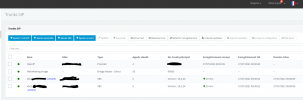
Thanks for that news, Have tried to update 2 SBCs from a V18 Beta 1 PBX but it seems update button apply no change version on SBCs.
Have waited almost 10 minutes and refreshed console view with no result. Release stay the same 16.2.24
Am I missing something ?
1627372307489.png
 
Last edited:
@aws2p give it some time until our repo is synchronized.
 
  • Like
Reactions: PhoneOnline
just tried 3 hours later but no more success
 
just tried 3 hours later but no more success
Mine just updated successfully.

Are you installed on Debian or Windows?
 
Debian
 
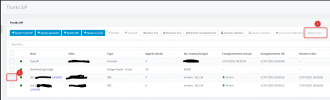
I'm going to say this just in case, please excuse me if it's self-explanatory, but to upgrade the SBC via the Management Console, you need to:
  1. Select the SBC entry in "SIP Trunks"
  2. Press the "Update" button.
NOT press on the blue "[Update]" text below the entry.
1627387842020.png
 
that's what i did ;)
 
that's what i did ;)
Out of curiosity, If you SSH onto the one of the SBC machines, and you type:
Code:
apt update
and then:
Code:
apt policy 3cxsbc
what versions of the SBC do you see available. Could you provide a screenshot?
 
I didn't took note of PI password as it is a demo pbx (really silly thing), so as it didn't work to update my 2 pi 3B+ on debian 9, so I recreated from scratch from more recent debian 10 image then tried update and evrything went fine in less than 30 seconds.
So, my problem is solved but there's an unanswered question about real ability to update directly PI3B+ on DEB9
 
So, my problem is solved but there's an unanswered question about real ability to update directly PI3B+ on DEB9
Updating the 3CX SBC to should be possible on the 3B+Deb9 provided the configuration was deployed as per our guides and using the 3CX SBC installation script.

I'm not sure what happened in your case but it may have been related to the repositories set on the Pi itself.
 
All SBCs i have in production have been installed with your guide and process, I never done an action on it, as like i said, I forgot Pi admin password so i was with no SSH access , since years they are now on line, they just received 3CX updates, nothing else.
So i' m curious to see what will happen to update others SBCs always running deb9.If they fail too, then it will be 3cx side to understand what happens.
 
o i' m curious to see what will happen to update others SBCs always running deb9.If they fail too, then it will be 3cx side to understand what happens.
If you do stumble upon one that fails please do let us know before you take any action to resolve it.
 
  • Like
Reactions: ChrisC_3CX
@imerecom

It seems you are missing the word "stretch" from that line. Where it says "-testing" it should've said "stretch-testing" (for Debian 9) or "buster-testing" (for Debian 10)

Could you check what is in the actual file with the following command:
Code:
cat /etc/apt/sources.list.d/3cxpbx-testing.list

What it should be is:
Debian 9:
Code:
deb [arch=armhf] http://downloads-global.3cx.com/downloads/debian stretch-testing main
or
Debian 10:
Code:
deb [arch=armhf] http://downloads-global.3cx.com/downloads/debian buster-testing main

Let us know what you see and then:

1. Correct it.
Use nano to edit and then save it:
Code:
nano /etc/apt/sources.list.d/3cxpbx-testing.list

2. Run:
Code:
apt update

3. Run:
Code:
apt-cache policy 3cxsbc

4. What is the latest version you can see when you run the above? If it is 18.0.27, try updating the 3CX SBC from the Management Console again and let us know how it goes.
 
Last edited by a moderator:
That fixed the repository issue however after apt update:
Reading state information... Done
153 packages can be upgraded. Run 'apt list --upgradable' to see them.

apt policy 3cxsbc
3cxsbc:
Installed: 16.2.24
Candidate: 16.2.24
Version table:

Confirmed it works

Hope the wrong sources list is just an alpha bug...

Thank you
 
@imerecom

I'll PM you shortly regarding this.
 
Can I update the SBC's OS from Debian 9 to Debian 10?
As of yet this cannot be done via 3CX, not for the 3CX SBC host at least.

Do bear in mind that, should you wish to upgrade the 3CX SBC Host OS from Debian 9 to Debian 10 and keep the configuration supported, you would have to redeploy using the corresponding ISO depending on whether you're running the 3CX SBC on a Raspberry pi or on x86 architecture.

• If x86-Based, you would have to use the 3CX ISO for Debian 10. This cannot be done yet as the 3CX SBC is not included in the current Beta/Alpha ISO's. It will be added to the 3CX ISO once the stable build of v18 is officially released.

• If ARM-Based(Raspberry Pi), you would have to redeploy using this guide which also contains the ISO: https://www.3cx.com/docs/installing-pbx-raspberry-pi/
 
  • Like
Reactions: JLSeagull

Forum statistics

Threads
111,992
Messages
590,171
Members
164,931
Latest member
admintest