SBC Register but Phone fail to register

Alex Aubert

Gold Partner
Advanced Certified
Joined
Feb 7, 2023
Messages
47
Reaction score
5
Hi I got a strange issues where Router Phones are able to register and SBC register as well but the Normal phones are unable to register to the SBC on both router phone or Debian.
I did try to activate verbose logs on debian config file. /etc/3cxsbc.conf but when I restart the services the config file is repulled from the 3cx so I lose my change.

I did try to reinstall the SBC and the issues still the same
 
Hi,

If you have an SBC on the LAN, and you restart an IP phone, the SBC will 'see' the 'plug and play' SIP and pass the information to the 3CX.
This means you should have the IP phone(s) listed in the 3CX under
Admin - Phones - PNP Phones

Can you see any phones there?

If not, there can be a lot wrong, let me try to mention a few (hope it will help)
-SBC and IP phone on same subnet?
-Can you ping from PC to IP phone and SBC
-Any firewall on the SBC blocking 5060
-Any firewall on router blocking 5090 on TCP or UDP (both needed) on outgoing.
-Working with VLAN, is this setup in switch or Phone configuration on the 3CX

There can be other things, but lets start with this.

Paulo
 
  • Like
Reactions: Alex Aubert
What model phone?
 
  • Like
Reactions: Alex Aubert
T53 ; I had to install
to then install the supported firmware.

1749851888152.png
I see him on PNP Phones ; seems more an issues with the SBC like the secure connection with the 3CX hosted isnt working.

I'm able to ping everything on site ; and yes we have a Vlan for the Phones. The phones was able to provision from pnp phones but fail to register.

Seems to have a cert issues as well : did try to put on verbose but settings changed overwrite when i restart the service

nano /var/log/3cxsbc/3cxsbc.log

CRIT | 20250613-151447.291 | 3CX | SBC | 0x7fe58022d800 | Log.cpp:159 | ====================== 3CX SmartSBC 20.0.100 @ hostname ======================
CRIT | 20250613-151447.291 | 3CX | SBC | 0x7fe58022d800 | Log.cpp:160 | Log started: type = file, level = ERR, size = 104857600, resip = ERR, remote = -1
CRIT | 20250613-151447.348 | 3CX | SBC | 0x7fe58022d800 | Bridge.cpp:28 | System Clock: resolution 0 microseconds, not monotonic
ERR | 20250613-151447.351 | 3CX | RESIP | 0x7fe58022d800 | /home/repomaster/workspace/SBC/resiprocate/resip/stack/ssl/Security.cxx:256 | Error calling stat() for /var/lib/3cxsbc/.sipCerts: No such>
CRIT | 20250613-151447.415 | 3CX | SBC | 0x7fe58022d800 | RPiTunnel.cpp:412 | Running in console mode
 
Could SIP ALG do this ... I did check on my router and its disabled but could the provider have something on their side blocking connection. It's working from my network so its something that block on the customers network.
 
Hi Alex Aubert,

The phone should work with the SBC local on port 5060 (within same subnet), the IP Phone will register with the SBC and send all 'data' to the SBC local, and should not exit to the internet (execpt time server, DNS or HTTPS for provisioning).
The SBC should be able to connect to the 3CX Server by the port 5090 (if default) on TCP but ALSO on UDP !
SIP ALG.... nahhh, i do not think so.

But in short... i think this works great, beacuse the SBC can see the IP hone, and the SBC can pass the information to the 3CX server (you can see the PNP list), so this communication is all working.

In my head it seems to be some problem with the provisionning.
Something in the configuration file that the phone does 'not like' when it receives the configuration.

Could it be the VLAN, do you enter the VLAN information in the 3CX phone settings?
Or does the Switch do Vendor VLAN, or LLDP/CDP, or DHCP Option or .... (lots of options here).

Can you still get in the web interface after provisioning, can you check what is wrong??

Paulo

EDIT: some typo
 
Last edited:
  • Like
Reactions: Alex Aubert
Yes I got access to phones ; but dont have much there ; I had DHCP option with old phone system but I did remove it then factory default phones but didnt fix the issue.
 
Hi,

so it seems the phone can not access the provisioning file.

Please note that some 'older' phone have problems with the SSL from the default.
Please try the following, just to be sure!

Login to phne web-interface and goto menu: Security -> Trusted Certificates -> Only Accept Trusted Certificates => set this OFF !
Now reboot the phone

Login to the phone again, and provision:
Settings -> Auto Provision => Press the button (at bottom) "Auto Provision Now"

Please note, I do not have a T53 here at the moment, so sorry if menu names is not correct, but sure you will find it.

Paulo
 
  • Like
Reactions: Alex Aubert
No much luck ; I will try to do a new Vlan tomorrow and see if still in issue.
 
I see the tunnel is UP to the 3CX instance ; but phone fail to register and dont see anything on the logs ... try to put it to verbose but keep getting overwrited by autoprovision

Able to ping phone and I'm on same VLAN

root@sbc-debian:~# netstat -an
Active Internet connections (servers and established)
Proto Recv-Q Send-Q Local Address Foreign Address State
tcp 0 0 0.0.0.0:22 0.0.0.0:* LISTEN
tcp 0 0 10.20.10.108:43795 3CX-IP:5090 ESTABLISHED
tcp 0 264 10.20.10.108:22 192.168.199.30:52131 ESTABLISHED
tcp6 0 0 :::22 :::* LISTEN
udp 0 0 0.0.0.0:5060 0.0.0.0:*
udp 0 0 0.0.0.0:20000 0.0.0.0:*
udp 0 0 0.0.0.0:20001 0.0.0.0:*
udp 0 0 0.0.0.0:20002 0.0.0.0:*
udp 0 0 0.0.0.0:20003 0.0.0.0:*
udp 0 0 0.0.0.0:20004 0.0.0.0:*
udp 0 0 0.0.0.0:20005 0.0.0.0:*
udp 0 0 0.0.0.0:20006 0.0.0.0:*
udp 0 0 0.0.0.0:20007 0.0.0.0:*
udp 0 0 0.0.0.0:20008 0.0.0.0:*
udp 0 0 0.0.0.0:20009 0.0.0.0:*
udp 0 0 0.0.0.0:20010 0.0.0.0:*
 
Hi Alex Aubert

The SBC (to me) seems to be fine, as it does communicate with the 3CX.

I would focus, on why the phone does not get the provisioning.
Phone provisioning means that the phone will go to the HTTPS url of the 3CX server,and download the configuration file.

If the phone can download the configuration, you will notice this, because it will not be 'default' anymore.
For example it will display 'not registered' or 'no connection', or 'failed to register', in any way differend than an 'empty' phone.

If the phone did really download the config from the 3cx server, the phone web interface should not be the admin/admin account anymore, but the 3CX web-password.
If the phone can not download the config, it does stay in default mode and has the admin/admin login.

What does happen on the phone, when you try to assign an PNP phone from the 3CX to an extension?


EDIT: Just some extra information.
Phone provisioning is NOT with the SBC, it is just an internet connection on HTTPS, so check if phone can connect from VLAN.

Paulo
 
Hi Paulo,

The phone is getting the config well if I delete it from the user an reasign it with pnp the assignement is working ; just have registration fail so the phone stays in no service.

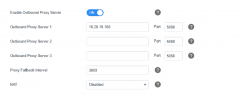
I got the password set and when I check account config its pointing with my 3cx system and see my sbc as outbound proxy.

I did open a Ticket with 3CX to help me troubleshoot as well and ask my internet provider to check their device for SIP ALG but since they had another VOIP system on site before it should be already turn off.
 
Hi Alex Aubert

Okay thank you for your response.

The IP phone does broadcast on port 5060 UDP for the SIP PNP.
This means the SBC is listning on the port 5060 UDP and does 'see' the phone (on the multicast address).
It is also able to communicate to the 3CX server on port 5090 where it is listed in the Phones-PNP list.

Seeing this happen, to me seems that the SBC is working fine (doing what it should do).
Listen op port 5060 UDP local and passing information to the 3CX server on port 5090.

The IP phone will register also on port 5060 UDP to the LAN IP of the SBC, and the SBC should also send this information to the 3CXserver on port 5090.
I would not understand why this should be differend? Perhaps someone would know this?

Paulo
 
Well Everything looks fine for me as well. I done this kind of setup a lots of time and doesn't experience those kind of issues. Will try with another kind of phone and see if I still have the issues. But those phone was pre-provisioned from office and was working well so its seems to have something to do with their network... But its same switch with same vendor I did a dozen of time without issues so...
 
Well Everything looks fine for me as well. I done this kind of setup a lots of time and doesn't experience those kind of issues. Will try with another kind of phone and see if I still have the issues. But those phone was pre-provisioned from office and was working well so its seems to have something to do with their network... But its same switch with same vendor I did a dozen of time without issues so...

Sounds like a networking issue from the description Alex. The phones get provisioned right, but can't talk to the SBC.
 
Hi John,

I'm able to provision the phone using the SBC with pnp ; an from the SBC I'm also able to ping my phone. Is there a way to put the logs to verbose on the SBC ; the config autoprovision each time I reboot the service so im getting not much infos.
 
Hello Alex Aubert,

Please try to read this:
https://www.3cx.com/community/threads/how-to-monitor-sbc-connection-on-3cx-server.62836/

There is this part from: YiannisH_3CX

There are 2 logs that can provide information about the connection of the SBC to the PBX. From the PBX side you can look into the tunnel log. From the SBC side you will need to enable verbose logging to see detailed logs. You can do so from the SBC config file. You will need to replace the "ERR" with "Verbose" and restart the SBC service.
Please note that you should not leave Verbose running for an extended period of time as it is CPU and HDD demanding.


Hope it helps you.

Paulo.
 
Once the phone is provisioned, log in the web UI and confirm the proxy of Account 1 is indeed the IP of the Debian SBC (they must both be on the same LAN of course - this is absolutely necessary).

Confirm this first please. And I should mention the phone should be factory reset before you assign it to 3CX, just to make sure everything is default and give you the best chance of success.
 
Yes it is but phone stays at fail lo register ; I did change the logs to verbose but when I restart the autoprovison overwrite my change
 

Members Online Now

Forum statistics

Threads
111,831
Messages
589,277
Members
164,660
Latest member
RJenkinsROCK