SBC Register but Phone fail to register

  1. Disable account 1 on the Yealink and save.
  2. Start pcap on Yealink (Settings>Configuration>PCAP)
  3. Enable Account 1 and save
  4. After 30-40 sec. go stop the pcap and download it

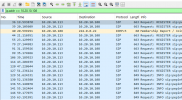
When opened in wireshark you should see the phone source IP send REGISTER to destination of the SBC IP at port 5060.

Does it send it and does it get an answer back?
 
I did restart the service : using this command
sudo systemctl restart 3cxsbc

I see from a phone pcap that my SBC doesnt reply


1750083395765.png
 
Ok finally, you should also look up how to run tshark on your SBC and then restart the phone.

After the phone is up for a minute at least after startup, you can stop the tshark capture.

So now you are looking for the opposite, see if the REGISTER sent from the phone ever reached the SBC, and whether the SBC actually replied back but the phone never got it.

Bash:
apt install tshark

tshark -i any -w capture.pcap
 
Last edited:
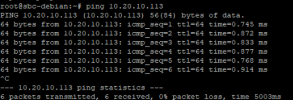
dont receive anything from the phone but if I ping this is replying

1750088928469.png

1750088836703.png
 
You’ll need to check the network configuration, as per the response in your existing ticket with 3CX Technical Support.

Please note that ping uses the ICMP protocol, which differs from how phones communicate using SIP on port 5060 over UDP. A successful ping does not guarantee that SIP traffic is allowed or correctly routed, so we recommend verifying that UDP port 5060 is open and not being blocked or filtered on the network or firewall.
 
  • Love
Reactions: JohnS_3CX
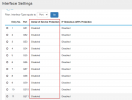
On CBS220 - This option that block phone registration

Go to the "Security" section, then "Denial of Service Prevention," and finally "DDOS Security Suite."


2025-07-18 13_12_39-PF-VIC-HV01 - ScreenConnect - Connected.png

 
Last edited:

Members Online Now

No members online now.

Forum statistics

Threads
111,831
Messages
589,277
Members
164,660
Latest member
RJenkinsROCK