Scan QR Code Error: PBX Could Not Be Reached

Status
Not open for further replies.

derventzie

Free User
Joined
Dec 17, 2018
Messages
26
Reaction score
0
I have just installed 3CX 16 on a Windows 10 machine and when I try to provision a phone with the 3CX app I get the error: Provisioning Error. PBX Could Not Be Reached. Connection Time out.
I have used 3cx in the past with no problems but now that I installed it again I can't get it to work...This error occurs when I try to provision a phone locally (it also appears when I try it remotely but thats because I haven't set it up yet)
Any ideas on how to fix it?
Thanks in advance!
 
  • Like
Reactions: derventzie
Thanks for your response

I checked the settings on the app and it was using the FQDN. I entered the local ip and "On Hook" appeared on the upper right but no status was retrieved it was saying connecting...I tried unistalling and installing 3cx again but no luck. I have opened all ports needed through my router and checked the firewall of my computer and they are open there too.

Unfortunately I'm not using Windows Server so I couldn't perform the steps of the URL you attached.

Also I think my ISP has put my connection behind NAT (CGN). Could this be the problem? Should I call them and ask them to be removed from NAT?
 
Last edited:
When you said that you were attempting to provision locally, i assumed that 3CX was installed locally as well, Now I'm thinking that may not be the case. It sounds as if there is no connection for Presence, although the extension is now registering. You will probably want to investigate why the FQDN isn't working. Is the PBX on the same LAN, or not? You might also want to run the firewall checker to see if all necessary ports are open.
 
  • Like
Reactions: derventzie
Yes, the PBX is on the same LAN with the device I am trying to connect. 3CX is installed on a computer running Windows 10 and I am trying to provision my phone with the 3CX app.

Although I have opened ports 5190, 5160,443 and 9000-10999 both from the computers' firewall and from the router (I've even DMZ the computer) these are the results from the firewall checker...
  • resolving 'stun-eu.3cx.com'... done
  • resolving 'stun2.3cx.com'... done
  • resolving 'stun3.3cx.com'... done
  • resolving 'sip-alg-detector.3cx.com'... done
  • testing 3CX SIP Server... failed
    • stopping service... done
    • detecting SIP ALG... not detected
    • testing port 5160... Mapping does not match 5160. Mapping is 64272.
    • starting service... done
  • testing 3CX Tunneling Proxy... failed
    • stopping service... done
    • testing port 5190... Mapping does not match 5190. Mapping is 46928.
    • starting service... done
  • testing 3CX Media Server... failed
    • stopping service... done
    • testing ports [9000..9398]... failed
    • testing ports [10600..10998]... failed
    • starting service... done
 
Last edited:
Try to send a welcome email to the client and see if that works for you. Also how are you accessing the management console? Are you using the local IP or the FQDN? If you are using the FQDN then the QR code will point to the FQDN link and if you have a firewall issue, the client might not be able to reach the PBX. Try to access the management console using the local IP and try again. If that works then there is a network limitation that prevents the client from reaching the PBX using the FQDN.
 
  • Like
Reactions: derventzie
Thanks for the reply.
So, I logged in the management console using the local IP and send a welcome email. I opened the file from the phone but no luck...It was saying "Connecting". After that I did the same thing again but I accessed the management console using the FQDN but again same results...
I also tried scanning the QR code and when I scanned the one from the management console (accessed by using local IP) the error was "PBX FQDN cannot be resolved" whereas when I scan the QR from the management console (using FQDN) the error is "PBX could not be reached"...
Any ideas?
 
Update: I contacted some people at my ISP and we changed a few settings from my ISP and now the results of the firewall checker are these:
  • resolving 'stun-eu.3cx.com'... done
  • resolving 'stun2.3cx.com'... done
  • resolving 'stun3.3cx.com'... done
  • resolving 'sip-alg-detector.3cx.com'... done
  • testing 3CX SIP Server... failed (How to resolve?)
    • stopping service... done
    • detecting SIP ALG... not detected
    • testing port 5160... full cone test failed (How to resolve?)
    • starting service... done
  • testing 3CX Tunneling Proxy... failed (How to resolve?)
    • stopping service... done
    • testing port 5190... full cone test failed (How to resolve?)
    • starting service... done
  • testing 3CX Media Server... failed (How to resolve?)
    • stopping service... done
    • testing ports [9000..9398]... done
    • testing ports [10600..10998]... failed (How to resolve?)

      • testing port 10902... Mapping does not match 10902. Mapping is 10898. (How to resolve?)

      • testing port 10952... Mapping does not match 10952. Mapping is 10650. (How to resolve?)
    • starting service... done
But again when I try to provision a phone the results are the same...

Update2: When I connect my phone on the internet via cellular network (and not WiFi so I'm not in the local network anymore) the provision through the FQDN console management both with the QR and with the welcome email works! When on cellular provisioning with the console management (accessed via local IP) shows that PBX could not be reached but I guess thats normal.
Now when I try to provision a phone locally none of the methods works...
 
Last edited:
on your LAN if you ping FQDN do you have succefull packets answer or just packet lost 100%
 
  • Like
Reactions: derventzie
@derventzie
You may check also if your device's local IP is not blacklisted on the PBX.
What's your device, Android or iOS?
 
  • Like
Reactions: derventzie
on your LAN if you ping FQDN do you have succefull packets answer or just packet lost 100%

When I ping the FQDN from inside the LAN I have successfull packets with 0% loss


@derventzie
You may check also if your device's local IP is not blacklisted on the PBX.
What's your device, Android or iOS?


My device is Android and I do not see it on the blacklisted devices list. Also although that my device is not provisining and shows the error PBX Could not be reached. Connection Time Out, when I choose to Play an audio file from inside the Managenent Console (From Settings --> Music on hold --> Play) and select the extension that should be assigned to the phone (but it shows error) the phone rings normally.
 
Although I'm not at all familiar with Android phones, I would suggest you a useful debugging trick which iOS can do and see if you can do it with your Android device:

- try to scan the QR code directly with device's camera - ie, no 3CX client involved. On iOS, device's camera detect's there is a QR code containing an URL link, so it prompts you displaying it and asking if you want to open it in the browser. Now, if the browser fails to open, you have to have a look at the URL, to see if you can figure out if something's wrong with it. If it looks OK but fails to open, then definitely is something with the local network you're using. (to continue, in iOS if Safari successfuly open the link, it detects it's a .3cxconfig file, attached to 3CX client app, and propmts you to open it with, well, 3CX client).

Keep in mind, all 3CX clients contains inside, basically, two independent engines: one SIP-based (the phone, connecting gernerally to PBX port 5060/5090) the other one HTTP-based the MyPhone client (connecting generally to PBX port 443/5001) so it's not necessarily that both fails connection.
 
  • Like
Reactions: derventzie
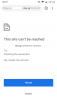
Outside the LAN it worked fine and downloaded the file as it should. But from inside it says that the site cannot be reached as you can see below (I have set the port to 5101)
 

Attachments

  • Screenshot_20190514-000750.png
    Screenshot_20190514-000750.png
    82.2 KB · Views: 17
It is that xxx.3cx.gr resolvable on the local network on which your Android is connected? If you try to open in the Android browser instead of htttps://fqdn:5101 htttps://localip:5101 is working? "Connection refused" is quite a common network error, and most generally it involves incorrect IP/FQDN/Port or a firewall blocking.
 
  • Like
Reactions: derventzie
So to me it means there is the local DNS the culprit (but here I cannot help you because I don't know how to configure such thing)
 
Okay thanks. So if local DNS is the problem then it's what @leejor said that needs to be done.

Is the device attempting to contact 3CX using the local IP of the server , or the FQDN? If it is using the FQDN, did you set up your network to be able to resolve it locally?

https://www.3cx.com/blog/docs/how-to-create-internal-fqdn/

Unfortunately I do not use Windows Server in my enviroment so I have no idea how else it can be done...I might end up setting one...(That's weird because in the past it used to work flawlessly with no extra configuration required)
Anyway, Thank you all for your help!
 
on your lan you said ping on FQDN was working fine so local DNS should be the same

I've no DNS server on my Lan and FQDN resolve, what are your network settings related to DNS, do you use 8.8.8.8 ?
 
Maybe I'm saying something stupid, but let's try it anyway:
since you said in the past it worked (I'm assuming you're referring the same xxx.3cx.gr:5101) and now not, it's not possible to be just a problem of a DNS cache? Resolving to a no-longer-valid local IP instead the actual one?
 
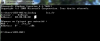
From LAN if you type in a cmd windows : nslookup your fqdn
do you have your public ip returned, and first answer returned is DNS IP resolving query, in my case 80.80.80.80
10614
 
Last edited:
Status
Not open for further replies.

Latest Posts

Forum statistics

Threads
112,359
Messages
592,096
Members
165,532
Latest member
hughesdouglas