Scan QR code error

Status
Not open for further replies.

Kwang Mien

Silver Partner
Advanced Certified
Joined
May 14, 2020
Messages
255
Reaction score
17
Hi,

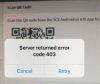
When I scan my QR code (in the 3CX client portal) using 3CX Mobile App on iPhone XS , iOS 13.5.1, the error "Server Returned Error code 403" appeared.
Please refer to the attached.

My extension is not provisioned in the 3CX mobile app.

Can anyone advise how this issue can be resolved ?

Thank you.

Regards,
Kwang Mien
 

Attachments

  • Server403error.JPG
    Server403error.JPG
    14.6 KB · Views: 24
Can you access the management console externally ?
 
Hello,

The QR code is dynamic so it it will use the URL you see in your browser.

If this is not accessible to the mobile phone, it will fail.
 
Hello,

The QR code is dynamic so it it will use the URL you see in your browser.

If this is not accessible to the mobile phone, it will fail.
i copied the url from the QR code and was able to see the prompt to download the provisioning file.
this means that the mobile phone can access to the URL. however, when scan the QR code, it returns 403 error.

is there anyway to provision the mobile app without scanning the QR code ? for example, using the provisioning file method
 
Send the ‘welcome email’ as it contains 3cx app config file.

ŵhen on the phone, select the file , select the 3cx app to open it with
 
Status
Not open for further replies.

Forum statistics

Threads
111,953
Messages
589,914
Members
164,849
Latest member
BillyAkansel