


- Joined
- Dec 9, 2020
- Messages
- 19
- Reaction score
- 1
Hi,
We have an issue whereby our sales and dispatch people share the QR code with others or call from home using their device. They have irregular schedules so it's hard to maintain a schedule within 3cx and disable external calls from an extension past working hours. We also have a lot of calls so we're not able to properly control whether the calls are personal or commercial.
I have 3 ideas to solve this, but none of them seem to be possible with 3cx.
1. Only whitelist the internal network IP address to be able to access the webclient / softphone. Not ideal as it also blocks the console and static IP address of ISP could potentially change (we experience this every 1-2 months) which would entirely block us.
2. Disable QR code login so they have to use the normal way of logging in. Seriously, it's so easy to share a QR image, take a picture, send and everyone can just access it. This should not be possible for an Enterprise solution or it should at least be possible to disable.
3. Only allow log in through SSO. We have this with Cloudflare Access for our system. Our employees can only access our ERP system with their MS account and when they are on the internal network (static IP). So they can't access from home or anywhere else. Admins can access from anywhere with their MS account (different Azure AD group).
3 would be the best solution.
Any (other) ideas?
We have an issue whereby our sales and dispatch people share the QR code with others or call from home using their device. They have irregular schedules so it's hard to maintain a schedule within 3cx and disable external calls from an extension past working hours. We also have a lot of calls so we're not able to properly control whether the calls are personal or commercial.
I have 3 ideas to solve this, but none of them seem to be possible with 3cx.
1. Only whitelist the internal network IP address to be able to access the webclient / softphone. Not ideal as it also blocks the console and static IP address of ISP could potentially change (we experience this every 1-2 months) which would entirely block us.
2. Disable QR code login so they have to use the normal way of logging in. Seriously, it's so easy to share a QR image, take a picture, send and everyone can just access it. This should not be possible for an Enterprise solution or it should at least be possible to disable.
3. Only allow log in through SSO. We have this with Cloudflare Access for our system. Our employees can only access our ERP system with their MS account and when they are on the internal network (static IP). So they can't access from home or anywhere else. Admins can access from anywhere with their MS account (different Azure AD group).
3 would be the best solution.
Any (other) ideas?

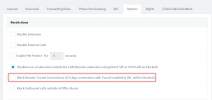




 Bottom line - app cannot safely distinguish what "internal" means, with the notable exception that it's in the same subnet as the PBX, and this is, as I said, an exception in real-life environments. Usually client can move/connect to different WiFis on the same physical office, the PBX might be located in a different country but VPN-ed, and so on.


