Shared park, light indication not working as expected.

rmcley01

Premier Customer
Joined
May 21, 2026
Messages
4
Reaction score
0
Hi everyone,

I’m experiencing an issue with the Shared Park feature. The button works perfectly when I press it, but there is no light indication at all.

The light does not indicate when a call is parked, and it also remains off when there are no calls parked.

Has anyone else experienced this issue or know how to resolve it?
 
is this on a desk phone? i've never heard of that issue.
 
Yes, this issue is occurring on a desk phone, specifically a Yealink T53W. The Shared Park button functions correctly; however, there is no light indication to show whether a call is parked.
 
interesting. if it's not too much hassle try factory resetting it. never once seen that behavior on a t53 unless maybe the LED is dead on that button??
 
I’ve already tried factory resetting, but the issue still persists. The LED's seem to be working properly.
 
very interesting. i'm at a loss because i've never seen that before.
 
Is it a router phone, or connected through an SBC? If the latter restart that.
 
are you using the stock 3cx template? Is the firmware running latest version?
 
Hi,

Straight to the point:

1. Remove BLFs and only leave the shared parking provisioned.
2. Login to the phone and disable account 1
3. Start PCAP on the phone, then go enable account 1
4. After 30 sec. elapsed, stop pcap and inspect it.

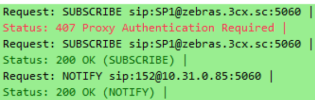
1787296866618.png

You see here a subscribe to SP1, with a 200 OK.
It was followed by a notify with the SP1 state that calls are terminated (ie. its idle)
The LED is lit on my phone as a result.

See what you get instead compared to mine and we take it from there.
Also check if ALL your phones SP1 is not lit, not just this one phone.
 

Forum statistics

Threads
111,875
Messages
589,512
Members
164,724
Latest member
StratisFear