Is there a way in V20 to transfer a call to shared parking on mobile? If not, any suggested workarounds?

Status
Not open for further replies.

OhNo

Free User
Joined
Sep 19, 2022
Messages
4
Reaction score
2
V20 has broken my small business's ability to operate as usual, as we are no longer able to transfer a call to SP1 using the 3CX mobile app.

We have many users that mainly work with mobile, both Android and iPhone.

Our usual workflow on V18 was:

- original recipient answers call (we don't always have a dedicated receptionist and all of us end up answering the main lines at times)
- original recipient transfers the call and parks the caller SP1 (hit the transfer button, dial 111, which was mapped to SP1, and click send)
- dial the intended recipient, have a conversation about what the parked caller is inquiring about
- the intended recipient of the call picks up SP1 at their leisure

As many have posted here, v20 seems to have broken the ability to use shared parking on mobile. I am not sure why this workflow is no longer supported. It worked fantastic for us, especially with many users who aren't tech-savvy.

I am hoping that this will be fixed, but in the interim, we need to train our users now on how to handle and transfer calls on mobile, and I'm not sure what to advise.

Common Scenarios
- transfer from mobile to another employee, but need to discuss call before transfer
- transfer from mobile to self on IP Phone

I'm sure I've left some things out, but the above two items are the most important. What is the easiest way to facilitate transfers to both oneself (from mobile to IP phone) and to others (allowing for discussion before the other has to pick up the call)?

Thanks!
 
  • Like
Reactions: David Forster
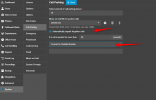
Have you also checked the below option?

1719546857912.png
 
  • Sad
Reactions: David Forster
Have you also checked the below option?

View attachment 42216
Thanks for responding, and I'm sorry--I don't understand. We're trying to enable our users to park (and pick up) while using the 3CX mobile app. This setting seems to be unrelated? Unless I misunderstand, it applies to already parked calls?

I may just be confused, but basically, the problem is that we can no longer park calls on mobile (or pick up parked calls).
 
  • Like
Reactions: David Forster
You need to use the magnifying glass on the “number pad” to search for it e.g. “SP2”.
 
You need to use the magnifying glass on the “number pad” to search for it e.g. “SP2”.
Does this work in V20? I thought it only worked in V18. I've tried the magnifying glass trick in V20.

I hit Transfer -> Blind
Click Magnifying Glass
Search for "SP1"
There is text in blue that says "Call SP1"
I Click it

Nothing happens :(
 
Hmm it works for me on the iOS app. The caller is left on SP.
 
  • Like
Reactions: Evolute IT
The method that @SteveITS mentioned works without issue.
Can you also test this with internal extensions call?
The behavior is the same?
 
The method that @SteveITS mentioned works without issue.
Can you also test this with internal extensions call?
The behavior is the same?
I had tried this internally. I will see if I can get record a video tomorrow to make the problem a little easier to diagnose and figure out whether or not it is operator error on my part.

Appreciate you both, @SteveITS and @TheodorosG_3CX.
 
You are welcome.
Let us know the outcome
 
I happened to come across your post as I've been periodically checking the forum for Shared Park updates as I came across the same issue after upgrading our NFR system that we use for testing.
I wanted to let you know that the problem is with the Android app as the iOS app does work as intended as SteveITS stated. However, if your phone is an Android (as I'm guessing it probably is), then yes you will see the behavior you mentioned in your earlier post on nothing happens after clicking "Call SP1" (using your example). I had our Receptionist install the 3CX app back on her Android just now to see if the issue still existed and it does. I provided her with an old iPhone XR to use on WiFi and I can tell you that the same process works perfectly, so if you have an iPhone you shouldn't run into any issues.

I am personally waiting (and hoping) to see if they bring back the feature of using dummy extensions to forward to SP extensions .. which I think you were referring to in your original first post. We use dummy extensions for phones that do not allow the mapping of SP extensions. The way it worked was you would create a dummy extension (eg: 1001) and set the Forwarding Rules to "Forward to Number" after 1 second and enter "SP1" into the destination box. Users could then dial 1001 from their mobile phone or a phone such as the old Polycom IP335 (been using 3CX for a long time :) ) to retrieve the parked call. You could also blind transfer to the dummy extension to park the call. Since 3CX increased the number of Shared Parks from 50 to I think 250 (may be higher now) we just assigned everyone their own personal Shared Park to avoid the accidental merging of calls .. as you do need to be careful about that.
Anyway I hope this information helps you!
 
  • Wow
Reactions: SteveITS
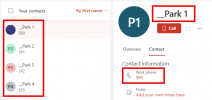
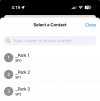
One workaround we have implemented for clients using Microsoft 365 is to create a shared mailbox in their M365 tenant that only the admin user has access to (so it doesn't confuse users on the M365 side). We then populate contacts in that shared mailbox for the Shared Park locations we want. Then in 3CX we sync that M365 shared mailbox with the company phonebook. When you create the contacts in the M365 shared mailbox, prefix the contact name with two underscores and those entries will sort to the top of the company phone book. This way when users hit the magnifying glass on their mobile app, they don't have to search - the Shared Park slots are at the top of the list. Granted, I don't know if this will still run into the issue with the Android app as mentioned above, the overwhelming majority of all of our mobile app users are on iOS. If nothing else, this gets your Shared Park spots added to the company phone book since 3CX rejects SP0 / SP1 / etc. as not being valid phone numbers when you try to add the entries to the phone book manually.
 

Attachments

  • 2024-07-11_16-28-52.png
    2024-07-11_16-28-52.png
    26.4 KB · Views: 26
  • Image.jpg
    Image.jpg
    68.4 KB · Views: 24
Wow @layton - that's impressive, if painful. I can confirm this behavior is still broken in Update 2. We're holding off on moving any customers to v20 until they get this fixed.
 
If they were intending to fix the issue, it seems like they would have gotten away from the "SP0" extension "numbers" altogether and resolved this once and for all. I'd like a few minutes with the bonehead who thought it was a good idea to use alpha characters in an extension numbers in the first place....
 
  • Like
Reactions: glennl
Agree with everyone, really need this back so we can setup dummy extensions for mobile and DECT users. We have installs with high DECT usage which would be impossible to upgrade until this is added back in.

Example Use case:
Office with receptionist >
Places call on park and makes announcement over pa >
Workshop worker finds a DECT phone and dials the dummy extension based on the announcement.

Better still as opposed to having to create all these dummy extension there should be an 'official' way to add a dial code for the SP's in the settings. We use 77 (as in the UK S & P are on the 7 key).

As for mobile, it's long overdue, but SP slots should be shown in user list (or separate screen), and show yellow if a call held in them or green if free.

Please please please 3cx, don't forget about DECT users.

Other than that, we like v20, still a bit work in progress in certain areas, but welcome the improvements, well done.

Dave.
 
Because there are potential issues with it connecting callers together, I suspect it was an intentional removal and is not going to be fixed...we'll see. They did rewrite everything in v20.

I don't see the Idea https://www.3cx.com/community/threads/shared-parking-screen-on-smartphone-app.44200/ linked in this thread yet, please vote.
Hey just thought I would let you know is the link you post is from 2016-2020. Pretty sure voting there will not help with V20. The dummy extensions forwarding to Shared Parks and Digital receptionists recordings from a phone are the last 2 things holding us back from upgrading all of our clients
 
the link you post is from 2016-2020
Yeah...sigh...

I assume the thought is, "park/unpark from the web client" which is fine if you're near a PC.
 
I have an update on this issue, since there are 3 forum threads all discussing the same topic I've only added the detail to one of the threads with an aim of making that thread the 'master thread' for this discussion issue..

https://www.3cx.com/community/threa...-from-mobile-and-dect-v20.126481/#post-610777

Not sure if a forum admin could make this thread (not the one above) read only to encourage all discussion reading this on the single main thread moving forwards?
 
Status
Not open for further replies.

Forum statistics

Threads
111,916
Messages
589,722
Members
164,787
Latest member
IWalter