Shared Parking Pick Up from Mobile and DECT - v20

charlesmurray

Bronze Partner
Joined
Mar 25, 2019
Messages
6
Reaction score
3
On v18, I used to often create several "dummy" extensions on systems and make them extension numbers such as 771, 772 and 773. These extension numbers correspond to the letters for SP1. SP2 and SP3. I would set the forwarding on these dummy extensions to go to Number and SP1, SP2 and SP3.

On v18, if you parked a call in one of the SP slots using a 3CX app or a deskphone, you could retrieve it on the 3CX mobile app or on a phone like a DECT phone that does not have BLF buttons. This was extremely handy on v18, as customers that come from systems like NEC, Panasonic, etc love to use shared parking. However being able to pick up a parked call from a mobile app or DECT is not normally available on 3CX, so this workaround was great for doing this.

I have tried this same config on v20, but if you try to pick up a parked call by dialling the dummy extension 771, 772 or 773, this now no longer works and you get a voice prompt error message, when you try it. Having set this on loads of systems, I am going to have a lot of disappointed customers now that they can no longer use this.

Does anyone have any alternative ways of picking up shared parking calls from 3CX mobile app or from DECT handsets (without BLF buttons)? Alternatively 3CX can you bring back this ability?

Also, parking orbits just don't cut it, I am afraid as there is not any indication on devices that do have BLFs.
 
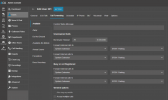
I was able to achieve this a much simpler way with Yealink DECT base. No need for dummy extensions or any CFD. Just use the replace function of the phone's dial plan editor. Works totally fine for both park and retrieve. Just use a 'Prefix' that is not anything your users would otherwise need to dial. To park, just transfer to the prefix from the handset. To pick up, just dial the prefix from the handset as a normal call. Enjoy.
View attachment 43678
Thank you very much. Just used this at a site with 5x W80B's and 20x W57R's and they are very happy to be able to easily use their 8 shared parking spaces along with the 60x T54W phones.
 
amazing work, such a simple fix.
 
I was able to achieve this a much simpler way with Yealink DECT base. No need for dummy extensions or any CFD. Just use the replace function of the phone's dial plan editor. Works totally fine for both park and retrieve. Just use a 'Prefix' that is not anything your users would otherwise need to dial. To park, just transfer to the prefix from the handset. To pick up, just dial the prefix from the handset as a normal call. Enjoy.
View attachment 43678
I'm bringing this thread back alive, because I held off as long as possible upgrades due to this removed ability.

I have had 3 clients CANCEL their service because 3CX removed this and I'm just now finding this. I'm going to try it Feb 2026 and see if it still viable.

If so, thank you so very much. You are saving my business one client at a time after the V20 upgrade lost me clients!

I work with multiple partners that are platinum and this is a game changer if it works. Otherwise we were going to slowly exit 3CX due to V20 reputation damage.
 
I'm bringing this thread back alive, because I held off as long as possible upgrades due to this removed ability.

I have had 3 clients CANCEL their service because 3CX removed this and I'm just now finding this. I'm going to try it Feb 2026 and see if it still viable.

If so, thank you so very much. You are saving my business one client at a time after the V20 upgrade lost me clients!

I work with multiple partners that are platinum and this is a game changer if it works. Otherwise we were going to slowly exit 3CX due to V20 reputation damage.
It works!!!!

The customer was in tears (actually). And the entire staff room lit up with cheering and excitement.

Thank you.

Such a simple fix.

Base page > Settings > Dial Plan > Replace prefix

Working in Feb 2026

*Wish I would have found this before I lost clients because of the V20 restriction.
 
On this subject. :)

I've been using the Fanvil DECT solution, the long-range one. Not only is the long range awesome, but the system park work is amazing.

With this, you can assign BLF keys to the handset. So you can add SP101 as a button to answer the park button. You just press this BLF button to answer the parked call.

Then, to put the call on park, create a dummy user with the number 101 that forwards to "system extension" SP101. So to park to the SP101 you just blind transfer the call to 101.
 
On this subject. :)

I've been using the Fanvil DECT solution, the long-range one. Not only is the long range awesome, but the system park work is amazing.

With this, you can assign BLF keys to the handset. So you can add SP101 as a button to answer the park button. You just press this BLF button to answer the parked call.

Then, to put the call on park, create a dummy user with the number 101 that forwards to "system extension" SP101. So to park to the SP101 you just blind transfer the call to 101.
I could never get the dummy extension working to also provide the BLF status. So not sure this would work for me.

Ideally there would be a cordless model supported that can be assigned BLFs with status indication.

I tried doing the forwarding rules to the SP numbers as it used to work before the recent updates but could never get it to work like it used to.
 
Hm I just tested that again in u8, both calling the ext or transferring, and it still immediately drops the call. It had stopped worked and was unsupported in v20 AFAIK.
 
  • Like
Reactions: Evolute IT
Doing it the screenshot way works for me; just tested it again, and it works fine. So I'm not sure why mine works and yours doesn't
 
  • Wow
Reactions: SteveITS

Latest Posts

Forum statistics

Threads
111,973
Messages
590,075
Members
164,895
Latest member
jasonkkrause