- Joined
- Dec 30, 2021
- Messages
- 68
- Reaction score
- 15
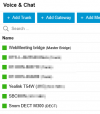
I’m having a strange issue trying to connect my Snom M300 base station with M25 handset to 3CX. No matter what I do, the base always stays red (unregistered) in 3CX.
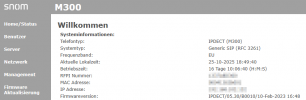
I’ve followed the official guide exactly as here https://www.3cx.com/sip-phones/snom-dect-phones/ The M300 is running the exact firmware version listed in the 3CX documentation, but I’ve also tried multiple others — including the latest 530/1400. No change at all.
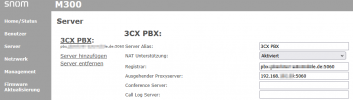
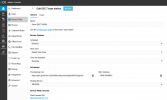
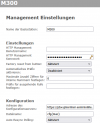
Auto-provisioning didn’t work over HTTPS (5001), only via HTTP (port 5000). Eventually, I downloaded the configuration file manually from 3CX and uploaded it directly to the M300 web UI. The config was accepted successfully — I can confirm it’s applied correctly — but the base still refuses to register with 3CX.
What’s really odd is that the M300 doesn’t even try to register. I ran Wireshark and checked the firewall logs — there are absolutely no SIP REGISTER packets coming from the M300’s IP 192.168.25.16).
It only communicates via TCP port 5001, but nothing on UDP 5060.So it looks like the DECT base never even attempts to initialize the SIP stack, regardless of what extensions are configured.
Here’s my current test setup:
Everything is on the same LAN (192.168.25.0/24) for now — no NAT, no routing, no VLAN separation. Once I see it working locally, I plan to move them into separate VLANs. But at this stage, SIP traffic should definitely be visible — and it’s not.
What i did so far
I’ve followed the official guide exactly as here https://www.3cx.com/sip-phones/snom-dect-phones/ The M300 is running the exact firmware version listed in the 3CX documentation, but I’ve also tried multiple others — including the latest 530/1400. No change at all.
Auto-provisioning didn’t work over HTTPS (5001), only via HTTP (port 5000). Eventually, I downloaded the configuration file manually from 3CX and uploaded it directly to the M300 web UI. The config was accepted successfully — I can confirm it’s applied correctly — but the base still refuses to register with 3CX.
What’s really odd is that the M300 doesn’t even try to register. I ran Wireshark and checked the firewall logs — there are absolutely no SIP REGISTER packets coming from the M300’s IP 192.168.25.16).
It only communicates via TCP port 5001, but nothing on UDP 5060.So it looks like the DECT base never even attempts to initialize the SIP stack, regardless of what extensions are configured.
Here’s my current test setup:
Code:
M25 Handset → M300 Base Station → 3CX SBC → 3CX PBXWhat i did so far
- Followed the 3CX guide step-by-step.
- Verified DNS resolution for 3cx.domain.tld — works fine.
- Confirmed 3CX PBX is reachable on port 5060 (telnet 3cx.domain.tld 5060 connects).
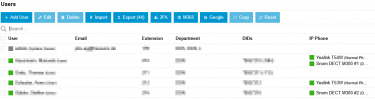
- Verified the SBC and PBX are fully operational — other SIP phones (Yealink, Fanvil) register without any issues.
- Factory reset the M300 multiple times and reconfigured manually.
- 3CX shows the M300 as unregistered (red).
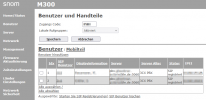
- In the M300 web UI, all extensions appear under Extensions , but their State is always blank.
- Clicking Start SIP Registration(s) does nothing — no network activity, no REGISTER packets.