


- Joined
- Feb 5, 2019
- Messages
- 5
- Reaction score
- 0
Hi,
I've been looking through the forum to find a possible solution for this problem but so far nothing was able to help me solve the problem.
Occasionally there is a problem that a call is only one way audio. (Usually the first call that is made by the device) It usually happens when an extension makes a call from outside the internal network to one that is also outside of the network. The problem does also occur when one or both are in the internal network.
We are using:
When launching the Firewall Check, it reports all tests are good, until it comes to the testing of the Media Server ports. The result is posted below.
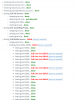
I have checked that the needed ports are opened on all firewalls, which is the case and all configurations were done as instructed on the website.
The weird part is that when relaunching the test, the ports that give the "full cone test failed" error change with every launch of this test.
Are these problems related and what could be done to try and solve this problem?
I've been looking through the forum to find a possible solution for this problem but so far nothing was able to help me solve the problem.
Occasionally there is a problem that a call is only one way audio. (Usually the first call that is made by the device) It usually happens when an extension makes a call from outside the internal network to one that is also outside of the network. The problem does also occur when one or both are in the internal network.
We are using:
- 3CX 15.5.15502.6
- Watchguard XTM2 series
- Watchguard XTM2 series
When launching the Firewall Check, it reports all tests are good, until it comes to the testing of the Media Server ports. The result is posted below.
I have checked that the needed ports are opened on all firewalls, which is the case and all configurations were done as instructed on the website.
The weird part is that when relaunching the test, the ports that give the "full cone test failed" error change with every launch of this test.
Are these problems related and what could be done to try and solve this problem?


