- Joined
- Nov 24, 2021
- Messages
- 34
- Reaction score
- 10
Greetings,
So we have about 270 Users, Using Webclient to be make and receive calls for about 6 years without a single issue.
last month we upgraded From v18 to v20 and we had some issues related to notifications popups and making the users registerd so they can appear online and then receive calls and make calls and all good now.
Except for some users, about 10 users or more they have a Sound/mic issue while using the webclient
they can receive and make calls but they cant hear the other side nor the other side can hear them, even when i dial *777 to test mic and sound there is no sound at all
example:
Laptop: Windows 11 Pro 64bit
Google Chrome : Version 141.0.7390.123 (Official Build) (64-bit)
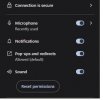
Microphone :allowed
Sound: Allowed
Notification: Allowed
and still cant hear or talk using a headphone or even using the Laptop internal mic and internal speakers even thought they were working just fine in V18
even cant listen to a current call or whisper.
*Note: Same laptop is working just fine with the 3CX windows app, so it seems it is related to the webclient only
what seems to be the problem here ?
So we have about 270 Users, Using Webclient to be make and receive calls for about 6 years without a single issue.
last month we upgraded From v18 to v20 and we had some issues related to notifications popups and making the users registerd so they can appear online and then receive calls and make calls and all good now.
Except for some users, about 10 users or more they have a Sound/mic issue while using the webclient
they can receive and make calls but they cant hear the other side nor the other side can hear them, even when i dial *777 to test mic and sound there is no sound at all
example:
Laptop: Windows 11 Pro 64bit
Google Chrome : Version 141.0.7390.123 (Official Build) (64-bit)
Microphone :allowed
Sound: Allowed
Notification: Allowed
and still cant hear or talk using a headphone or even using the Laptop internal mic and internal speakers even thought they were working just fine in V18
even cant listen to a current call or whisper.
*Note: Same laptop is working just fine with the 3CX windows app, so it seems it is related to the webclient only
what seems to be the problem here ?