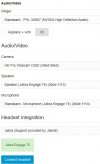
In the settings of the web client, it is possible to set the speaker. However, this does not do anything. The speaker is the speaker set in System Sound settings on the PC, the setting in de PWA client is ignored.
Is it possible to use a different speaker for calls than for the PC?
Did you ever found out what caused this issue?
We're running into the same issue. And have looked at almost every possible option.
Sound drivers
Output devices
Reconnecting headset and dongle
It only seems to be working if you manually select the headset as output device for all audo on the workstation.
However then they don't have the ringtone when a call comes in.
Any tips might help