Stun provisioning going away in v20

Status
Not open for further replies.
We 100% use stun in all 50+ setups we've done so far. This is going to suck, bad. It's been very reliable for us. We program each phone with different ports, and it works fine for us. Only time it gives us issues is if the ISP changes out their device that does SIP ALG, or if a firewall update turns SIP ALG back on for us.

1) Is there a chart somewhere that shows how many phones these v2 self-sbc phones can sustain?
2) When upgrading to v20, will it completely kill all our phones from operating like normal since STUN is dropped?
 
1) Is there a chart somewhere that shows how many phones these v2 self-sbc phones can sustain?
10 IP phones can be used behind a router phone and a dedicated SBC running on windows or linux can support up to 100 IP phones.
 
  • Like
Reactions: NatalyS_3CX
Alejandro just to clarify my understanding on the SBCs, internal calls that go across 2 different SBCs, send the voice audio through the 3CX server, correct? So a company that makes lots of internal calls might be better served by having one large SBC than setting lots of SBCs, or setting up each individual phone as its own SBC?

(Though, making a phone its own SBC makes it portable...just pointing that out. Also making each phone its own SBC can result in lots of "trunk down/up" alerts since the SBCs trigger that.)
 
Hi @SteveITS so, IP phones provisioned behind the sbc if they call each other, the audio is sent between the endpoints.

If you have multiple remote locations with a SBC and users from this location call each other, then the audio is sent through the server, but if these remote locations are connected between them, then the audio can be sent directly through the endpoints.

Please note that if the recording is enabled then the audio will be sent to the server in order to record the call.
 
OK thanks. And then it sounds like, for a location with 25 phones and 3 router phones, the audio stays local as well?
 
OK thanks. And then it sounds like, for a location with 25 phones and 3 router phones, the audio stays local as well?
same LAN and extensions without using pbx delivers audio or recording, yes the audio is sent through the endpoints when calling between them.
 
  • Like
Reactions: VoIPTools
With remote office workers, and our clients have many, there is one phone at a given location. I'd like to see the option to configure the phone as SBC for itself, which we can do now, but not have it show up in the Trunks section, generating notifications every time it is up or down, and also not selectable as an SBC to route other phones through. Basically make it an SBC/Tunneled extension, but not available as an SBC for other extensions, and not have it clutter the Trunks node with 20+ standalone SBC phones.
 
generating notifications every time it is up or down
Separating the notifications would help this issue:
  • SIP trunks
  • SBC
  • Router Phones
We have a client with several, and every short outage we get a slew of emails.

Or possibly, have a checkmark on the SBC/trunk as to whether or not it should trigger notifications when down. That would allow customization for people who take their now-portable phone home occasionally.
 
  • Like
Reactions: Nathan@Voxtelesys
Separating the notifications would help this issue:
  • SIP trunks
  • SBC
  • Router Phones
We have a client with several, and every short outage we get a slew of emails.

Or possibly, have a checkmark on the SBC/trunk as to whether or not it should trigger notifications when down. That would allow customization for people who take their now-portable phone home occasionally.


From management standpoint, I like this idea.
1696014332676.png
Split general general email notification settings to 3 items:

Trunks
SBC
Routerphones

Then that type of notification can be turned on of off as the management of the system sees fit.

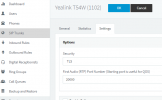
2nd be able to turn off notifications for specific SBC's. Add a checkbox here "Send notification email":

1696014529442.png


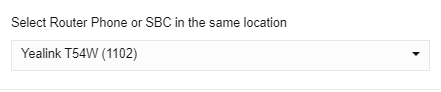
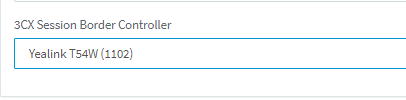
Lastly, as far as routerphones that will be remote SBC for themselves only, I would like to see them not be visible in the trunks and not selectable as the SBC for other phones.

It could be needlessly confusing to see 20 or 30 phones in this list to choose from, but most of them being in remote locations by themselves.

Imagine dozens of phones in these lists to choose from that are SBC's just to get away from using STUN and are on remote networks by themselves, and are not to be used for routing other phones.

Webclient
1696015464205.png
Managment console

1696014860557.png

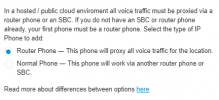
Maybe another option here, such as "Tunnel Phone -- This phone will only proxy voice traffic for itself"

1696015352801.png

That's how I see it to make this move away from STUN and the awesome newer capability of using hardware phones as SBC's streamlined.
 
  • Like
Reactions: SteveITS
With remote office workers, and our clients have many, there is one phone at a given location. I'd like to see the option to configure the phone as SBC for itself, which we can do now, but not have it show up in the Trunks section, generating notifications every time it is up or down, and also not selectable as an SBC to route other phones through. Basically make it an SBC/Tunneled extension, but not available as an SBC for other extensions, and not have it clutter the Trunks node with 20+ standalone SBC phones.
This is a good point. WE are streamlining the SBC on phone setup to support phones connected directly via SBC and this is a good point to consider.
 
  • Like
Reactions: Les Webb
We have many sites setup with STUN currently. @Nick Galea Will STUN completely stop working in V20?
Just trying to figure out so we have time to move customers to new setups
 
Separating the notifications would help this issue:
  • SIP trunks
  • SBC
  • Router Phones
We have a client with several, and every short outage we get a slew of emails.

Or possibly, have a checkmark on the SBC/trunk as to whether or not it should trigger notifications when down. That would allow customization for people who take their now-portable phone home occasionally.
I was looking for this thread. :) This week we had a home user with unstable Internet but has an SBC for a fax. So our choices were to deal with hundreds of emails or turn off alerting for the SIP trunk.

We also would like to know about STUN because we have a client who insisted on it for their few physical phones (pre-router phone era). Not a huge scale issue obviously, but need to know if we need to convert before v20 or can let it slide and not bill the client for it.
 
We have many sites setup with STUN currently. @Nick Galea Will STUN completely stop working in V20?
Just trying to figure out so we have time to move customers to new setups
In this thread, last post on page 1, Nick said you can use STUN in v20, but you will need to support it completely.

Existing phones should continue working without changes as a result.
 
  • Like
Reactions: NatalyS_3CX
  • Like
Reactions: NatalyS_3CX
We have many sites setup with STUN currently. @Nick Galea Will STUN completely stop working in V20?
Just trying to figure out so we have time to move customers to new setups
You can keep using STUN in v20 by using a custom template. So yes you can but there will be a warning and you will have to support it yourself A to Z. Existing phones will continue to work as normal (i.e. existing templates will be left as they are) .

We recommend using a router phone as its more reliable. Installs with yealink or fanvil are easy to convert as the tunnel can be installed on a wide range of phones (most T4 and T5 models). Or buy one new phone per remote site for less than $100.

You might need to configure them with an FQDN. We are preparing an update 9 which will have a convert function which will allow you to configure split DNS and then update all provisioning templates automatically. That said i assume most STUN configurations are using some kind of FQDN already given that they are remote.

However for on premise installs the changes are less strict. I am preparing a blog post which will explain all this in more detail.
 
Last edited:
I have upgraded a handful of systems that had a few directly connected phones and they continue to work, it's just that nothing shows up under the IP Phone tab in the users profile. So I tried using a custom template to add a phone directly by following the steps in the "Provisioning a phone with STUN" section of this page https://www.3cx.com/docs/manual/ip-phones/ but the "Connect directly" option when you go to configure the phone manually is greyed out. I assume setting the option values to "1" turn that option on, but it doesn't matter what I set those values to, it always has "Connect via SBC" and "Local LAN/VPN" as the only available choices, as "Connect directly" is always greyed out.

I know this isn't supported, but am I missing something to make the "Connect directly" option available? Do I need to restart a service after creating the template? Is this option only available to paid licenses, as these are the 4SC Standard Free versions? Please let me know. Thanks in advance for any help.
 
I have upgraded a handful of systems that had a few directly connected phones and they continue to work, it's just that nothing shows up under the IP Phone tab in the users profile. So I tried using a custom template to add a phone directly by following the steps in the "Provisioning a phone with STUN" section of this page https://www.3cx.com/docs/manual/ip-phones/ but the "Connect directly" option when you go to configure the phone manually is greyed out. I assume setting the option values to "1" turn that option on, but it doesn't matter what I set those values to, it always has "Connect via SBC" and "Local LAN/VPN" as the only available choices, as "Connect directly" is always greyed out.

I know this isn't supported, but am I missing something to make the "Connect directly" option available? Do I need to restart a service after creating the template? Is this option only available to paid licenses, as these are the 4SC Standard Free versions? Please let me know. Thanks in advance for any help.
The connect directly is the router phone option. When you select a router capable phone, this option becomes available.
 
Ok, thanks for the reply Nicholas. So which option should I choose then, "Connect via SBC" or "Local LAN/VPN"? I've tried both and neither seems to work.
 
Ok, thanks for the reply Nicholas. So which option should I choose then, "Connect via SBC" or "Local LAN/VPN"? I've tried both and neither seems to work.
If the phone is a normal phone you have the option of connecting it through a router phone or dedicated SBC machine using the connect via SBC.

If it is in the local network, you have the option to connect it via RPS provisioning, or via plug and play, which is the mechanism used until now for local provisioning.
 
Nicholas, the whole point of this is that the phone is remote, no LAN or SBC/Router phone. My assumption with adding this section to the phone template was to enable the RemoteSTUN option, which I assume is the "Connect directly" option:

<AllowedNetworkConfig>
<option value="LOCALLAN">0</option>
<option value="REMOTESTUN">1</option>
<option value="SBC">0</option>
</AllowedNetworkConfig>

and now that I think about it, the router phone is under the first option, "Connect via SBC / Router phone" so logically the "Connect directly" option should be for the Remote STUN.

Has anyone successfully got a Remote phone to work using the templates?
 
Status
Not open for further replies.

Forum statistics

Threads
111,933
Messages
589,809
Members
164,807
Latest member
Smax