Stun provisioning going away in v20

Status
Not open for further replies.
Nicholas, the whole point of this is that the phone is remote, no LAN or SBC/Router phone. My assumption with adding this section to the phone template was to enable the RemoteSTUN option, which I assume is the "Connect directly" option:

<AllowedNetworkConfig>
<option value="LOCALLAN">0</option>
<option value="REMOTESTUN">1</option>
<option value="SBC">0</option>
</AllowedNetworkConfig>

and now that I think about it, the router phone is under the first option, "Connect via SBC / Router phone" so logically the "Connect directly" option should be for the Remote STUN.

Has anyone successfully got a Remote phone to work using the templates?
No, the connect directly is for the Router phone to be able to connect. Then the other phones will be able to connect through the SBC device or router phone.

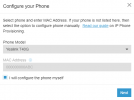
The provisioning method that shall not be named would require the manual configuration to be enabled

1709737728483.png

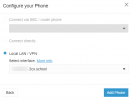
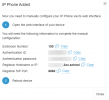
You will not even go through the process of adding the MAC address of the device. Once you click on Next it will bring up only the local LAN/VPN option, then the configuration details (credentials) to configure the phone manually.

1709737859506.png

1709737918292.png

(ignore the SIP Port. Was doing some testing with a different SIP Port other than 5060)
 
  • Like
Reactions: Evolute IT
Sorry Nicholas.

Ok, so do you need to use the phone template for the phone choice per the comment that STUN is still available via the templates? And do you need to uncheck the "Block remote non-tunnel connections" box under user "Options"? Let me know. Thanks.
 
So I got it working, but did have to uncheck the "Block remote non-tunnel connections" box under user "Options" to get it to register and had to put a valid Outbound Caller ID, as without it, I was getting call or registration to ... failed - forbidden, when trying to place a call. Inbound calls worked...
 
We updated to V20 a week ago and I moved to SBC from STUN as we already had SBC going for some analog to digital devices and I saw that STUN was not being supported. We now have no voice incoming or outgoing for both in-office or external calls. I want to switch back to STUN to diagnose whether it's the SBC or not but I see here that it's a pain now. Before I mess around with custom templates, I was curious if anyone else is having the same issue? I've read a couple of other threads on the forum and have tried a few things suggested but with no success.
 
So I got it working, but did have to uncheck the "Block remote non-tunnel connections" box under user "Options" to get it to register and had to put a valid Outbound Caller ID, as without it, I was getting call or registration to ... failed - forbidden, when trying to place a call. Inbound calls worked...
TimEllis im stuck with the same problem. What model of the telephone did you use? Im trying to follow Nicholas guide but there is no option to "configure phone by myself" for DECT phones (Yealink W70B). I have couple of examples where STUN is the only way and pushing SBC for every single location is nonsense. First in line, client with 3 offices with 1yealink dect phone per location. Right now i he will need sbc for every location (no VPN between offices). So cost for him growing x2. The funniest thing about this is that when I prepare it now on version v18, connect the phone via STUN, and upgrade to v20, it will work. So why doesn't v20 just have this feature built-in?
 
Tomshi, I used a Yealink T40G. Have you tried using an non DECT phone to see if it works?
 
Not yet. I'm currently working on case with DECT phones and trying to figure it out first.
 
So is STUN still working on V20? I have a fanvil i62 doorbell working via STUN and now after the upgrade it isn't working anymore.
 
Status
Not open for further replies.

Forum statistics

Threads
111,933
Messages
589,809
Members
164,807
Latest member
Smax