T54w - Logo format is not supported

Status
Not open for further replies.

sanch6

Silver Partner
Advanced Certified
Joined
Jul 5, 2024
Messages
65
Reaction score
26
I'm trying to upload a custom logo for T54w.
It is on a Entreprise Version 20.0 Update 3 (Build 659 Alpha)
Documentation says the following: Yealink T29G / T46S / T46U / T54S / T54W, .png, 480*272 and admin console: Format .png, width 480, height 272, bitdepth 24.

1723800877729.png

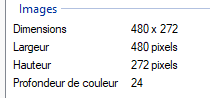
Here is my file details:

1723800729576.png


When uploading it I get the error : Logo format is not supported
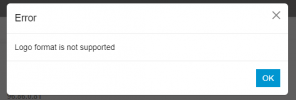
1723800788147.png

What I'm doing wrong ?
Thank you
 
Are you using a PNG?
 
  • Like
Reactions: Guillaume Bourgeois
Hi @ConceptsWeb, thanks for your answer, yes my file is logo2.png
Also tried with jpeg, even if not listed as supported. Without success...
How are you creating the PNG? Is it a transparent image or something like that?
 
  • Like
Reactions: Guillaume Bourgeois
How are you creating the PNG? Is it a transparent image or something like that?
Tried with Photoshop and Paint.net.
With transparent background or a black one. Same error :(
 
Tried with Photoshop and Paint.net.
With transparent background or a black one. Same error :(
Try compressing the image using an online service or something.
 
  • Like
Reactions: Guillaume Bourgeois
Try compressing the image using an online service or something.
Same error, also tried with another image for a T58w on another instance in Version 20.0 Update 3 (Build 659 Alpha).
Tried many online image compressor or converter... don't know what I'm doing wrong.

Last time I was able to do it playing with phone template and uploading image to a ftp.
This time I ordered Enterprise licences to make it on "the correct way", but seems more difficult
 
Please share your image ..
I'll try it on my end and attempt to identify the cause.
 
  • Like
Reactions: Evolute IT
  • Like
Reactions: Guillaume Bourgeois
Thanks for reporting this, it was an issue in the Alpha build that has been fixed.

You should find the fix in the next Beta build when it comes out.
 
Thanks for reporting this, it was an issue in the Alpha build that has been fixed.

You should find the fix in the next Beta build when it comes out.

I was just about to mention that it works directly on the phone itself (through the interface).
So, I was going to assume the issue might be on the 3CX "web interface side". :p
 
  • Like
Reactions: sanch6
Thank you all for your support. Will wait the next release then.
Is there any estimated release date ?
Best regards
 
No ETA yet, but please keep in mind that the current build you are using is Alpha and not intended for production environments. The Beta is usually not very far though, so keep an eye out on our blog posts for more info :)
 
Hey, just to let you know it's working now with the BETA !
 
Status
Not open for further replies.

Members Online Now

No members online now.

Forum statistics

Threads
111,831
Messages
589,277
Members
164,660
Latest member
RJenkinsROCK