Solved Teams Direct Routing Fail to dialout or dial in

Status
Not open for further replies.

Patrick_Frigon

Platinum Partner
Basic Certified
Joined
Feb 16, 2022
Messages
10
Reaction score
2
Hi,

We try to install teams Direct Routing from Hosted 3CX 18.0 Update 2 (Build 314)Version.

- My sync Microsoft 365 was done
- My certificate was succesful loaded
- the synced With Ms 365+Teams was done from my user
- My Ms Licences is M365 Buisness Voice without calling plan
- i see the call activity on ms teams management consol . The code for Final Sip code for outbound call from teams is 603 and for incoming call is 404

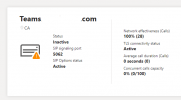
see the two print screen


Direct Routing​

direct call routing state.PNG

direct call routing state 2.PNG
 
Hi,

We try to install teams Direct Routing from Hosted 3CX 18.0 Update 2 (Build 314)Version.

- My sync Microsoft 365 was done
- My certificate was succesful loaded
- the synced With Ms 365+Teams was done from my user
- My Ms Licences is M365 Buisness Voice without calling plan
- i see the call activity on ms teams management consol . The code for Final Sip code for outbound call from teams is 603 and for incoming call is 404

see the two print screen


Direct Routing​

View attachment 27967

View attachment 27968
603 is usually Declined so it would mean that either Teams hasn't completed their side of the setup, or something is misconfigured.

Did you configure the Office Phone as E164 correctly in each O365 users?
 
What @ConceptsWeb said, try opening a Powershell, connect with Connect-MicrosoftTeams,the run the following command for each user you have synced:
Code:
Set-CsPhoneNumberAssignment -Identity <EMAIL/UPN> -PhoneNumber "+<E164 CALLER ID>;ext=<3CX EXT NUMBER>" -PhoneNumberType DirectRouting

e.g.
Code:
Set-CsPhoneNumberAssignment -Identity [email protected] -PhoneNumber "+11234567890;ext=100" -PhoneNumberType DirectRouting

If this works, note that the new User Script that is in V18 U3 Beta and will also be like this in U3 final is like this.
 
What @ConceptsWeb said, try opening a Powershell, connect with Connect-MicrosoftTeams,the run the following command for each user you have synced:
Code:
Set-CsPhoneNumberAssignment -Identity <EMAIL/UPN> -PhoneNumber "+<E164 CALLER ID>;ext=<3CX EXT NUMBER>" -PhoneNumberType DirectRouting

e.g.
Code:
Set-CsPhoneNumberAssignment -Identity [email protected] -PhoneNumber "+11234567890;ext=100" -PhoneNumberType DirectRouting

If this works, note that the new User Script that is in V18 U3 Beta and will also be like this in U3 final is like this.
i Modified the the phone number to adding the extention (+1 581 555 5555 ext. 206 ). and i receve the same 603 cause code.

if i try the Beta is it possible to roolback to stable release ?
 
if i try the Beta is it possible to roolback to stable release ?
No, rolling back is not possible so I would not recommend it.


About the issue you are facing, first can you check in the 3CX Management Console --> Users, if next to the users that you have Teams integration enabled for you see "MS 365+Teams"?
1645107120259.png

If you do, then please try the following:
1. Switch 3CX Logging to "Off" from Dashboard --> Activity Log --> Settings
2. In the Dashboard --> Activity Log press "Purge" to delete the current logs
3. Go back to Dashboard --> Activity Log --> Settings and enable "Verbose"
4. Make a call from the Teams Client of a synced user to the VMail extension (default 999)
5. If the call fails, go to the Activity Log and now search for the 603 error message that 3CX sent. close to it you should also see the INVITE message from Teams towards 3CX. Could you please paste that here, just hide sensitive data like your IP Address, names, your FQDN.
 
At some point Patrick, I can remote session with you and take a look at your setup. We have the integration working for multiple customers.
 
No, rolling back is not possible so I would not recommend it.


About the issue you are facing, first can you check in the 3CX Management Console --> Users, if next to the users that you have Teams integration enabled for you see "MS 365+Teams"?
View attachment 27990

If you do, then please try the following:
1. Switch 3CX Logging to "Off" from Dashboard --> Activity Log --> Settings
2. In the Dashboard --> Activity Log press "Purge" to delete the current logs
3. Go back to Dashboard --> Activity Log --> Settings and enable "Verbose"
4. Make a call from the Teams Client of a synced user to the VMail extension (default 999)
5. If the call fails, go to the Activity Log and now search for the 603 error message that 3CX sent. close to it you should also see the INVITE message from Teams towards 3CX. Could you please paste that here, just hide sensitive data like your IP Address, names, your FQDN.
See my trace :

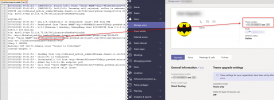
02/17/2022 9:26:51 AM - [CM502001]: Source info: From: "Jonh Doe"<sip:+15815555555;ext=[email protected]:5061;user=phone>;tag=ed1f4d8d4f9a4068b3e2af3775a1e50e; To: <sip:[email protected]:5062;user=phone>
02/17/2022 9:26:51 AM - [CM503013]: Call(C:12): Incoming call rejected, caller is unknown; msg=Invite-IN Recv Req INVITE from 52.114.148.0:25088 tid=ea27eb0a Call-ID=fe636f9b0c0c5c6fbec18d9f7b76218b:
INVITE sip:[email protected]:5062;user=phone;transport=tls SIP/2.0
Via: SIP/2.0/TLS 52.114.148.0:5061;branch=z9hG4bKea27eb0a
Max-Forwards: 70
Record-Route: <sip:sip-du-a-us.pstnhub.microsoft.com:5061;transport=tls;lr>
Contact: <sip:api-du-a-uswe2.pstnhub.microsoft.com:443;x-i=d26464e0-58e1-4f16-8deb-0abcafde58cf;x-c=fe636f9b0c0c5c6fbec18d9f7b76218b/d/8/16f145936d7f411f93c7c66e7fa83da7>
To: <sip:[email protected]:5062;user=phone>
From: "Jonh Doe"<sip:+15815555555;ext=[email protected]:5061;user=phone>;tag=ed1f4d8d4f9a4068b3e2af3775a1e50e
Call-ID: fe636f9b0c0c5c6fbec18d9f7b76218b
CSeq: 1 INVITE
Session-Expires: 3600
Min-SE: 300
Allow: INVITE, ACK, OPTIONS, CANCEL, BYE, NOTIFY
Content-Type: application/sdp
Supported: timer
User-Agent: Microsoft.PSTNHub.SIPProxy v.2022.2.14.2 i.USWE2.3
Privacy: id
P-Asserted-Identity: <tel:+15815555555;ext=206>
P-Asserted-Identity: <sip:username@domainname>
Content-Length: 1102

v=0
o=- 66836 0 IN IP4 127.0.0.1
s=session
c=IN IP4 52.113.220.16
b=CT:10000000
t=0 0
m=audio 49250 RTP/SAVP 104 9 103 111 18 0 8 97 101 13 118
c=IN IP4 52.113.220.16
a=rtcp:49251
a=ice-ufrag:jRL/
a=ice-pwd:trWQabW+RP+IWOG7CO1GXVlm
a=rtcp-mux
a=candidate:1 1 UDP 2130706431 52.113.220.16 49250 typ srflx raddr 10.0.137.92 rport 49250
a=candidate:1 2 UDP 2130705918 52.113.220.16 49251 typ srflx raddr 10.0.137.92 rport 49251
a=candidate:2 1 tcp-act 2121006078 52.113.220.16 49152 typ srflx raddr 10.0.137.92 rport 49152
a=candidate:2 2 tcp-act 2121006078 52.113.220.16 49152 typ srflx raddr 10.0.137.92 rport 49152
a=label:main-audio
a=mid:1
a=crypto:1 AES_CM_128_HMAC_SHA1_80 inline:LNAduj+wr2XfQHFVRD4gwJwjlJoYV/vcuoK9aWzQ|2^31
a=sendrecv
a=rtpmap:104 SILK/16000
a=rtpmap:9 G722/8000
a=rtpmap:103 SILK/8000
a=rtpmap:111 SIREN/16000
a=fmtp:111 bitrate=16000
a=rtpmap:18 G729/8000
a=fmtp:18 annexb=no
a=rtpmap:0 PCMU/8000
a=rtpmap:8 PCMA/8000
a=rtpmap:97 RED/8000
a=rtpmap:101 telephone-event/8000
a=fmtp:101 0-16
a=rtpmap:13 CN/8000
a=rtpmap:118 CN/16000
a=ptime:20
02/17/2022 9:26:51 AM - Leg L:12.1[Unknown:] is terminated: Cause: BYE from PBX
02/17/2022 9:26:51 AM - Terminated from "Jonh Doe"<sip:+15815555555;ext=[email protected]:5061;user=phone>;tag=ed1f4d8d4f9a4068b3e2af3775a1e50e to <sip:[email protected]:5062;user=phone>;tag=0b043a5c; reason: Rejected
02/17/2022 9:26:51 AM - L:12.1[Unknown:] Sending: OnSendResp Send 603/INVITE from 0.0.0.0:0 tid=ea27eb0a Call-ID=fe636f9b0c0c5c6fbec18d9f7b76218b:
SIP/2.0 603 Decline
Via: SIP/2.0/TLS 52.114.148.0:5061;branch=z9hG4bKea27eb0a
To: <sip:[email protected]:5062;user=phone>;tag=0b043a5c
From: "Jonh Doe"<sip:+15815555555;ext=[email protected]:5061;user=phone>;tag=ed1f4d8d4f9a4068b3e2af3775a1e50e
Call-ID: fe636f9b0c0c5c6fbec18d9f7b76218b
CSeq: 1 INVITE
Warning: 499 AL153-DHLJJ-OEWHI-8WW5K-1MUG5 "Caller is forbidden"
Content-Length: 0

02/17/2022 9:26:51 AM - SendMsg from <sip:[email protected]:5062;user=phone>;tag=0b043a5c to "Jonh Doe"<sip:+15815555555;ext=[email protected]:5061;user=phone>;tag=ed1f4d8d4f9a4068b3e2af3775a1e50e
02/17/2022 9:26:51 AM - Call(C:12) is terminated
02/17/2022 9:26:51 AM - IncomingCall: C:12 from <sip:+15815555555;ext=[email protected]:5061/UDP> to <sip:[email protected]:5062/tls>
02/17/2022 9:26:51 AM - Added leg L:C:12.1[No endpoint yet]
02/17/2022 9:26:51 AM - Call from "Jonh Doe"<sip:+15815555555;ext=[email protected]:5061;user=phone>;tag=ed1f4d8d4f9a4068b3e2af3775a1e50e to <sip:[email protected]:5062;user=phone>;tag=0b043a5c
 
Is the phone number sent by Teams is the same as the Office Phone field of the users?

The call is rejected because it's from unknown caller, which is odd.
 
See my trace :

02/17/2022 9:26:51 AM - [CM502001]: Source info: From: "Jonh Doe"<sip:+15815555555;ext=[email protected]:5061;user=phone>;tag=ed1f4d8d4f9a4068b3e2af3775a1e50e; To: <sip:[email protected]:5062;user=phone>
02/17/2022 9:26:51 AM - [CM503013]: Call(C:12): Incoming call rejected, caller is unknown; msg=Invite-IN Recv Req INVITE from 52.114.148.0:25088 tid=ea27eb0a Call-ID=fe636f9b0c0c5c6fbec18d9f7b76218b:
INVITE sip:[email protected]:5062;user=phone;transport=tls SIP/2.0
Via: SIP/2.0/TLS 52.114.148.0:5061;branch=z9hG4bKea27eb0a
Max-Forwards: 70
Record-Route: <sip:sip-du-a-us.pstnhub.microsoft.com:5061;transport=tls;lr>
Contact: <sip:api-du-a-uswe2.pstnhub.microsoft.com:443;x-i=d26464e0-58e1-4f16-8deb-0abcafde58cf;x-c=fe636f9b0c0c5c6fbec18d9f7b76218b/d/8/16f145936d7f411f93c7c66e7fa83da7>
To: <sip:[email protected]:5062;user=phone>
From: "Jonh Doe"<sip:+15815555555;ext=[email protected]:5061;user=phone>;tag=ed1f4d8d4f9a4068b3e2af3775a1e50e
Call-ID: fe636f9b0c0c5c6fbec18d9f7b76218b
CSeq: 1 INVITE
Session-Expires: 3600
Min-SE: 300
Allow: INVITE, ACK, OPTIONS, CANCEL, BYE, NOTIFY
Content-Type: application/sdp
Supported: timer
User-Agent: Microsoft.PSTNHub.SIPProxy v.2022.2.14.2 i.USWE2.3
Privacy: id
P-Asserted-Identity: <tel:+15815555555;ext=206>
P-Asserted-Identity: <sip:username@domainname>
Content-Length: 1102

v=0
o=- 66836 0 IN IP4 127.0.0.1
s=session
c=IN IP4 52.113.220.16
b=CT:10000000
t=0 0
m=audio 49250 RTP/SAVP 104 9 103 111 18 0 8 97 101 13 118
c=IN IP4 52.113.220.16
a=rtcp:49251
a=ice-ufrag:jRL/
a=ice-pwd:trWQabW+RP+IWOG7CO1GXVlm
a=rtcp-mux
a=candidate:1 1 UDP 2130706431 52.113.220.16 49250 typ srflx raddr 10.0.137.92 rport 49250
a=candidate:1 2 UDP 2130705918 52.113.220.16 49251 typ srflx raddr 10.0.137.92 rport 49251
a=candidate:2 1 tcp-act 2121006078 52.113.220.16 49152 typ srflx raddr 10.0.137.92 rport 49152
a=candidate:2 2 tcp-act 2121006078 52.113.220.16 49152 typ srflx raddr 10.0.137.92 rport 49152
a=label:main-audio
a=mid:1
a=crypto:1 AES_CM_128_HMAC_SHA1_80 inline:LNAduj+wr2XfQHFVRD4gwJwjlJoYV/vcuoK9aWzQ|2^31
a=sendrecv
a=rtpmap:104 SILK/16000
a=rtpmap:9 G722/8000
a=rtpmap:103 SILK/8000
a=rtpmap:111 SIREN/16000
a=fmtp:111 bitrate=16000
a=rtpmap:18 G729/8000
a=fmtp:18 annexb=no
a=rtpmap:0 PCMU/8000
a=rtpmap:8 PCMA/8000
a=rtpmap:97 RED/8000
a=rtpmap:101 telephone-event/8000
a=fmtp:101 0-16
a=rtpmap:13 CN/8000
a=rtpmap:118 CN/16000
a=ptime:20
02/17/2022 9:26:51 AM - Leg L:12.1[Unknown:] is terminated: Cause: BYE from PBX
02/17/2022 9:26:51 AM - Terminated from "Jonh Doe"<sip:+15815555555;ext=[email protected]:5061;user=phone>;tag=ed1f4d8d4f9a4068b3e2af3775a1e50e to <sip:[email protected]:5062;user=phone>;tag=0b043a5c; reason: Rejected
02/17/2022 9:26:51 AM - L:12.1[Unknown:] Sending: OnSendResp Send 603/INVITE from 0.0.0.0:0 tid=ea27eb0a Call-ID=fe636f9b0c0c5c6fbec18d9f7b76218b:
SIP/2.0 603 Decline
Via: SIP/2.0/TLS 52.114.148.0:5061;branch=z9hG4bKea27eb0a
To: <sip:[email protected]:5062;user=phone>;tag=0b043a5c
From: "Jonh Doe"<sip:+15815555555;ext=[email protected]:5061;user=phone>;tag=ed1f4d8d4f9a4068b3e2af3775a1e50e
Call-ID: fe636f9b0c0c5c6fbec18d9f7b76218b
CSeq: 1 INVITE
Warning: 499 AL153-DHLJJ-OEWHI-8WW5K-1MUG5 "Caller is forbidden"
Content-Length: 0

02/17/2022 9:26:51 AM - SendMsg from <sip:[email protected]:5062;user=phone>;tag=0b043a5c to "Jonh Doe"<sip:+15815555555;ext=[email protected]:5061;user=phone>;tag=ed1f4d8d4f9a4068b3e2af3775a1e50e

02/17/2022 9:26:51 AM - Call(C:12) is terminated
02/17/2022 9:26:51 AM - IncomingCall: C:12 from <sip:+15815555555;ext=[email protected]:5061/UDP> to <sip:[email protected]:5062/tls>
02/17/2022 9:26:51 AM - Added leg L:C:12.1[No endpoint yet]
02/17/2022 9:26:51 AM - Call from "Jonh Doe"<sip:+15815555555;ext=[email protected]:5061;user=phone>;tag=ed1f4d8d4f9a4068b3e2af3775a1e50e to <sip:[email protected]:5062;user=phone>;tag=0b043a5c
Yes the same but im not sure if is inter correctly :

See print screen of the user 3CX.

Extention : 206
Caller ID : +15815555555ext206

user 206.png

To teams Side = Phone Numbers : +1581 555 5555;ext=206
 
Yes the same but im not sure if is inter correctly :

See print screen of the user 3CX.

Extention : 206
Caller ID : +15815555555ext206

View attachment 27996

To teams Side = Phone Numbers : +1581 555 5555;ext=206
Caller ID ain't the same at all.

Why is the ext in the caller ID? That's not supposed to.
 
  • Like
Reactions: NickD_3CX
I agree with @ConceptsWeb , that would certainly explain the "603" that 3CX sends.
 
  • Like
Reactions: Evolute IT
Yes the same but im not sure if is inter correctly :

See print screen of the user 3CX.

Extention : 206
Caller ID : +15815555555ext206

View attachment 27996

To teams Side = Phone Numbers : +1581 555 5555;ext=206
If you're up for it, DM me and I'll take a look with you. This really sounds like a misconfigured thing somewhere.
 
If you're up for it, DM me and I'll take a look with you. This really sounds like a misconfigured thing somewhere.
ok im willing for a remote session . how do you want to proceed
 
Did you manage to resolve the issue with the extension being in the caller ID? I'm having the exact same issue with SIP 603 and the caller from Teams not being matched to the user in 3CX

From my POV, everything I have configured is exactly as documented
 
Did you manage to resolve the issue with the extension being in the caller ID? I'm having the exact same issue with SIP 603 and the caller from Teams not being matched to the user in 3CX

From my POV, everything I have configured is exactly as documented
You say that Teams --> 3CX you get "603 Decline".
Calls 3CX --> Teams work?

Also in the Management Console --> Users, how to you see the Extensions that are synced with Teams, is it like the OP showed here?
https://www.3cx.com/community/threa...-fail-to-dialout-or-dial-in.88074/post-417491
 
  • Like
Reactions: Evolute IT
At my side my issue was the CallerId of my user was not in E164 format.

i have correct for an number like this exemple and my Teams intégration work good

Outbound Caller ID Exemple : +15815556666
 
  • Like
Reactions: NickD_3CX
When I call my mobile from Teams I get a "603 Decline" and it looks like my inbound call from Teams to 3CX isn't being matched to the user

3CX > Teams via extension ID doesn't receive the call however I hadn't checked that until you're reply

In the management console, I see the exact same as OP. M365+Teamschrome_ty7YSZXKlW.png

I've attached the logs I collected for both instances in either direction
 

Attachments

At my side my issue was the CallerId of my user was not in E164 format.

i have correct for an number like this exemple and my Teams intégration work good

Outbound Caller ID Exemple : +15815556666
Ahhhh okay makes sense!

Initially, I checked this as well as the caller id overrides in Teams as that was mentioned in other posts however it hadn't granted me any positive results.

Regardless, thanks for letting me know!
 
Are these values the same?
1645803724018.png

Also are these values the same?
1645803961249.png

If you all this matches, what you can try is:
  1. Disable MS365 User Sync in 3CX
  2. Delete Extension 002
  3. Re-create Ext 002, in the email put the UPN of the MS365 user, and leave First/Last Name fields empty.
  4. Re-enable User Sync
  5. Wait a few minutes and re-check Ext 002, it should now have First/Last name and "Teams" appeared in the "Synced with" column (if it hasn't, restart all 3CX Services).
  6. Try a call from Teams to 3CX again to number *777 (Echo Test Extension)
 
Status
Not open for further replies.

Forum statistics

Threads
112,149
Messages
590,965
Members
165,170
Latest member
SupportRock