Trying to upgrade from 15.5.15502.6

Status
Not open for further replies.

Si_PEarson_LPC

Joined
Apr 5, 2016
Messages
18
Reaction score
8
For various reasons we've got quite far behind with upgrading our 3CX. We are currently on version 15.5.15502.6 and I'm trying to upgrade to SP6 A so I can at least view our current maintenance expiry in the dashboard before I move up to v16 and then 18.

I followed this (https://www.3cx.com/blog/news/pbx-upgrade-update-6/) hoping it would update my system but it doesn't install SP6 A.

So what is the recommended course of action to upgrade? Can I go from 15.5 straight to 18 by backing up and restoring during install?

Any help appreciated.

Thanks,
 
Hi
Your first link take me to the v18 upgrade page with step one telling me to check my Licence Maintenance which I can't currently do on my version. It also only gives instructions to upgrade from v16 to 18.

The host is Windows 2012R2. I will upgrade this before going to v16.

Can I go straight from 15.5.15502.6 to 18 with no issues?
 
  • Like
Reactions: chance-wmt
That's fine, but as I understand it I can't upgrade to v16 without installing 15.5 SP6 A so that the system sees the valid maintenance. Am I wrong in this? If so where can I download the v16 ISO?

Thanks,
 
Thanks for the v16 link, my customer portal only gives links to v18!

Will try upgrading to v16 on a new OS and see how it goes.

Many thanks,
 
Thanks for the v16 link, my customer portal only gives links to v18!

Will try upgrading to v16 on a new OS and see how it goes.

Many thanks,
Hi!

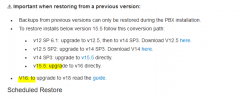
@kieferschild is absolutely right, from V15.5 you need to first go to V16 latest Update, then to V18.
Make sure though that you are in fact on the latest update, if you are not on V15.5 Update 6, the backup may not be restored correctly.

So to summarize, for other that may also be reading, what you need to do is:
  1. Upgrade your V15.5 system to Update 6 or Update 6a (this helps: https://www.3cx.com/blog/news/pbx-upgrade-update-6/)
  2. Make a Full 3CX backup and download it off the host machine.
  3. Uninstall V15.5
  4. Install V16: https://downloads-global.3cx.com/downloads/3CXPhoneSystem16.exe (installer installs latest Update)
  5. During the installation, restore your backup where asked.
  6. Make another new Full 3CX backup of your V16 system, after double-checking that there are no more updates to do, and download the backup off the host machine.
  7. Uninstall V16
  8. Install V18: https://downloads-global.3cx.com/downloads/3CXPhoneSystem18.exe
  9. Restore backup when asked.

Note @Si_PEarson_LPC :
If you are not on V15.5 U6 as you say, post a screenshot of what the executable says so we can see what may be preventing it from running.
 
Thanks both,

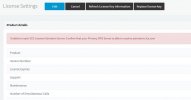
I believe that I am on Update 6 but the system will not let us upgrade to Update 6A as the system cannot see our maintenance licence information (see below). However I think the reason we cannot see it is because we are not on Update 6A which I believe included updates to the SSL certs for the activation servers. I will test updating to v16 this weekend.

I would feel more confident if there was an offline 6A update I could install first.

Capture.JPG
 
Are your DNS servers pointing to Google? If not, can you change them?
 
Are your DNS servers pointing to Google? If not, can you change them?
They're not. Will change them this evening and see if it makes a difference.

Thanks,
 
They're not. Will change them this evening and see if it makes a difference.

Thanks,
Where did you check what version you currently have installed?

Also I asked, when you run this tool, what happens? Do you get no error message at all? does a Windows not open at all? If you get a message, send us a screenshot.
 
I checked on the Updates page. and also on the dashboard. Capture.JPG
Capture.JPG

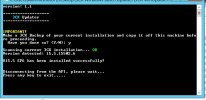
The executable does run, I think it only installs up to SP6 but not SP6A as the system is still showing Out Of Date.

Capture.JPG
 
I checked on the Updates page. and also on the dashboard. View attachment 26126
View attachment 26127

The executable does run, I think it only installs up to SP6 but not SP6A as the system is still showing Out Of Date.

View attachment 26129
Try downloading and running this please:
https://downloads.3cx.com/downloads/misc/ActivationPatch2020/3cxWindowsUpdater.exe

Although this should install V15.5 U6a, it may still not activate for now due to it being THAT old.
Regardless though, proceed with the upgrade path explained above
 
That just worked fine on a test system so I'll run it in this evening on the live system and then crack on with updating to v16 and then 18.

Thank you both for all your help.
 
  • Like
Reactions: NickD_3CX
You are most welcome.
If you run into anything else, let us know.
 
Status
Not open for further replies.

Forum statistics

Threads
111,975
Messages
590,084
Members
164,901
Latest member
Silent_Guru