Unable to clear extension in Webclient

Status
Not open for further replies.

JohnWoodCC

Premier Customer
Joined
Dec 1, 2022
Messages
46
Reaction score
9
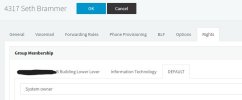
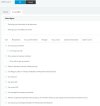
When logged in as myself the System Owner, I am unable to clear extensions in the Web Client. I click on the three dots and clear is not an option. I can clear extensions of users that are in the same group as me(IT), but for any other group, I cannot clear extensions. I did a quick search on a few extensions in the admin console, and the default access for the system admin and system owner is to clear extensions. However, in the web client, the default group only shows my extensions, but the Admin console shows 476 extensions.

How can I clear extensions of any user and why do the extensions not show in the default group?

 

Attachments

  • 3cx-Webclient-Default-Group.jpg
    3cx-Webclient-Default-Group.jpg
    32.2 KB · Views: 16
  • 3cx-AdminConsole-Default-Group.jpg
    3cx-AdminConsole-Default-Group.jpg
    4.5 KB · Views: 16
I'm still trying to figure this out. Any help would be appreciated. thanks. :)
 
Make yourself an owner of the group named "Default". Your default group and the group called Default can be 2 separate things.
 
I am the system owner of the group called Default as well as the IT group.

3cx-Default-Group.jpg
 
When logged in as myself the System Owner, I am unable to clear extensions in the Web Client. I click on the three dots and clear is not an option. I can clear extensions of users that are in the same group as me(IT), but for any other group, I cannot clear extensions. I did a quick search on a few extensions in the admin console, and the default access for the system admin and system owner is to clear extensions. However, in the web client, the default group only shows my extensions, but the Admin console shows 476 extensions.

How can I clear extensions of any user and why do the extensions not show in the default group?

Regarding your question, which other extensions are in the default group? If you navigate to the management console > users and click into the groups and then into the default group? Also what rights do they have? For example, do they have show presence to group members enabled?
 
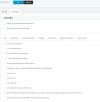
My default group shows 476 extensions, and it shows the system admin and the system owner have rights to clear extensions.See screenshots below of default group permission for system admin and system owner.

Default-Group-System-Owner.jpg
 

Attachments

  • Default-Group-System-Adminjpg.jpg
    Default-Group-System-Adminjpg.jpg
    61.8 KB · Views: 6
Do you have MCM mode on in your PBX?
 
I do not know what MCM is, or what it would be good for.
 
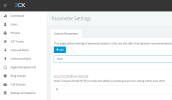
How is this set?
1683902086274.png
:5001/#/app/settings/parameters/custom
 
it's set to zero
 
Status
Not open for further replies.