Unable to update T54Ws - 96.87.0.16

Tom Mills

Silver Partner
Advanced Certified
Joined
Dec 13, 2017
Messages
25
Reaction score
10
I have a pair of T54Ws that I'm having an issue with.

I upgraded the PBX to Version 20.0 Update 6 (Build 486 Alpha) which showed 96.87.0.16 is available for these phones, they are currently on 96.86.0.81 which my reading suggests is only one release down so there seemingly should be no issue with updating?

When I push the update out through 3CX the update fails and the phones go into a loop. Update fails, phone restarts and reregisters, gets told to update again, which fails again.
I can break the loop by removing the phone from the user, rebooting the device and then re adding it. It then registers back to the PBX on 96.86.0.81.

I've pulled the rom for 96.87.0.16 and tried to upgrade that via the web interface of the handset, but get a Bad ROM error (have downloaded a couple of different times to be sure).

Any thoughts on why these ones won't update? I haven't upgraded any lilve systems yet so only have this one to play with.
 
Hi Tom,

I've pulled the rom for 96.87.0.16 and tried to upgrade that via the web interface of the handset, but get a Bad ROM error (have downloaded a couple of different times to be sure).
That is to be expected according to Yealink. The specific models can only upgrade via a web server like 3CX.

When I push the update out through 3CX the update fails and the phones go into a loop. Update fails, phone restarts and reregisters, gets told to update again, which fails again.

Just to troubleshoot, you can try to delete then factory reset one of them, and once its back reprovision it and then try to upgrade.

If the phone cannot, you will need to speak with Yealink Support so they can help your troubleshoot and assist with the upgrade.

Some things to look out for:
  • If on a custom FQDN / certificates, make sure its ones that Yealink actually supports otherwise it will fail
  • Check the config file of the Yealink via 3CX Phones page, and see if the link for the firmware is reachable for the phone
  • Update one at a time in case the bandwidth the phone can attain is not enough, causing it to abort
  • Notice whether the phone is giving any error message you can relay back to Yealink Support
  • Ensure they are connected to LAN (not WiFi) and if you use PoE ensure that it can provide whatever wattage Yealink requires. Same goes if using a power adapter.
 
  • Like
Reactions: GregG_3CX
Hi John,

I deleted one of the phones, factory reset the device, re added to the user, and rebooted. It goes back into a loop of updating.

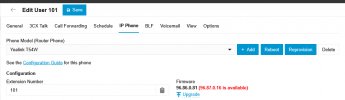
Interestingly I see this after adding the phone to the user but before plugging it back in, although that may be the browser cache?

1744119594046.png
 
Yeah that's normal, the session will expire after a minute or so. Have you checked the rest of the things I've mentioned yet?

One last thing I can recommend is to check whether you have any DHCP Options set up in your network which could cause the phone to behave differently from the expected way.

Beyond the above, I would then recommend to contact Yealink Support so that they can assist you with troubleshooting.
 
No DHCP options and the phones have been upgraded on this server since V18.

I take it you mean this line in the config?

firmware.url = https://******.my3cx.co.uk:5001/provisioning/j77kf3o0hno1m0/firmware/yealink/

Using a 3CX cert, bandwidth is fine, connected over the LAN, so it should all be business as usual but it's throwing an error.

I've opened a ticket with Yealink. Will post back here if they come up with a solution. They are working fine on the old firmware but I just can't get them on to the latest.
 
Yes, however once you click upgrade on a phone, and assuming you don't edit any settings or BLFs, the firmware.url will change to include the full path to the .rom file, please confirm this for me before contacting Yealink.
 
So send the update, then check the phone config file?
 
Exactly, can be done all from the phones page, click upgrade, then click the 3 dots and choose Config.

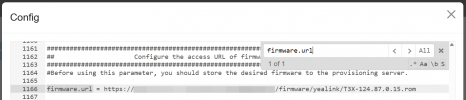
Should look like this:
1744121185684.png


Once again, make sure you are not editing any extension setting during the upgrade process, if you make any changes the firmware url will reset back to the one you showed me rather than the example I show above.
 
Oh I understand, so if I do that it shows like this:

firmware.url = https://*******.my3cx.co.uk:5001/provisioning/j77kf3o0hno1m0/firmware/yealink/T5XW-96.87.0.16.rom
 
  • Like
Reactions: JohnS_3CX
Maybe not the recommended way, but with an intermediate step via this firmware I was able to update to the current one via web ui:

https://dmfile.yealinkops.com/firmw...W(T57W,T53W,T53,T53C,T54,T57)-96.86.0.118.rom

Found this link
somewhere in the 3cx forum (as a onedrive link)
or at
https://www.ip-phone-forum.de/threads/erstes-fw-update-für-t58w-version-150-87-0-15.321478/

If you are still in the boot loop, I would first try to reset the phone without Internet access to prevent it from being provisioned again.
 
We have confirmed with Yealink that the phones will upgrade from our previous 96.86.0.81 to the latest.
 
The specific models can only upgrade via a web server like 3CX.
That's interesting, I thought prior advice was to upgrade firmware before trying to add a router phone, or normal phone even. Is that just for the 96.87 firmware? (and later)
 
That's interesting, I thought prior advice was to upgrade firmware before trying to add a router phone, or normal phone even. Is that just for the 96.87 firmware? (and later)
From Yealink they said just this time, just for T5 for the major version 86 to 87 upgrade.
 
  • Like
Reactions: SteveITS
Yealink have given me an interim build, 96.86.0.118. I'll test when I am in the office tomorrow.
 
  • Like
Reactions: JohnS_3CX
Thanks, let us know how it goes
 
I have tried upgrading from 96.86.0.77 to 96.87.0.16, and from 96.86.0.81 to 96.87.0.16 (via Yealink admin gui), neither worked.

It has only worked when upgrading from 96.86.0.118 to 96.87.0.16.
 
I came across this post when we couldn't get a T54W to upgrade from 96.86.0.154 to either 96.86.0.81 (3CX) or 96.87.0.16 (3CX), we had to get it downgraded to 96.86.0.70 (Yealink), after which we was then able to get it to 96.86.0.81 (3CX) so that we could get it into 3CX. It also would not go from 96.86.0.70 (Yealink) to 96.87.0.16 (3CX).

Luckily I had to hand 96.86.0.81 (3CX), to upgrade it to as the 3CX Yealink site only had 96.87.0.16 (3CX), it might be worth putting the 96.86.0.81 (3CX) back for download as I can imagine this will be a regular occurrence.

Now, that was tough with all those numbers, so please don't pull me up lol
 
To update on this, Yealink provided me 96.86.0.118 and i was able to manually update to that, then manually update to 96.87.0.16.
 
  • Like
Reactions: JohnS_3CX

Forum statistics

Threads
111,973
Messages
590,078
Members
164,896
Latest member
sameage