unconditional call forwarding set by the end user on the phone

Status
Not open for further replies.

GVB

Free User
Joined
Sep 8, 2017
Messages
67
Reaction score
4
Hello,

Is there really no short code to set the forwarding number for immediate/DND forwarding on the phone?
Some people are used to it from on our retarded Alcatel phone central and request this again.

Trying to force it on the Fanvil X3G phone doesn't work and is not recommended from what I've read here.

Worst case I need to open the web admin to users or install the 3CX client on everyone's machine.
 
Check the dial codes setup on your system - Management Console - Settings - Dial Codes

You should see *60 and *61, which will turn DND on and off.

You need to configure the routing of calls for DND, using the 3CX or web client, you only have to do this once unless the forwarding number changes. You can not use the phone or any dial codes to do this
 
the DND button on the phones works fine and routes to the correct extention that's not the problem.

the point is... we have different sites so the forwarding number is not always the persons cell phone number but could be another extention or landline.

from what I've seen passing by during the few hours of searching for this is that this was already requested since 2007 or 2008 and every other PBX I worked with has this as basic feature.

something like *60#[forwardingnumber] shouldn't be hard to implement I guess?
 
I posted a workaround 2 years ago for Yealinks. I can confirm it will work for Fanvil x6, and assume x4 as well.

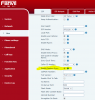
You must disable "Feature Sync" on the line for the phone you want to enable unconditional call forward on from the phone.

In the config file it's line under
<sip>
called
<FeatureSync>1</FeatureSync>

Set it it "0"

Or via the webgui and uncheck "Enable Feature Sync".

You can then set unconditional call forward from just the desk phone.

upload_2019-1-30_9-39-41.png

Original answer/post.

https://www.3cx.com/community/threads/dial-code-to-set-custom-forwarding-rule.47134/

Only quotes or mentions, my originals disappeared.
 
Thanks Dan,

I saw your post but couldn't find that setting but now I see it's on the right side of the screen instead of left.

I will give it a try.
 
That trick seems to work on the X3Gs aswell.

Now I wonder what features it won't sync now?
 
That trick seems to work on the X3Gs aswell.

Now I wonder what features it won't sync now?

My understanding is it syncs phone status with 3cx. So some things, like setting away on the phone, won't sync with 3cx or something like that.

Disabling the feature sync means that the phone "grabs" the call and forwards it, instead of 3cx doing it on the server side.
 
Status
Not open for further replies.

Forum statistics

Threads
111,913
Messages
589,706
Members
164,782
Latest member
David853