Hello
@mcaponong,
Thanks for your feedback, and glad to see that the template is working when you upload it to 3CX!
I can't agree more, testing the template from the tool is a very important feature, and totally supported! In order to troubleshoot this, please check the following:
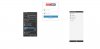
- Ensure that you have set the configuration parameters created by the wizard. To do this, select the "Parameter Values" node, and complete the parameters with the appropriate values.
- Go to the Properties window and enter the "Number" to test in the "Contact Lookup" section. Right click the "Parameter Values" node and select "Contact Lookup" to emulate an inbound call from this number and trigger the contact lookup.
- Once the contact lookup ends, you will see the results on the right side of the tool. If there is any error or exception while connecting to the CRM or parsing the response, you will see it there.
- If you don't see anything after you executed the "Contact Lookup", it's possible that you can't access the CRM from the machine in which you have the tool installed, due to a firewall configuration. In order to check this, ensure that you can access the configured URL from a browser.
Hope the information helps, and please do not hesitate to get back to us with any further questions.
Kind regards.