Update 2 Beta: Re-introducing the Global Search Bar

N_G

Founder
Joined
Jun 6, 2006
Messages
4,870
Reaction score
9,389
Despite a slight delay and as originally planned, the search bar in the Web Client and Desktop App now searches across contacts and team members (as did the search bar in the old web client). Try Update 2 Beta (for Linux) for additional support and improvements to the MS Teams integration.

Global search bar is back​

When in the ...
Continue reading the Original Blog Post.
 
Last edited by a moderator:
Great news for the global search bar but still no full display of icons... Please add, customers still not used to it or/and like it.

Admins extensions permisions still no changes too, I kinda repeat me here, but we need to give Super-admin to let the customer manage/configure O365 integration, CRM,.. that a problem of security.

Best Regards, Aubin.
 
Hi @Nick Galea

The new version is great, but there are two things:

1.
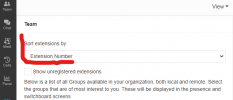
I miss this function

1637853859158.png

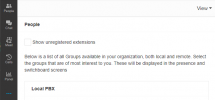
New Version

1637853931975.png


2.
If I call a private contact: the name is not displayed.
First the group is displayed, then the extension name and finally the contact name.
But the field is too small. Only the group and the extension name are displayed. So every private contact appears with the same name
 
@Tyler.Calhoun Can you please be more specific on what you mean by "First the group is displayed, then the extension name"

?
 
@Constantinos Constantinou

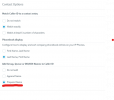
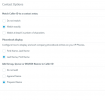
1637855874151.png

This setting only applies to the global phonebook and has no effect on the private phonebook.

Calls via the private phonebook always look like this:

Group name > Queue name > DID name > Caller name.

But in the dialer there is only space for Group name and Queue name

every call looks the same
 

Attachments

  • 1637855828986.png
    1637855828986.png
    24.8 KB · Views: 18
Please also add 'Contact' at first in the side menu (why is it behind the ... ??)
 
The menu is staying as it is. Contacts are now listed in the People icon
 
The menu is staying as it is. Contacts are now listed in the People icon
What if we don't use personal contacts? We only use CRM ones.
 
well, then you are managing them from your crm right? You can trigger the call from there - or you can search crm contacts right from the search bar in people.
 
Last edited:
I just can't get the idea to don't give the possibility of personalisation...
A daily app should fit people with their personal preferences.

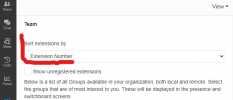
With the change of this search bar, we lost the sorted by extension number...
What will my customers say when they will open their webclient with sorted by name extensions after 3 years of sorted by extensions number ?

The change log didn't tell anything about it, the news too.
After the update of the App Desktop, for example, we have nothing that tell you what is the main new features or changes (could be really nice for customers side).
 
the problem does not only occur in the people overview.

In the queue panel the extensions are now sorted only by alphabet.

This is a big problem with skill based routing.
Group 1 extensions start with 1xxx
Group 2 extensions start with 2xxx

in the new version all are now mixed up

Edit:
please do not misunderstand. The new version is really good. The new search bar is a must have, but:
Please integrate the function "Sort extensions by: Extension Number" in the final version
 
Last edited:
@Tyler.Calhoun Hi Tyler we are looking into this.... Could you attach a screenshot to be sure we are talking about same thing?
 
  • Like
Reactions: Tyler.Calhoun
@Nick Galea Hi Nick,
no Problem.
Check out the version
3CXDesktopApp-18.5.28 or the webclient 18.0.237

Settings > View

1637925036214.png

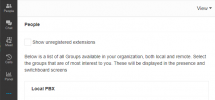
and now the Beta 3CXDesktopApp-18.7.7 or Webclient 18.0 (Build 302)

1637925124104.png

The setting "sort extension by" is completely missing
 
OK i meant the queue view but now i understand. We are checking and will revert
 
The menu is staying as it is. Contacts are now listed in the People icon
The hidden menus are pointless IMO.

You want to take menus that are used often and hide them, but you stick an "apps" icon on the page which will get used very rarely. The same outcome is acheived from the QR code button in the top right - so why have we got this button twice on the same screen?

Im yet to try the beta search function so my opinion may change.
 
well, then you are managing them from your crm right? You can trigger the call from there - or you can search crm contacts right from the search bar in people.
Normally, I would agree. But we use ConnectWise (very slow UI) so it's faster to use 3CX to call people lol

@Nick Galea Hi Nick,
no Problem.
Check out the version
3CXDesktopApp-18.5.28 or the webclient 18.0.237

Settings > View

View attachment 26177

and now the Beta 3CXDesktopApp-18.7.7 or Webclient 18.0 (Build 302)

View attachment 26178

The setting "sort extension by" is completely missing
Yeah, we sort by extension because we use bridges and that's how we sort people. Agreed that should not be removed.

OK i meant the queue view but now i understand. We are checking and will revert
Glad we can all agree!

The hidden menus are pointless IMO.

You want to take menus that are used often and hide them, but you stick an "apps" icon on the page which will get used very rarely. The same outcome is acheived from the QR code button in the top right - so why have we got this button twice on the same screen?

Im yet to try the beta search function so my opinion may change.
Yeah, that Apps button is definitely not useful compared the submenu items. Same with the User Manual icon and the 3CX logo going to the same place.
 
@ConceptsWeb - you can call your CRM contacts from 3CX, no problem. Just enter the name in the search bar and it will find the contact..... Didnt you try? Let me know if you have an issue.

We are looking into search by extension but its not how the interface is supposed to work. In larger companies you should select the group of people you are part of or better still just use favorites to show the people you work with everyday rather then just the full extension list....
 
@ConceptsWeb - you can call your CRM contacts from 3CX, no problem. Just enter the name in the search bar and it will find the contact..... Didnt you try? Let me know if you have an issue.

We are looking into search by extension but its not how the interface is supposed to work. In larger companies you should select the group of people you are part of or better still just use favorites to show the people you work with everyday rather then just the full extension list....
We can't favorite bridged extensions. Until then, the favorites are useless to me.

And yes I can search contacts but only those that are stored in 3CX obviously. For any others, I have to go through CW once then they get synced.
 

Forum statistics

Threads
112,351
Messages
592,036
Members
165,514
Latest member
megalmazan