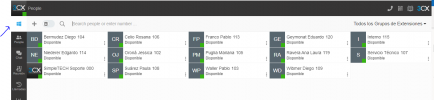
Update 2 Final: Search Across Contacts and Team Members

Thanks Nick for your reply.

But as you say, there is still no Mac client. Wouldn't it have been better to wait to have it and avoid these problems? Right now they will only be able to use the old MAC phone, which most of them don't want with v16 (they were happy with the CHROME extension). As for LINUX users, although globally they are not significant for 3CX, for us they are important and until now there was a solution for them.

Thank you very much.

Regards.
 
c. If you are on v18 already, install update v2 and install the old extension for your mac and linux users. Install the new Windows desktop app for your windows users if you have not done so already. If you are using the old Windows app there is nothing you have to do.

Hey Where is the link to download the old extension?
 
@Carlos Alvarez - Ehm.... So on the Mac you can use the current extension if on V18, update 2? And Mac app is imminent. I dont know what you mean by "separate phone window" If you mean the dialer of the extension you can get it back by installing the old extension as per the blog post.
 
Last edited:
  • Like
Reactions: Evolute IT
I see no mention in this release of a promised mid-December fix for the Microsoft o365 shared/external users being synchronized. Has that been resolved?
 
I see no mention in this release of a promised mid-December fix for the Microsoft o365 shared/external users being synchronized. Has that been resolved?
If it's the issue I think you mean, then yes. A lot of MS365-related issues and functions have been improved.
If you are having some issue and you continue having it after you upgrade to V18 U2, shoot me a PM or post in the MS365 section and we can check it out.
 
  • Like
Reactions: jed and Evolute IT
I feel like some of us are seeing different behavior than expected or intended, and perhaps that's the confusion.

Our internal server version is: 18.0 Update 2 (Build 307)Version

On multiple Macs (M1, Intel, laptop, desktop) I've tried removing/reinstalling the extension from: https://chrome.google.com/webstore/detail/3cx/dijllljhgnommpcoogbfcnadmnleeook

There used to be an individual small 3CX softphone window, that you could put anywhere, and would show your incoming calls as well as let you make calls. It would come forward for a call and you could see/handle it instantly. Now, the phone/dialer/notifications are all within a tab. There is no clear indication of where the call is other than the tab icon turns from the blue 3CX arrow into a bell. The user has to scramble for a tab to see and handle the call.

This no longer exists on any Mac I've been testing:

nNytJxoL6Zs18Movv1iq_jpXGnVdRoSXDDpTb3rhqY2dOnQeLca0JqnYtfhyftUm_B4R9IPrnXODg-1cCN1RT4ieSw=w640-h400-e365-rj-sc0x00ffffff


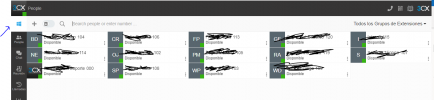
Now it's this inside a tab, and it doesn't pop up anything:

View attachment 26472
  1. Open Chrome
  2. Remove any plugins you have that say "3CX"
  3. Go to the link https://chrome.google.com/webstore/detail/3cx/dijllljhgnommpcoogbfcnadmnleeook and add the plugin.
  4. Double-check in your browser that the plugin was installed
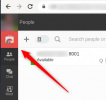
  5. Refresh your WebClient and you should see this in the top-left corner:
    1639057591726.png
  6. Press it. This provisions the Plugin.
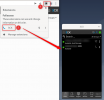
  7. Enable the plugin like this:
    1639057707694.png
This happens to be on a Debian machine, but MacOS and all other non-Windows platforms work the same way.
 
@Carlos Alvarez have you installed the old extension as per the blog post? It looks like you have not.
 
The Blog post 2 months ago only saif that the browser extension will be deprecated with no exact date.
Deprecating it today with no warning was bad communication.

Also the RSS feed for the 3CX blog and 3CX status page are really unreliable. Could someone at 3CX check on those feeds?

Also will be a fun few days with lots of employees complaining that the browser extension does not work anymore.
So it seems someone fixed the RSS feed for now, as I got 5 new Entries from 3CX today. Thank you for that.

But with the update of the extension yesterday, when searching for a contact in the global search bar on 3CX v16 an trying to star ba call, it only opens the settings of the new ClicktoCall extension.

Wasn't this tested before the rollout yesterday?
 
@TICgal - Nice to meet and talk to you too! yes i understand that in this environment the old extension works well. Unfortunately the number of Desktop linux users are minimal. So we have no plans for a linux desktop app.

However, i am on ChromeOS myself and the inbound notifications work perfect since the latest chrome update. As long as the client is in the background somewhere you will be notified. Also we plan on supporting the Android app on ChromeOS. Furthermore, 3CX is open standard so you can use pretty much any SIP phone available on Ubuntu and connect it to 3CX. And use it in conjunction with the web client? I have not run Ubuntu recently but when i did there we're some pretty good ones included....

Now if you are on update 2, you can install the old extension and have another 6 months to figure out the best way forward for Ubuntu users?

Thanks for the swift reply.
I am curious about how you know the number of Linux Desktop users.
Anyway, since Electron is the chosen development framework for the clients, I will expect a multiplatform client :).

Finally, we will consider SIP phones. We never needed them in the past. It won't be the same since integration with 3CX contacts will not be possible (am I wrong?).

Our migration was on hold because of our GLPI 9.5-3CX 16 Integration. As of today, everything is broken, so next week we are hoping to have v18 update 2 to see what we can do as a workaround.

We'll see how it goes...
 
@Carlos Alvares - OK glad it was resolved. Its the exact same extension as for v16 but works with v18.
@TICgal - Well for outbound calls you can use the Webclient, this is available. You could just use the SIP phone for inbound notification and let the user choose whether to answer from the SIP Phone or the webclient (because we use sip forking)? Also please check if Ubuntu does not support Chrome notifications just like ChromeOS because i believe this will be sufficient for you.... It is for me I am on ChromeOS.... Re your question how we know... Its a report in the Chrome Extension upload account basically.... Sorry the number is very low :( We will review electron on linux but there are so many distributions and desktops its a nightmare...
 
Last edited:
We do have the same problem, we are still on v16 an now the dial pad is gone with the new clicktocall extension.

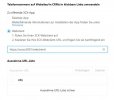
The new extension needs a config to transfer clicktocall numbers to the webclient. Where is this info stored, so we can push this to all users? We don't use the desktop app.
 

Attachments

  • 3cx.JPG
    3cx.JPG
    38.1 KB · Views: 21
We do have the same problem, we are still on v16 an now the dial pad is gone with the new clicktocall extension.

The new extension needs a config to transfer clicktocall numbers to the webclient. Where is this info stored, so we can push this to all users? We don't use the desktop app.
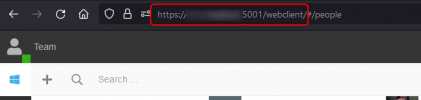
Your users, in the Welcome Emails you sent them will find a link with the WebClient URL.
It will look something like this:
1639061321282.png


This is what you need to put in that field you showed in the screenshot you attached.
In the same Welcome Email, your users will also find the credentials they need to use to login.

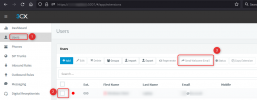
If a user doesn't have their Welcome Email, from the Management Console of your 3CX you can easily resend it to them:
1639061472095.png
 
  • Like
Reactions: N_G
Hi Nick,

thanks for your answer. Sorry for the misunderstanding. I know that URL.

The Question is:

How can I push this URL-setting to all my users at once (per GPO, registry, config-file etc.), so the Users don't need to do this by themselves?

The simplest way would be the registry-path with this URL-setting or the config-file of the extension i can push with a GPO
 
Last edited:
  • Like
Reactions: MH_INDUS
Hi Nick,

thanks for your answer. Sorry for the misunderstanding. I know that URL.

The Question is:

How can I push this URL-setting to all my users at once (per GPO, registry, config-file etc.), so the Users don't need to do this by themselves?

The simplest way would be the registry-path with this URL-setting or the config-file of the extension i can push with a GPO
I'm not aware of a way that this link can be pushed to the plugin via GPO.
 
I'm not aware of a way that this link can be pushed to the plugin via GPO.

May you ask your development? I can't find any registry setting or a config-file with this setting in the chrome or egde extension path.

But this URL-setting has to be stored somewhere, and with the proper path it should be no problem for me to push this config out. Its not very enterprise like to tell 600 users to config this setting by themselves.
 
To add on.... V16 Web client doesn't let you divert to voicemail on Queue calls - which is a loss of functionality for basic call control.
 
another major loss that nobody is acknowledging is that a browser extension can be installed by a standard user on their computer without intervention while a desktop application requires an administrator login.
 
  • Like
Reactions: CBX and Robert N.
We have several customers updated to v18 Update 2, who until today used Click2Call in Chrome to make outgoing calls.

Until today it was enough to make a single CLICK on the "hyperlink" for the number to be reflected in the 3CX client ...

With the new Chrome extension (CLICK2CALL 3CX) ... now you need to do THREE CLICK to get the same result ...
Is there a way to call with a single click?
Click2Call-3CX-Chromev18.JPG
NOTE: in its image of Chrome Web Store it says "a single click to call" ... is it possible?

How can we do?
Thankyou Team!
 
Good Day,

Sorry if I am misunderstanding something, but despite we updated to v18 SP2 and removed chrome extension from PCs. I can't see any red banner to enable 3cx extension.
We test in two PCs without lucky.
I am trying with both extension:
1) https://chrome.google.com/webstore/detail/3cx/dijllljhgnommpcoogbfcnadmnleeook/related
2) https://chrome.google.com/webstore/detail/3cx-click2call/baipgmmeifmofkcilhccccoipmjccehn


1639078758201.png

We have more than 150 customers with hundreds of user each one. I understand that this change was announced on october, but it is not so simple to update several customer with specific CFD and custom integrations developments.
Also, we are selling and implementing new 3cx projects every month. We are making big efforts to have more 3cx subscription each month, but it should be good to have better ways of communicate this kind of changes.

New features are welcome, but publishing a blog with link https://www.3cx.com/blog/releases/chrome-edge-extensions-beta/ and title "New Chrome and Edge Browser Extensions" is not as same as making a specific blog announcing EOL (End of life) of a used feature. I follow 3cx accounts (Partners Linkedin, Web blog, Twitter) but honestly I am only click on which seems important
 

Attachments

  • 1639077064107.png
    1639077064107.png
    44.2 KB · Views: 5
So we're in the same kind of situation as others here. It's all been said about how and why, and I need to focus on making things work as quickly as possible. Most of our clients are still on v16, we believed we had more time and we have had some issues with v18 where we have rolled it out, but we will obviously need to get that done for a longer term fix.

In the meantime I need some clarification as I can't seem to figure out from the past posts with links to links and going back and forth on versions and functionality, what I need to do to get the core functions my clients have been using.

Most of the systems are v16. The workstations are Windows with Chrome and the Extension. The users rely on the click to dial from web sites and the dial pad that the (now old) Extension provided.

Ultimately we like to have exactly that (without adding the Windows application), if we can't have that than the click to dial and the ability to answer/hangup would be what we are after. Unfortunately, no matter which link I chose for the Extension I don't get either of these, I assume I'm missing something in the process or I just haven't found the right link.

So please, starting with a Chrome browser and no 3cx Extension installed, what are the steps to make this work, and please don't refer me to another link in some other thread, and if there is some setting I need to make please include that information.

Thanks
 

Forum statistics

Threads
111,993
Messages
590,175
Members
164,931
Latest member
admintest