Update 3 Beta Now with Improved “Always Awake” PWA

Status
Not open for further replies.
"Added auto-answer on incoming call" -> This feature useful for example: Call Center Customer Service or Auto Dialer but can you guys add one more column for auto answer delay? for example 5sec, 10sec, that would be helpful for agent to notified incoming calls before pickup? currently the legacy 3CX softphone will auto answer without notified the agent.
 
"Added auto-answer on incoming call" -> This feature useful for example: Call Center Customer Service or Auto Dialer but can you guys add one more column for auto answer delay? for example 5sec, 10sec, that would be helpful for agent to notified incoming calls before pickup? currently the legacy 3CX softphone will auto answer without notified the agent.
The Auto-answer feature was more or less implemented for scenarios in which an agent is logged into a queue that has multiple callers waiting, meaning that the queue agent should be aware that a new call will automatically connect upon ending the ongoing call. That said, I would expect that an agent would turn the autoanswer setting off if there are no other callers waiting in the queue as he/she cannot know when the next incoming call will occur.

In any case, as you are a Platinum partner you might want to consider searching through our Ideas Section to see if anyone else posted a similar feature request or even post this yourself.

What you can do in the meantime is maybe utilize the "Launch external application" feature to create a visual or even audio notification for the agent once a call gets connected.
 
  • Like
Reactions: Evolute IT
Hi,
the new version is once again great!
I let 20-30 users test the desktop version before a complete update.

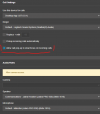
Every user called me immediately and reported that when a call comes in, the dialer stays in the background.
In the settings you can enable the function again, but after a complete update I now have to explain this to 250 users.
Is it correct that by default the function is disabled from now?
 
Last edited:
Sorry, I missed the previous posts.
There it is described that the app cannot manage this function itself.

What I wonder is that the function was previously set as default in every version and is only disabled from the new beta.
Screenshot 2022-02-21 090536.png
 
Last edited:
Amazing features and improvements 3CX Team.
I hope to have a version of the Desktop App for Linux desktops, but... the PWA support is already very useful by the way
 
Amazing features and improvements 3CX Team.
I hope to have a version of the Desktop App for Linux desktops, but... the PWA support is already very useful by the way
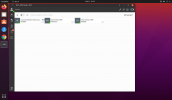
Not sure from your comment if you are using the PWA App, but you can use it on Linux in a similar way you would the Desktop App, you can even pin it if the OS allows it:
1645457146387.png

For other reading this, all I did was installed Chrome for Ubuntu, opened a WebClient from Chrome, installed the PWA as explained here, then just added it as a Favorite to pin it to the left.
 
Not sure from your comment if you are using the PWA App, but you can use it on Linux in a similar way you would the Desktop App, you can even pin it if the OS allows it:
View attachment 28083

For other reading this, all I did was installed Chrome for Ubuntu, opened a WebClient from Chrome, installed the PWA as explained here, then just added it as a Favorite to pin it to the left.
Nahh It's just a comment for the app... but I use PWA it this way and it's working very well
 
Hello, has anyone tested if the v18 Update 3 is resolving the Microsoft 365 Time-out issue with big Office Tenants?

https://www.3cx.com/community/threa...-times-out-after-initial-configuration.86592/
https://www.3cx.com/community/threads/microsoft-365-integration-console-failure.87180/#post-412111

Couldn't find anything specific in the change-log about that, and it would be really helpful to have that option again.
We have indeed made improvements in this area, but if you or one of the other users that had a problem on V18 U2 could install a V18 U3 Beta, even if it is on another machine that you may have for testing, that would be good feedback for us. You wouldn't need to disrupt the "main" installation at all, just create a new App Registration on this "temp" installation and check if the users now load faster and without any errors.
 
  • Like
Reactions: manuelronacher
1645625251065.png

Since the updates for many users.

Is this related or not at all ?
 
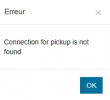
Where are you getting this error? Is there some specific action you are doing and this appears?
This error appears during an incoming call when clicking the green button to accept the call on the dialer panel of the Windows application.
 
You need to fully close the app and restart it again after update. We saw that with clients that did not close the app after update.
Well, we restarded the whole PCs several times since the update :cool:
 
Well, we restarded the whole PCs several times since the update :cool:
weird bug then. Let's see what 3cx will find out. Actually we use it on a test instance with 40 users, no issues after restart. Did you try to re-provision?
 
weird bug then. Let's see what 3cx will find out. Actually we use it on a test instance with 40 users, no issues after restart. Did you try to re-provision?
Nope, I will try that.
 
Jabra Headset-Integration in MAC-OS-App missing?
While working in Browser-App it is completely missing in the App. Plantronics and so on are there..... step backwards?
 
Jabra Headset-Integration in MAC-OS-App missing?
While working in Browser-App it is completely missing in the App. Plantronics and so on are there..... step backwards?
For Mac you are unfortunately right, the Jabra integration is missing and is not currently available. I am not sure on the reason, but as out R&D went over this, I am guessing it might be related to some library that is missing or not available the way we do the integration.
 
  • Like
Reactions: Evolute IT
This error appears during an incoming call when clicking the green button to accept the call on the dialer panel of the Windows application.
If this happens on every incoming call and is easy to replicate, contact me via PM so we can do a short TeamViewer session to gather some logs and try and see what might be causing this.
 
  • Like
Reactions: WifxMain
Status
Not open for further replies.

Forum statistics

Threads
111,974
Messages
590,083
Members
164,901
Latest member
Silent_Guru