Update 4 Beta 2 Released

Status
Not open for further replies.

N_G

Founder
Joined
Jun 6, 2006
Messages
4,857
Reaction score
9,290
A second Beta of V18 Update 4 has been published in preparation of the final version which is due to be released shortly.

Caller ID exception rules back to MC​

Time-based Caller ID exception rules can now be managed once again from the Management Console.

Schedule monthly updates​

You can now schedule an upda...
Continue reading the Original Blog Post.
 
150% appreciation for bringing the exception rules management back MC.
 
150% appreciation for bringing the exception rules management back MC.
Thanks for adding that back in :), any chance the User click to talk tab will be added back in as well for the next update?
 
Last edited:
  • Like
Reactions: Soli
@Phone systems NZ Our focus will be on making user settings editable by manager or admin from webclient...

i.e. this screen (using @tronic idea of a picture says more then a thousand words :) )
1656997740628.png
 
@Nick Galea

Done in a test environment:
I "found" the " Multi-Company Mode (MCM) " :D
( I found the parameter to be activated, by pure chance!
Obviously, not to be done in production, you will tell me :p )

But, it must not be "finished implemented" because, I don't see the difference other than being able to associate system extensions to user groups

lol


But the name says it all, it promises !!! thx

In reference to your comment in this other publication
https://www.3cx.com/community/threa...nist-view-status-scheduler.114872/post-533412
 
  • Like
Reactions: Evolute IT
@Nick Galea

Done in a test environment:
I "found" the " Multi-Company Mode (MCM) " :D
( I found the parameter to be activated, by pure chance!
Obviously, not to be done in production, you will tell me :p )

But, it must not be "finished implemented" because, I don't see the difference other than being able to associate system extensions to user groups

lol


But the name says it all, it promises !!! thx

In reference to your comment in this other publication
https://www.3cx.com/community/threa...nist-view-status-scheduler.114872/post-533412
The MCM mode is still very very very early. Only some changes are visible. This is why U4 is more like a backend update than a "feature update".

However, here's the few changes I was able to spot (on top of the System Extensions in Groups) :

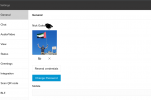
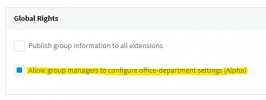
Allowing Office Settings in Webclient.
1657030446382.png

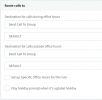
Routing calls to a Group:
1657030628700.png

Getting an API token (still no docs or indications of what is possible with this API.)
1657030463432.png

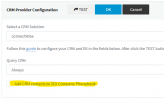
Small note, U4 also allows this in the CRM Integration now:
1657030562963.png
 
Was the extension level "block outbound calls outside of office hours" feature removed or just relocated?
 
One of our customers needs to disable Click2Talk and Click2Meet for all end users. I'm afraid this is no longer possible? AFAIK, disabling Click2Meet also means disabling the entire webmeeting feature. Unfortunately, we have to disable chat and webmeeting in 3CX. These functions are not approved by the works council.
 
Was the extension level "block outbound calls outside of office hours" feature removed or just relocated?


I believe this was moved in anticipation of the Multi-Company Mode (MCM) feature.
The same goes for the "Auto-Switch" feature in the extensions


MCM.png
 
  • Like
Reactions: Evolute IT
One of our customers needs to disable Click2Talk and Click2Meet for all end users. I'm afraid this is no longer possible? AFAIK, disabling Click2Meet also means disabling the entire webmeeting feature. Unfortunately, we have to disable chat and webmeeting in 3CX. These functions are not approved by the works council.


I'm curious, what is the difference for your client between Click2Meet and a WebMeeting "schedule" .
If end-users can't use Click2Meet for "works council" reasons, so can the WebMeeting ? Nope ?


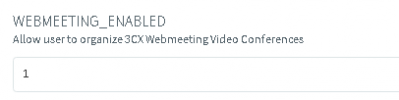
I can see that the parameter still exists in the "DN Property"
I believe 3CX just intends to move the setting.


1657043487385.png
 
  • Like
Reactions: Evolute IT
I'm curious, what is the difference for your client between Click2Meet and a WebMeeting "schedule" .
If end-users can't use Click2Meet for "works council" reasons, so can the WebMeeting ? Nope ?


I can see that the parameter still exists in the "DN Property"
I believe 3CX just intends to move the setting.


View attachment 30868
The client should not use Click2Meet nor WebMeeting. In the current version, disabling the Click2Meet function, will disable the webmeeting function as well. Now in the Beta, I'm afraid that is not longer possible.
Disabling "WEBMEETING_ENABLED" has no effect for me.
 
The MCM mode is still very very very early. Only some changes are visible. This is why U4 is more like a backend update than a "feature update".

However, here's the few changes I was able to spot (on top of the System Extensions in Groups) :

Allowing Office Settings in Webclient.
View attachment 30861

Routing calls to a Group:
View attachment 30864

Getting an API token (still no docs or indications of what is possible with this API.)
View attachment 30862

Small note, U4 also allows this in the CRM Integration now:
View attachment 30863
Where is the API? i cant see it
 
Small note, U4 also allows this in the CRM Integration now:
1657030562963.png
In U4 the CRM engine has been redesigned, and now adding CRM contacts to 3CX contacts is not mandatory. The contact details can be passed directly from the CRM engine to the 3CX client, without storing the details in the 3CX phonebook. This setting that you highlighted allows keeping the same functionality you had in U3, for those users that prefer keeping contacts in the 3CX phonebook, for easier lookup, calling, etc.

In addition to this, now the CRM engine will log some calls that previously were not being logged, for example missed queue calls.
 
In U4 the CRM engine has been redesigned, and now adding CRM contacts to 3CX contacts is not mandatory. The contact details can be passed directly from the CRM engine to the 3CX client, without storing the details in the 3CX phonebook. This setting that you highlighted allows keeping the same functionality you had in U3, for those users that prefer keeping contacts in the 3CX phonebook, for easier lookup, calling, etc.

In addition to this, now the CRM engine will log some calls that previously were not being logged, for example missed queue calls.
Right I should check that this also works lol

Still waiting on my DID in the lookup scenario lol but the ability to not save the contact already allows more flexibility.

I did notice that in the Webclient/DesktopApp, in Settings > Integration, the dropdown "Ringing/Connected" isn't there anymore.
Is that an oversight or on purpose? If so, if it's on ringing always now, it will break dozens of my integrations.
 
  • Like
Reactions: edossantos
I did notice that in the Webclient/DesktopApp, in Settings > Integration, the dropdown "Ringing/Connected" isn't there anymore.
Is that an oversight or on purpose? If so, if it's on ringing always now, it will break dozens of my integrations.
Now the popup happens always when the call is connected, and there is no way to configure a different behavior.
 
Now the popup happens always when the call is connected, and there is no way to configure a different behavior.
Great! Connected is good for me lol
 
In U4 the CRM engine has been redesigned, and now adding CRM contacts to 3CX contacts is not mandatory. The contact details can be passed directly from the CRM engine to the 3CX client, without storing the details in the 3CX phonebook. This setting that you highlighted allows keeping the same functionality you had in U3, for those users that prefer keeping contacts in the 3CX phonebook, for easier lookup, calling, etc.
Does the function will be tick on by default if we upgrade 3CX that have CRM on in U3 ? Or we will need to enable it after the upgrade ?
 
Does the function will be tick on by default if we upgrade 3CX that have CRM on in U3 ? Or we will need to enable it after the upgrade ?
This will be disabled by default, so you will need to change the setting if you need to add CRM contacts to the 3CX phonebook. If you want to change this before the upgrade, so your users keep the existing functionality, add the global parameter "CRM_PHONEBOOK_SYNC" with value "1". Or you can change this from the MC > Settings > CRM integration just after upgrading to U4.
 
Status
Not open for further replies.

Forum statistics

Threads
111,974
Messages
590,081
Members
164,899
Latest member
mazet