Update 4 Beta: New Receptionist View & Status Scheduler

Status
Not open for further replies.
I understand the frustration felt on both side of this issue. 3CX has gone to great lengths to develop new features and functions and march their product(s) forward. Betas are Betas... Things work, things don't... this is the nature of software development. I also know that things evolve and evolution can be painful.

From an Admin Prospective, Please, don't take our tools away. I understand empowering the User, but we support the user that breaks things more often than fixes them. Taking away Admin Console control from ANY feature will always be met with questions, concerns and out right disagreement. Frankly, I still reel from the fact that I can no longer see a Users "Status" on the User Screen. Something that users now change regularly on their own, not know what they have done which creates a Support Call.

Thank you 3CX for the ongoing development that makes the 3CX Product what it is. Please hear our cry, in order to support a product of this caliber, we as Admins, need more control, not less or at least a central place to fix the things User constantly break or at the very least re-program beyond their ability to understand and then call for support.
 
@SweetAction thanks for the heads up.
@rock4 Well i am glad you understand but i believe your post also shows that you have not read our comments and understood. Admins can centrally control everything from the webclient given the correct rights. Anybody can see status screen from the webclient and even a receptionist given rights can change status. Nowhere in the blog post is it claimed or is it evident in the beta that central control by admins is being taken away. Its just some settings are to be done from the webclient. And there is more granular control so department managers can do some settings as well if you want to give those rights. As simple as that and much requested also. So this is a perfect example about hype and negativity being created around nothing at all.
 
Last edited:
Hey gang

I know its frowned upon to install a BETA on an actual client but I feel you only get a real feel for the release with proper usage.I'd like to install on our system (not a clients) Before I pull the trigger (at my own risk) to have a tinker will my current virtual extensions, forward rules, auto switches etc remain functioning as is?
 
The updates are looking good and I have now spent a few hours testing out the beta release (and reading everything in this forum post)

As well as what the other have mentioned about putting the time profiles back in the admin portal please could you also consider putting the Click to talk tab under Users back into it as well. When we are managing (and charging customers) for looking after their systems we need to be able to easily and quickly make changes to there system and to be able to see what changes a user has done without having to move between 2 different consoles. Also with the click to talk tab gone we now can't pre-set this up from the one console before a system goes live. Having to go into each users web client or a 2nd admin web client will be very time consuming for installers and admins. Without it pre-set the click to talk link does not appear in the welcome email which is handy for a new user to see in there right from the start.

I do like how you have added the options to the users console but there are customers that will not want to go looking for it and will want the admins to do it for them and in some company's they will not want their users to be able to change it.

I have also had a play with the new click to talk web plug in and it's very nice to be able to make changes to the colours and settings from the admin console. Currently with the Beta I could not figure out a way to add time profiles like we used to be able to do from the WordPress plugin. I am guessing this will be coming in a release soon though :)

I really like the 3CX system and your great work in evolving it, Please don't take my comments as negative as I know this is a beta realise. Everyone just wants the product to be the best it can be for everyone so we can continue to supply a great product and service to our end users :)
 
Last edited:
  • Like
Reactions: tronic
@Phone systems NZ - OK one more time since you asked nicely :) All these types of settings will be done from the webclient going forward. You can do it as an admin or a manager, take your pic, but you will need to login via the webclient. Management console will continue to be slimmed down. Exception rules are just back temporarily from there as they will all be from webclient in the future but its true they could not be easily done at the moment. Update 5 will unlock the group function and then webclient is your new management console for user/extension settings. Get used to it!
 
If more and more features will be pushed to the webclient will there also be a quick and easy way for admins to swap between systems like you can with the app for mobile?
Swapping between systems for testing on mobile so far has been a great handy thing instead of redeploying every time.
 
Login and logout just like you have to with management console. You dont have to redeploy anything. And with single sign on you can be logged into both with same credentials in separate tabs
 
Last edited:
Hey Nick, since alot of people are using dummy extensions to adjust office hours - wouldn't it be helpfull that there be more than just open/closed options on the default office hours? If my example would be possible in 3CX i'm sure everyone will drop the dummy extensions :)

Example: 1656579224969.png
 
@Phone systems NZ - OK one more time since you asked nicely :) All these types of settings will be done from the webclient going forward. You can do it as an admin or a manager, take your pic, but you will need to login via the webclient. Management console will continue to be slimmed down. Exception rules are just back temporarily from there as they will all be from webclient in the future but its true they could not be easily done at the moment. Update 5 will unlock the group function and then webclient is your new management console for user/extension settings. Get used to it!
@Nick Galea can you provide some clarification on what you mean with "webclient." as I think this might be where some of the miscommunication has come from. When you say "webclient is your new management console for..." do you mean we will need to log directly into the users direct extension webclient to make these changes? If this is the case, will you allow administrators direct access to the users web password with an icon like you do for other credentials?

I'm little disheartened by the comment of "get used to it." on several of your responses. You are making material changes to how the software will be administered to end users. For the most part, in this forum, you are speaking to your outside sales and support teams throughout the world. We're in the trenches actively selling the system, supporting users, and training our own staff internally. While I understand that it probably gets frustrating explaining things over and over again, you should know that we are all just trying to understand the changes that are happening and providing you with feedback on what we need for everyone to be successful. Our success equals success for 3CX.

One suggestion I would make is to provide forum access for beta releases to partners only so we can hash things out in a less public space.

Finally, I want you to know how much I absolutely appreciate the fact that the CEO of 3CX is so active in these discussions. Your passion for the product is nothing short of astounding. As others have said, we all love 3CX and simply want it to be the best product on the market. I've been selling telephony products for 25 years now, and 3CX is hands down the best I've ever used and I'm glad to sell it every day.
 
Last edited:
@Phone systems NZ - OK one more time since you asked nicely :) All these types of settings will be done from the webclient going forward. You can do it as an admin or a manager, take your pic, but you will need to login via the webclient. Management console will continue to be slimmed down. Exception rules are just back temporarily from there as they will all be from webclient in the future but its true they could not be easily done at the moment. Update 5 will unlock the group function and then webclient is your new management console for user/extension settings. Get used to it!

Hey Nick, since alot of people are using dummy extensions to adjust office hours - wouldn't it be helpfull that there be more than just open/closed options on the default office hours? If my example would be possible in 3CX i'm sure everyone will drop the dummy extensions :)

Example: View attachment 30809
Nick, as VoiceKing explains here, we use dummy extensions for complex time routing. I understand the Send to Group will allow users through the Webclient to set destinations for the group, but only for the "in, out, break hours". There's no "exceptions" or custom times that we can add on there, so the dummy (hidden) "group" extension is useless, and we'll still need an extension.

Also, since those management are gone from the console, we have to login into EACH dummy extension one by one, since Office Settings have VERY LIMITED options for the managers. I hope those you remove will be added back in there so we don't have to go around tens of extensions to configure our routing.

Also, as others have pointed out, we'll need a one-click login because we won't start emailing ourselves the welcome email of every single dummy extension we need. It's a waste of precious time.
 
@dallaskincaid Thanks for the heads up. When i say webclient it just means that as admin or manager you can login in to your webclient and manage user extensions settings for ALL EXTENSIONS that you have rights to. So there is certainly no logging into each persons extension individually. As an admin you can have access to all extensions or as a manager for all the extensions in the group you are a manager of...... So to understand how it will work go to StartUP or enable StartUP mode and you will see. However this is not even alpha, we still need to document and prepare. The groups custom office hours and routing rules are going to be way more powerful then dummy extensions. But if you want to keep using dummy extensions go right ahead. Just to summarize:

Office Hours
-------------------
Current/Old - One set of global office hours for the whole PBX based on local system time (i.e. computer time)
New (U5) - Global office hours PLUS as many group office hours as you want. Group office hours based on time zone that you set. So for example if you have remote offices in different time zones you can still put them on one PBX. Extension inherits the office hours of the group. BUT you can set custom office hours for an extension. And route calls differently based on in or out of office hours (U5)

Call routing
----------------

Old - route calls based on DID and hours. Extension "exceptions" are based on caller ID so its quite limited.
New - Group routing extension - route calls to different destinations based on in or out of office hours and holidays. This is for all calls, not just those with particular caller IDS. Plus you still have exceptions based on in or out of office hours in web client.

plus you can still setup exceptions in the management console and making your dummy extensions

@ConceptsWeb Sorry but your understanding of it is wrong and you are taking pre mature conclusions. You can use dummy extensions all you want it will just not be a smart way of doing it going forward. Wait for update 5 to understand what the groups will be able to do.
 
Last edited:
@dallaskincaid Thanks for the heads up. When i say webclient it just means that as admin or manager you can login in to your webclient and manage user extensions settings for ALL EXTENSIONS that you have rights to. So there is certainly no logging into each persons extension individually. As an admin you can have access to all extensions or as a manager for all the extensions in the group you are a manager of...... So to understand how it will work go to StartUP or enable StartUP mode and you will see. However this is not even alpha, we still need to document and prepare. The groups custom office hours and routing rules are going to be way more powerful then dummy extensions, just trust us on this one. I have been in telecoms for 25 years too so i know a little bit as well :):) But if you want to keep using dummy extensions go right ahead.
@Nick Galea Trust me, the LAST thing I want to do is create dummy extensions for anything. :) I wasn't really concerned about the groups issue. I was mostly just confused as to how we were going to administer extension options going forward. Your explanation makes complete sense and I'm positive that will clear up a LOT of the confusion for everyone. Thanks for the quick response!
 
Wait for update 5 to understand what the groups will be able to do.
Do you recommend to stay your PBX at U3 even if the U4 will be live, to keep easy the management of dummy extension ?
And then with the U5 to migrate the dummy extension to the groups management ?
 
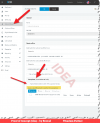
Thought I follow up on Nicks reply with a few pictures, hoping they say a thousand words.

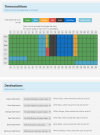
"Assign to Groups" - You can assign Users and System extensions (IVR, Trunks, queues and ring groups etc) to a group.

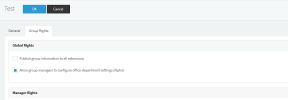
"Allow Group Manager to configure Office department Settings" - Then you can then allow the managers to access these groups from the client.

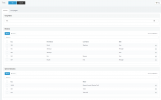
"Office Settings in Client" - This is the settings you can access and play with from the client.

So there is no reason why you can't just create yourself a user on every system you do and assign this to manager of each group.

If people don't get it now, I'm out. lol
 

Attachments

  • Allow Group Manager to configure Office department Settings.png
    Allow Group Manager to configure Office department Settings.png
    18 KB · Views: 84
  • Assign to Groups.png
    Assign to Groups.png
    58.4 KB · Views: 84
  • Office Settings in Client.png
    Office Settings in Client.png
    31.3 KB · Views: 84
Thank you for this @tronic ! And more things coming to this in the coming months

@MidiTélécom you can update as in U4 you can edit extensions and exceptions in there probably also going forward from there. You can just not edit time exceptions on the webclient side.
 
Last edited:
  • Like
Reactions: MidiTélécom
Interesting and divisive thread. I'll throw my 2c in...

There are 3 really small features I'd really like to see in u4:

  • Customization of which Icons appear in the left side menu of webclient/apps. With v18, the Voicemail icon got moved to an overflow menu. Most of my users use webclient or app for voicemail quite a bit, and the additional click to get to it has been a long annoyance to many. And realistically, no one is keeping their window dimensions so short they wont all fit on that bar.
  • There needs to be an option, or at least a Parameter that can be enabled, that disables the "Assign/Clear" functions for extensions from deleting recordings for that extension. We've had issues with lost recordings for clients employees that left that were needed to be recovered.
  • Bring back the little "eye" icon to reveal the webclient password for an extension. Sure there's a workaround, but sometimes I'm working off my phone, and that becomes really cumbersome. Maybe just have a system parameter to enable it for guys like us.

On this whole webclient/office hours/user management deal:

I definitely support having user and call routing management in Webclient, in a user friendly way. Many clients want to be able to tweak routing and manage users, and this is an easy and convenient way for them to do it.

What I won't support is removing full/advanced management of those functions from the administration side, unless the entire admin console is getting moved into webclient so we can retain a single source of admin, with fully configurable permissions. Having to log in to 2 places to manage what we currently do in 1 would be a big step backwards.


A few things (some small, some big) I would like to see in upcoming versions:

  • A proper routing scheduler, not just for user extensions, but ring groups, queues, etc. Just get rid of the whole issue of needing dummy extensions in the first place.
  • Add a voicemail greeting option for Ring Groups so we can have custom greetings for group voicemails.
  • A checkbox when using at least the yealink phone provisioning template to enable headset ringing in ear.
  • An option that if a user was logged into Queue's when they enabled DND, automatically log them back into Queue's when disabling DND.
  • If a Receptionist send a call to an extension, and the extension doesn't pick up, bring the call back to the receptionist with a tag so they know it is a returning call. This way while that extension is being tried, they can handle other calls without needing to worry about trying to pickup the first after a while of ringing, or the caller getting lost and hanging up.
  • Most modern SIP phone have openvpn built in, can we have a 4th option for phone provisioning, where openvpn to the 3CX PBX is utilized as an alternative to STUN. This would secure traffic and help avoid pitfalls associated with using STUN.
  • We can copy users, I'd also like to see a copy function for ring groups, queues, IVR's.
  • In Chat, a "take conversation from user". Sometimes someone will be chatting a client with SMS, leave the thread open, then I need to start an SMS chat with the same client. Then they'll be out of office, I'll have to get their webclient credentials and login as them and transfer the conversation. This needs to be simpler.
  • Faxing in webclient. See a list of received faxes, be able to upload a PDF to and send it. And work with Groups as well, so a group can send and receive faxes from a single number. And if you want to be really spiffy with it, be able to configure faxing as either t.38 through the trunk or through a provider that uses an API (and a way to build connector packages or templates for providers).
  • A native way to access Shared Parks in the android/ios apps.
  • See android/ios devices connected/"registered" to an extension, and be able to deauthorize/delete them.
  • Group BLF settings and/or be able to have a library of BLF templates that you can select to apply to an extension.
  • SBC's need to be able to cache phone firmware for install on its local phones. Or as an option for larger sites at least.
  • If voicemail transcription is enabled, use the TTS to automatically generate a self identification message and store it, and remake it any time the name fields are updated.
  • Take the previous idea one step further, in IVR prompts, have a box to enter the text for the IVR, and a drop down to select the TTS voice, and a preview button. We have a lot of clients that love the google wavenet voices for their IVR's, please make it easy to generate these since we already have it connected to the API for transcriptions.
On behalf of all of our users, thank you for the consideration on future development. The "Ideas" forum here is locked somewhere so I don't have anywhere else put those ideas.
 
  • Like
Reactions: autohaus
@AltecSolutionsGroup Thank you for the feedback. Some good points there but too many for me to respond.

Let me close this thread so we will have soon a beta 2 thread. To summarize

1.You can use dummy extensions as much as you want for ever. (we never said we would remove it)
2. We will bring time based caller ID exceptions back in management console in next beta (i wonder really how many people use them) It was an oversight that we took them out before having group routing extension in update 5. This is really only for a call from a caller ID with custom times. Didnt think it was such a biggie.
3. We are not taking away central access to extension management. My comment about webclient was that in time it will allow management of settings of users from there and then it will replace parts of management console yes. But its a process. Maybe i should have been clearer in my comment yes.

Going forward I would appreciate more positive tone in comments?

Evolving a software is a bit like traveling/going on holiday. Everybody would love to be at the destination at the blink of an eye but unfortunately you have to go thru security, wait for passport control, sit in cramped seats before you arrive at your destination. When your sitting on the beach your are happy you took the trip :) Its the same for software, to go somewhere we need to make some allowances - deprecate some features, do some things differently. The destination is worth it and plus in many cases it's simply needed.
 
Last edited:
Thanks @Nick Galea for your quick responses.
I will wait for version 5 to ask my questions on the same subject. Your "last answer" already answers many questions.

But I have only one question, about the future strategy of 3CX, I tried to find my answer in the various threads, I apologize for making you repeat if that's the case.

I created a StartUP environment (test), Question:
Should we expect that in the future, "futur on-premise" installation type will be a "StartUP type" copy but with an administration console?

I'm not interpreting here, I'm wondering if your goal for the future, also for "On-premise", is to make more management functions for calls flow accessible via the WebClient.
(I am not referring to "callflow apps") in "On-premise" type installation (21 extensions and more) .


thx

- Guillaume
 
  • Like
Reactions: jed
@bravad No problem... The strategy is to have more granular manage of extension options, and done via the web client. Admins/Managers dont need to login to a separate console to monitor or manage their users. Its not really a focus point of our vision though, i would say that having smaller, more quickly deployable instances via StartUP for smaller companies. Dedicated remains for bigger companies....
 
  • Like
Reactions: jed and bravad
Hey Nick, since alot of people are using dummy extensions to adjust office hours - wouldn't it be helpfull that there be more than just open/closed options on the default office hours? If my example would be possible in 3CX i'm sure everyone will drop the dummy extensions :)

Example: View attachment 30809


I'm glad to hear that we're not the only ones having challenges with scheduling.
Especially for public holidays in medium/large companies with several "points of sale".
In Canada, province of Quebec, in the month of June, there was the feast of the province of Quebec.
Several of our customers closed their offices which are based in the province of Quebec, but other points of sale, not located in province of Quebec, deployed in the same 3CX, should not be closed.

Manually, we have to modify each of its customers who have their "special" schedules (dates), based on the DID.

The scenario occurs even more frequently for customers with administrative offices (open Monday to Friday) as well as points of sale (open 7 days a week).

On public holidays, if this is a weekend,
The administrative offices, being already "closed", these are closed the following (or preceding) working day. We cannot apply a date rule on the system because the points of sale remain open on the day the administrative offices are closed.


We work with CallFlows but it's a pity that our customers are not able to apply their "date-based" configurations themselves.

We cannot let an end user manipulate a CallFlow.


I thought of opening a publication in the forum category "ideas" but, the last time, it has been several years before the idea is developed. (Audit Logs)

Even today, we are still looking for the best solution to properly manage Inbound Rules.
Here's a POC of an idea I'm considering posting, if many support my suggestion.

https://i.imgur.com/xIOHqpM.png

 
  • Like
Reactions: Evolute IT and jed
Status
Not open for further replies.

Forum statistics

Threads
111,972
Messages
590,065
Members
164,887
Latest member
KrishnaMR