Update 7 - DECT, VoIP Providers, RPS Mass provisioning

It would help to mark the old client “legacy/deprecated” or similar, and move it last.
 
  • Like
Reactions: N_G
@GaSo Where does it say we will remove 4 SC or 8 SC licenses? Please stop jumping to conclusions without any official statements from our company.

That said, yes 4 SC or 8 SC on premise licenses are probably going to become more expensive. And if $200 a year is too much for a customer then yes they best start looking elsewhere. $200 for a system that is running custom call flows is peanuts
Please remember that we don't all use on premise to make use of advanced features, I've never even looked at call flows, I use on premise because 3CX is also part of our door entry system and if our only internet line were to go down I don't like the thought that we wouldn't be able to answer the door intercoms, unless I have been missing a trick all this time.
 
  • Like
Reactions: mcsphones
@RichB as i already said they are not going away but they are going to cost a little more.
 
Last edited:
@GaSo - fair enough, you are right. No we will be keeping 4 SC or 8 SC on premise/self hosting for sure. When i said not worth it, i meant for $100 per year. And of course everybody says they will support it themselves but its not the case. So expect price increases for the 4 SC and to a lesser extent 8 SC self hosted. BTW our hosted will support call flows soon.

@Sparky Bear Sure we will keep Azure and we have market places images. But I believe if they can afford Azure they can also pay a bit more for the PBX license.
if it is just a price increase that is fine, even if we have to upgrade to 16SC it is not an issue as again, the cost isn't that excessive for most clients.
 
  • Like
Reactions: Ines Wild and N_G
More importantly,
Is Hotdesking coming to Router Phones?
 
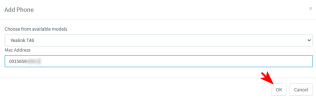
Is anyone else seeing an issue where they cannot click the OK button to add a phones MAC address?
I've tried different models same issue.
Different computers
Tried Edge/Chrome/Firefox all have the same issue.
 

Attachments

  • 2023-02-27_215326.png
    2023-02-27_215326.png
    13.4 KB · Views: 20
Is anyone else seeing an issue where they cannot click the OK button to add a phones MAC address?
I've tried different models same issue.
Different computers
Tried Edge/Chrome/Firefox all have the same issue.
Figured out my own issue.
The extension has been around for many years and had a very simple Phone Web Page Password of 1234.
The Add phone button will not let you click OK if the phone web page password is simple now.

Not sure if that is a new in update 7, not that I have simple passwords often, but I don't remember this being an issue in the past? Might be worth adding a warning or something so you know you can't save until the password is changed.

What is also interesting about this is if have an old extension with a simple phone web page password and delete all the configured phones. You can no longer see the password field, so adding the hardware phone is really a head scratcher then. You have to use the regenerate button in order to create a new phone web page password before you can configure a hardware phone.
 
  • Like
Reactions: N_G
@tsukraw01 that's a good find... Thanks for reporting we will add feedback.
 
Hi;

I started getting an error as shown in attachment, both webclient and desktop app have the same problem.
This was due to custom DECT templates that caused errors. When the invalid DECT entries and templates are removed the problem goes away.
 
This is the German version:

We are going to make the welcome email clearer. We had put the windows app back because it was requested a lot of times by the way. These days we recommend the PWA one unless you need hotkeys.

Now in regards to 4SC pricing - it will not be anything very drastic but we are thinking $200 instead of $125 per year. Still very cheap in my opinion.
 
Hello Nick,
as you answered me previously hosted 3cx will be more flexible in near future, so, is there any chance to find Direct SIP available in SP7 for hosted 3CX ?
And notification choice for Backup ?
 
@aws2p Hi there! yes we are working on it, we might need until update 8. And it will include everything you can do on a normal self hosted instance. yes i think we did the thing about the backup notification in update 8
 
Firstly, the new RPS provisioning is incredible. How that works so quickly blows my mind.

But I just have a little weird thing with router phones not showing online. The handset has registered, and shows in the phone tab as 'via SBC':
1677616975225.png
But then over in the trunks area, the SBC shows as down:
1677617019170.png

I wondered if its just the management console UI not updating due to the changes with the WebClient. But it seems to affect provisioning. When I try and generate a file for a DECT base unit that should use this SBC, we get:
1677617131736.png

I've checked the phone is all on the latest firmware. And confirmed its a X4U-V2 unit. Tried some reboots and things too, and nothing seems to fix it. What am I missing?
 
  • Like
Reactions: N_G
Firstly, the new RPS provisioning is incredible. How that works so quickly blows my mind.

But I just have a little weird thing with router phones not showing online. The handset has registered, and shows in the phone tab as 'via SBC':
View attachment 34478
But then over in the trunks area, the SBC shows as down:
View attachment 34479

I wondered if its just the management console UI not updating due to the changes with the WebClient. But it seems to affect provisioning. When I try and generate a file for a DECT base unit that should use this SBC, we get:
View attachment 34481

I've checked the phone is all on the latest firmware. And confirmed its a X4U-V2 unit. Tried some reboots and things too, and nothing seems to fix it. What am I missing?
Check out this thread: https://www.3cx.com/community/threa...-register-via-router-phone.119233/post-555040
 
Last edited:
Thanks for the reply. In my situation, this was a brand new phone, never provisioned before. But I got it working by just simply factory resetting and letting it auto-provision again. My suspicion is it needs that latest firmware update to actually provision the SBC side.
So my workflow for now is:
- Add MAC as router phone
- Let the brand new phone auto-provision out of the box
- Push the new firmware from the management console
- Factory reset the phone, and let it restart

Really doesn't take that much longer as the provisioning is so dam fast. And much easier pushing firmware from 3CX than manually logging in to a bunch of phones to upload the firmware directly.
 
  • Like
Reactions: JohnS_3CX and ivank
Thanks for the reply. In my situation, this was a brand new phone, never provisioned before. But I got it working by just simply factory resetting and letting it auto-provision again. My suspicion is it needs that latest firmware update to actually provision the SBC side.
So my workflow for now is:
- Add MAC as router phone
- Let the brand new phone auto-provision out of the box
- Push the new firmware from the management console
- Factory reset the phone, and let it restart

Really doesn't take that much longer as the provisioning is so dam fast. And much easier pushing firmware from 3CX than manually logging in to a bunch of phones to upload the firmware directly.
Hi Sam,

Your suspicion was correct but the above workflow won't work because the phone will not have the router-enabled firmware out of the box. It will try to register Direct SIP style because it is missing the SBC part, and get blacklisted.
I will recommend this workflow instead and it should be followed in this specific order:

1. Manually upgrade the router phone firmware - before you ever connect it to 3CX.
2. Set it up in 3CX as a router phone.
3. Factory reset it so it can provision correctly.
4. After the phone comes up, you can finally proceed to add the "normal" phones too.
 
Thanks for the reply. The steps in my post did work just fine though. The phone came online and I could push the firmware from the management console.
 
Thanks for the reply. The steps in my post did work just fine though. The phone came online and I could push the firmware from the management console.
Not sure how your test was done but regardless, the phones will get blacklisted for most people using the default 3CX security settings if they don't follow this order. I think we might revise the guides to make this more clear.
 
Interesting! The screenshots in my original post show the phone online in the 'Phones' tab, which is obviously where I could push firmware from. And it never got blacklisted.

For what its worth, security settings are the defaults that come out of the box of a fresh install from the deployment wizard.
 
Will the old PBX Express install process still be available or is Lightsail no longer a possibility?
 

Forum statistics

Threads
111,994
Messages
590,183
Members
164,934
Latest member
bunthoeun.may