Upgrade to v18 and Debian 10 (Buster)

  • Thread starter Thread starter B.lueken
  • Start date Start date
My Azure version updated to Debian 10 but 3CX is not active. How do I manually install v18 on Debian 10?
@farsight

Maybe you already got this worked out. I would suggest, install v16 manually on Debian 10, then use the 3CX update process to get upgraded to v18.

David
 
Maybe you already got this worked out. I would suggest, install v16 manually on Debian 10, then use the 3CX update process to get upgraded to v18.
I'm sure your intentions are all good, however, I would actually recommend against this because:

1. Manually installing 3CX is not supported.

2. Running v16 on Debian 10 also not supported, plus, it will prevent the upgrade to v18 from appearing.

Best course of action would be what was mentioned here or here.
 
We had this same problem. Has this been resolved? We have quite a few users on Lightsail. We tried one decent size 3cx instance that failed and would not boot. Had to blow away and restore.
 
@farsight

Maybe you already got this worked out. I would suggest, install v16 manually on Debian 10, then use the 3CX update process to get upgraded to v18.

David
Yup. I deleted the VM. Created a new 3CX Azure VM. That was Debian 9 and 3CX v16. The upgrade to v18 worked the second time.
 
Unfortunately the upgrade is broken again; looks like there was an issue with downloading the PBX package from you guys.

*** UPDATE ***
I have to blow away my AWS Lightsail install and re-install + restore
This works and gives V18; but I do not want to do this for another 15 clients
 
Last edited:
Hi guys,

When will the definitive version be available?
 
To give my personal V18 upgrade feedback on Cloud PBXs from AWS lightsail and OVH

  1. PBX goes smooth and everything went fine (pbx is on OVH)
  2. PBX goes smooth and everything went fine, but once update has succesfully ended , pbx started to vanish and be unreachable (AWS lightsail) I did a backup and complete reinstall on a new VM.
  3. PBX upgrade stopped in the begining because there was an uncommon source list, after deletion of wrong source, process completed successfully (OVH instance)
  4. PBX never finished and stay with server error message in console login page ( AWS lightsail instance) after help from 3CX staff on sunday (NikosT):), we found a problem in locales, so 3CX ask me to reinstall. After reinstall on new VM and restore pbx is updated to V18.
So finally, on 4th pbx update only one went fine alone, 3 others need 3CX Staff assistance and time to reinstall.
 
One Debian PBX I ran the upgrade on completely died and the OS would not even boot after that. I built a new PBX from ISO on other hardware and performed a restore. This worked.

Another PBX I upgraded, there were issues with some of the BLF functionality after the upgrade. This was resolved with a license refresh and reboot server and phones.

Another PBX I attempted to upgrade completely failed OS upgrade and PBX is still working on V16.
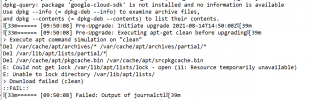
That one provided me the following error which appears to be a lock file that could be cleared on a PBX reboot. Please provide input. Here is the relevant log excerpt.

1629145762568.png
 
After 30 minutes can not login to GUI - server error. SSH telling me wrong password.
Plug monitor into Pi and no display. Still have Red/Green lights on the Pi.


Lucky me - I did not unplug the USB backup and the 3cx upgrade wrote OVER the USB. My backup is MIA. I should have done a local backup.
 
Last edited:
@craigreilly Keep in mind that Raspberries can take much more time to upgrade.
@Felicia King That part of the log doesn't say much as failing at the beginning, middle or end of an upgrade makes huge difference. If the system is still operating and running V16 that means it must have failed early before upgrading to Buster. In any case, the best and safer solution would be to deploy a new clean V18 instance and restore from backup (or restore that machine at a pre-upgrade state and retry)

Generally, upgrading an O.S can be a quite complex task, especially on self-hosted systems that users can install/configure/change anything they want. Even though we've tested this on thousands of systems successfully, catering for every single installation/setup out there is not possible as there is a multitude of possible configurations. The first and most important step before upgrading is to take a backup. This is a golden rule. When you have one (be that an application backup such as 3CX, or VM etc) you can ensure that whatever happens, you can restore functionality. We also take an emergency backup on behalf of the user before upgrading. Deploying a new 3CX instance and restoring from a backup can be done in literally minutes.

Having said that, before upgrading, going over a very basic checklist can greatly help:
  • The system has sufficient free disk space
  • The system has sufficient free memory (especially on systems with low specs that also use swap).
  • The system is not busy with any other task - meaning CPU, Network, Ram, Disk are not heavily used
  • There are no cronjobs scheduled that could interfere with the upgrade (such as updates, backups, etc)
  • There is no remote administration tool running that could take actions while the upgrade is running
  • The system/folder/user permissions haven't been changed
Common cases in which we have seen upgrades failing:
  • Third party source lists under /etc/apt/sources.list.d/. Additionally, in some cases users attempted to edit 3CX (or other default) source lists and didn't exit properly resulting in the system creating .save files (for example 3cxpbx.list.save) which caused problems.
  • Sources in /etc/apt/sources.list being unreachable or broken
  • Dependency issues caused by third party packages
  • Users who have changed nginx's configuration to run custom SSL certificates.
  • The upgrade was interrupted/stopped manually by the administrator. If you interrupt the upgrade process it will most certainly end up in a corrupted system.
 
Hi @Nathan Sutherland ,

As the log indicates there was a problem with the key being used by those repositories to sign its packages. Even though this is an issue that breaks the upgrade, the script detected it and restored 3CX to V16. So even though the upgrade failed, your 3CX system should be operational. This gives you time to migrate to your new instance.
 
@craigreilly Keep in mind that Raspberries can take much more time to upgrade.

I figured that - but after an hour and nothing - I simply pulled the external USB drive that I was using for backups to fire up a new install - and it no longer had my nightly backup on it.... wasn't a big deal. I just use this installation at home with 3 extensions, 2 DIDs, 1 Provider... Took 30 minutes to recreate on a new install of v18.

Now changing my backup medium on that install. :)
 
Hi @Nathan Sutherland ,

Let's begin by establishing that a license key can only have one instance bound to it's FQDN at a time. So as you correctly said, having multiple instances with the same key will result in the FQDN keep changing DNS records and pointing to a different installation, each time one contacts our activation servers.

Regarding the migration steps you are pretty much correct.

1. Take a full backup of your 3CX installation and download it
2. Shut down the old VM
3. In the Customer Portal click Reinstall and follow the steps
4. Login into your new instance and upgrade to V18
6. Restore from backup via the Management Console

Regarding your second point, I am afraid this is currently not possible. If you need a "test" installation which will be running along with the production one, you'll also need another key with another FQDN. In that case you can take a backup without License key information and restore it to the instance you will deploy for your secondary key (for which you will select a new FQDN during setup).
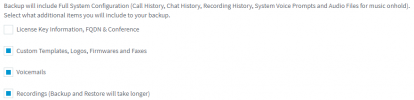
1629213854656.png
 
Common cases in which we have seen upgrades failing:
  • Third party source lists under /etc/apt/sources.list.d/. Additionally, in some cases users attempted to edit 3CX (or other default) source lists and didn't exit properly resulting in the system creating .save files (for example 3cxpbx.list.save) which caused problems.
We hit this one, for some reason there was an extra sources file for a backport list.

For those wondering, there is a list of "approved" sources in the install script ;)
  • Users who have changed nginx's configuration to run custom SSL certificates.
I think we may have run into this, we had some issues with certificate generation when we first deployed 3cx and changed to certbot. 3cx is likely writing the nginx ssl back to "normal" which is likely why we are getting an error when trying to launch nginx. I will have to manually remove certbot to revert the nginx changes, then ensure the SSL cert is correct then reattempt the upgrade.

In case anyone is curious, the error we get is:
nginx: [emerg] PEM_read_bio_X509_AUX("/var/lib/3cxpbx/Bin/nginx/conf/Instance1/**certname.pem***") failed (SSL: error:0909006C:pEM routines:get_name:no start line:Expecting: TRUSTED CERTIFICATE)

For those running the upgrade on linux, I highly recommend using the "tail" command on the debian9to10 log file to monitor the progress of the install.
 
@DavidHuang do me a favor, check on /var/lib/3cxpbx and check if there 's a Core file or at /usr/lib/3cxpbx/BackupCmd .
If so, that's the issue why it fails..

I have this file located on my PBX, should it be deleted before upgrading? (I have some pre-requisites to resolve first as per my other post)
 
@FridayIT this indicates that there is a crash. What are the specs you have on this machine please ?
 
@FridayIT this indicates that there is a crash. What are the specs you have on this machine please ?

We are running the PBX on a VM:
32 SC ent license
2 vcpu assigned
4gb of memory
80gb storage (large storage required for call recordings :) ) storage on all partitions has free space.

Core file exists before attempting an upgrade.
 
@FridayIT this is then from another crash that must have happened on the machine.
This can happen for a lot of reasons so I would recommend to check this with our Tech Support Team.
 

Forum statistics

Threads
111,975
Messages
590,084
Members
164,901
Latest member
Silent_Guru