Upgrade to v18 and Debian 10 (Buster)

  • Thread starter Thread starter B.lueken
  • Start date Start date
Hi,

Just tried to upgrade from V16 to V18. Debian upgrade failed from 9 to 10. Error message indicates an issue with the locale settings.
Code:
2021-08-20 16:41:02 (27.7 MB/s) - '/tmp/update.sh' saved [24319/24319]

[33m====== [16:41:04] Preparation: Script path is /tmp/update.sh[39m
[33m====== [16:41:04] Starting: Backup script /tmp/update.sh[39m
[33m====== [16:41:04] Starting: Current directory: /tmp[39m
[33m====== [16:41:04] Starting: Current user: root[39m
[33m====== [16:41:04] Starting: Current date: Fri Aug 20 16:41:04 AWST 2021[39m
[33m====== [16:41:04] Starting: Current version: 9.13[39m
[33m====== [16:41:04] Starting: Architecture: amd64[39m
perl: warning: Setting locale failed.
perl: warning: Please check that your locale settings:
perl: warning: Falling back to the standard locale ("C").
# Created by cloud-init v. 0.7.9 on Mon, 19 Apr 2021 08:17:16 +0000
LANG="en_US.UTF-8"
/usr/bin/locale: Cannot set LC_CTYPE to default locale: No such file or directory
/usr/bin/locale: Cannot set LC_MESSAGES to default locale: No such file or directory
/usr/bin/locale: Cannot set LC_ALL to default locale: No such file or directory
LANG=en_US.UTF-8
LANGUAGE=
LC_CTYPE="en_US.UTF-8"
LC_NUMERIC="en_US.UTF-8"
LC_TIME="en_US.UTF-8"
LC_COLLATE="en_US.UTF-8"
LC_MONETARY="en_US.UTF-8"
LC_MESSAGES="en_US.UTF-8"
LC_PAPER="en_US.UTF-8"
LC_NAME="en_US.UTF-8"
LC_ADDRESS="en_US.UTF-8"
LC_TELEPHONE="en_US.UTF-8"
LC_MEASUREMENT="en_US.UTF-8"
LC_IDENTIFICATION="en_US.UTF-8"
LC_ALL=
/usr/bin/locale: Cannot set LC_CTYPE to default locale: No such file or directory
/usr/bin/locale: Cannot set LC_MESSAGES to default locale: No such file or directory
/usr/bin/locale: Cannot set LC_COLLATE to default locale: No such file or directory
C
C.UTF-8
POSIX
en_AU.utf8
[31m[16:41] Preparation: Locales seems to be invalid. Abort. - 0[39m
::FAIL::

Any ideas what is going on?

Thanks, Ross
 
Hi @RossFS,

It seems that system locales haven't been set up properly.

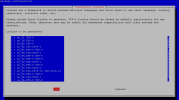
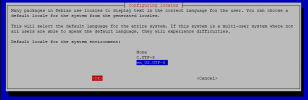
SSH on the system, run the following command and follow the steps (it is only two screens/steps)
Bash:
sudo dpkg-reconfigure locales
Make sure you select the correct locale and also make sure you select a default locale (in the second step)

Example:
1629450495032.png

1629450520779.png

Then reboot and try upgrading again.
 
Got same problem and even after that change nothing change, only reinstall from scratch did.
It was direct advice from Nikos to reinstall
 
Got same problem and even after that change nothing change, only reinstall from scratch did.
It was direct advice from Nikos to reinstall
Are you sure you didn't you change /etc/default/locale or /etc/locale.gen manually? :)
 
  • Like
Reactions: N_G and NikosT_3CX
Yes ,on first one path, and tried with sudo dpkg-reconfigure locales, no success to proceed end of upgrade to V18.

Yes you 're right my initial problem was i changed manually in V16 locales to have Welcome emails and reports in French. But solution with reconfigure locales changed nothing to end properly upgrade to V18.
Only Reinstall was a fix
 
@aws2p your case was a little bit different :)
Yours broke when it went to database so there were not a lot we can do in this case.
 
Okay, i'm not linux expert at all , so I thought it was clearly same as it happens to me.

Well , what I undrestood is , in most of the cases broken or never ended update goes straight to reinstall as a shortest and sure way of having a stable pbx in V18
 
@aws2p well it's not actually like this as there are not so many cases, but I kind agree with you on this.
There are many checks on the script to prevent OS UPgrade and PBX from breaking and have to re-install. In more than 95% of the cases, we roll back the OS Upgrade and we prevent the OS to break or we apply fixes on the fly ( as much as we can via the script ).
Now if the machine has been modified manually and heavily changes have been made, then yes this is something we can not control and the person who did these, is responsible to fix them or re-install the PBX to a new machine.
 
Last edited:
  • Like
Reactions: FridayIT
Well, based on my small experience until now with only update of 4 cloud pbxs all initially installed with pbxexpress, 3 on 4 turned bad to be reinstalled, so may be this is my only fault, but like I said, I have not a lot of linux knowledge, so I don't try to improvise something , for locales changes I did manually , it was an advice from CEO Stefan Walters I applyied , perhaps wrongly.
But this one occured only on one pbx.

i don't know if this is already the case but it could be interesting for everyone install process log how and when pbxs were installed, perhaps we could have some statistics on failure related to some specific release used during install.
 
Last edited:
As per your post here :
https://www.3cx.com/community/threads/upgrade-to-v18-and-debian-10-buster.81956/page-3


PBX goes smooth and everything went fine (pbx is on OVH)
>> Correct, this means machine wasn't modified and was left as per default installation.

PBX goes smooth and everything went fine, but once update has successfully ended , pbx started to vanish and be unreachable (AWS lightsail) I did a backup and complete reinstall on a new VM.
>> By the time Upgrade was successful then this means issue came up after. If PBX was installed via 3CX Wizard, and wasn't touched at all from admin after installation, this shouldn't happen. If MC was the issue and you couldn't reach it, then ssh and check services is the way on this. If there 's no time for this, then yes the fastest wa is to spin up a new one and restore backup.

PBX upgrade stopped in the beginning because there was an uncommon source list, after deletion of wrong source, process completed successfully (OVH instance)
>> Machine config was altered from extra source list so Upgrade OS rolled back and there was no break on the PBX.

PBX never finished and stay with server error message in console login page ( AWS lightsail instance) after help from 3CX staff on sunday (NikosT):), we found a problem in locales, so 3CX ask me to reinstall. After reinstall on new VM and restore pbx is updated to V18.
>> Yeapp I can confirm this as we were chatting Sunday night :)
as explained above, for this there was no solution since this broke when database was setting up since Locale were manually altered.


So based on the above, whatever wasn't touched went smooth. Even the one that had small extra manual config, didn't break, it just rolled back.
 
Hy,
I upgraded from v16u8/debian9 to v18/debian10

3CX was successfully updated.
3CX Phone System Management Console ID: 10009 08/25/2021 4:33:52 PM

Your 3CX Debian OS failed to update
3CX Phone System Management Console ID: 10012 08/25/2021 4:26:27 PM

debian9to10.log
Code:
--2021-08-25 16:26:26--  https://downloads.3cx.com/downloads/misc/debian9to10/update.sh
Resolving downloads.3cx.com (downloads.3cx.com)... 151.80.125.73
Connecting to downloads.3cx.com (downloads.3cx.com)|151.80.125.73|:443... connected.
HTTP request sent, awaiting response... 200 OK
Length: 24601 (24K) [application/x-sh]
Saving to: ‘/tmp/update.sh’

     0K .......... .......... ....                            100%  104M=0s

2021-08-25 16:26:26 (104 MB/s) - ‘/tmp/update.sh’ saved [24601/24601]

[33m====== [16:26:27] Preparation: Script path is /tmp/update.sh[39m
[33m====== [16:26:27] Preparation: Upgrade script update.sh seeems to be already running. Found /tmp/UPDATE_RUNNING[39m
                                                                                                                                                                                                                                                                                                                                                                                                                                                                                                                                                                                                                                                                                                                                                                                                                                                                                                                                                                                                                                                                                                      Progress: ~38.770%, 2893/7462 items processed
Progress: ~38.778%, 2894/7463 items processed

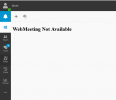
webmeeting is not ok

1629919816315.png

Code:
root@3cx-p1:~# uptime
 21:05:26 up  4:31,  1 user,  load average: 0.04, 0.03, 0.00
root@3cx-p1:~#
root@3cx-p1:~# uname -a
Linux 3cx-p1 4.19.0-17-amd64 #1 SMP Debian 4.19.194-3 (2021-07-18) x86_64 GNU/Linux
root@3cx-p1:~# cat /etc/debian_version
10.10
root@3cx-p1:~#

what to do in this case?
 
Just to be clear for readers of this thread..... In most cases the problems are because its not a standard 3CX iSO or PBXexpress deployed instance. If you do not have a standard instance, then you must take a backup, deploy 3CX Iso if an on premise install, or deploy from customer portal to cloud (the former PBXexpress) and restore.

If you modify the linux instance or use a non standard cloud provider then you will always have problems. We do not test and do not offer support for such cases and this is NOT the way to go.

If our upgrade script detects a modified linux or unknown linux instance, upgrade will be cancelled. This script is continuously improved so our detection is getting better. So it has not failed but rather aborted...
 
@voip-toni can you PM me with the Public ip address of this PBX that failed on the first time but then succeeded ?
 
Our on premise install was made with debian9/v16update8 iso from 3cx.
It was not modified in any way

After rebooting the server the webmeeting page showed up but with the error 0x0018
I did a forum search and found the solution to restart the gatewayservice
After that also the webmeeting worked.
 
@voip-toni thanks for the PM.
Now as I can see you have triggered the upgrade, Management Console logged you out from the PBX, then you logged back in immediately and you triggered the Upgrade button again.
Script detected this, sent you the email for the 'Debian OS Update Failed " because the second attempt was invalid and yes it failed since the first one was running and then the script proceeded with the successful upgrade of the PBX and the OS as should. ( logs below )

About the error 0x0018, this is something our Webmeeting team is checking

Bash:
[33m====== [16:26:18] Starting: Backup script /tmp/update.sh[39m
[33m====== [16:26:19] Preparation: Checking Debian version[39m
[33m====== [16:26:19] Preparation: System is stretch (9.13). Go ahead.[39m
[33m====== [16:26:19] Preparation: Preparing 3CX Backup: /var/lib/3cxpbx/Instance1/Data/Backups/rescueBackupUpgrade.zip[39m
Progress: ~43.550%, 1266/2907 items processed
Progress: ~97.869%, 2893/2956 items processed
Progress: ~40.752%, 2893/7099 items processed
Progress: ~38.811%, 2893/7454 items processed
Progress: ~38.801%, 2893/7456 items processed
Progress: ~38.770%, 2893/7462 items processed
Progress: ~38.778%, 2894/7463 items processed
[33m====== [16:26:27] Preparation: Script path is /tmp/update.sh[39m
[33m====== [[B]16:26:27] Preparation: Upgrade script update.sh seeems to be already running. Found /tmp/UPDATE_RUNNING[39m[/B]
Progress: ~38.778%, 2894/7463 items processed
Progress: ~42.610%, 3180/7463 items processed
Progress: ~51.802%, 3866/7463 items processed
Progress: ~56.934%, 4249/7463 items processed
Progress: ~64.518%, 4815/7463 items processed
Progress: ~71.392%, 5328/7463 items processed
Progress: ~79.847%, 5959/7463 items processed
Progress: ~88.101%, 6575/7463 items processed
Progress: ~93.957%, 7012/7463 items processed
Progress: 100.000%, 7463/7463 items processed
DONE.
 
  • Like
Reactions: voip-toni
@voip-toni thanks for the PM.
Now as I can see you have triggered the upgrade, Management Console logged you out from the PBX, then you logged back in immediately and you triggered the Upgrade button again.
Script detected this, sent you the email for the 'Debian OS Update Failed " because the second attempt was invalid and yes it failed since the first one was running and then the script proceeded with the successful upgrade of the PBX and the OS as should. ( logs below )

About the error 0x0018, this is something our Webmeeting team is checking

Bash:
[33m====== [16:26:18] Starting: Backup script /tmp/update.sh[39m
[33m====== [16:26:19] Preparation: Checking Debian version[39m
[33m====== [16:26:19] Preparation: System is stretch (9.13). Go ahead.[39m
[33m====== [16:26:19] Preparation: Preparing 3CX Backup: /var/lib/3cxpbx/Instance1/Data/Backups/rescueBackupUpgrade.zip[39m
Progress: ~43.550%, 1266/2907 items processed
Progress: ~97.869%, 2893/2956 items processed
Progress: ~40.752%, 2893/7099 items processed
Progress: ~38.811%, 2893/7454 items processed
Progress: ~38.801%, 2893/7456 items processed
Progress: ~38.770%, 2893/7462 items processed
Progress: ~38.778%, 2894/7463 items processed
[33m====== [16:26:27] Preparation: Script path is /tmp/update.sh[39m
[33m====== [[B]16:26:27] Preparation: Upgrade script update.sh seeems to be already running. Found /tmp/UPDATE_RUNNING[39m[/B]
Progress: ~38.778%, 2894/7463 items processed
Progress: ~42.610%, 3180/7463 items processed
Progress: ~51.802%, 3866/7463 items processed
Progress: ~56.934%, 4249/7463 items processed
Progress: ~64.518%, 4815/7463 items processed
Progress: ~71.392%, 5328/7463 items processed
Progress: ~79.847%, 5959/7463 items processed
Progress: ~88.101%, 6575/7463 items processed
Progress: ~93.957%, 7012/7463 items processed
Progress: 100.000%, 7463/7463 items processed
DONE.
Thank you for the information. It was not me :D
Some other admin did this. But now I know for sure that it is correct.
I had the error 0x0018 again today in the morning. After closing the webclient and starting the quickmeeting again it worked
 
  • Like
Reactions: NikosT_3CX
you logged back in immediately and you triggered the Upgrade button again
It would be user-friendly if there was a banner on the login page that "you were logged out so the upgrade could run, please wait until you receive the 'success' email" rather than letting people wonder if they got kicked out. :)
 
For those looking for success stories, tonight I did the v18 upgrade on my v16 running on VMware. I executed a backup and then shutdown the server. I executed a VM snapshot and then started the 3CX/Debian server again. Waiting a solid 5 minutes and then ran the update, which ran successfully in 10-15 minutes. It appears v18 is running without any issues so far after 20 minutes.

EDIT: My event log is filling up with "08/28/2021 10:41:25 PM - [CM101008]: The '' feature is disabled in currently activated licenseBLF" and have NO idea what this error is referring to.
 
  • Like
Reactions: N_G and NikosT_3CX
@dkirk-ads if you go to the license key tab and you refresh your key, do Joh have the same issue after that ?
 
  • Like
Reactions: Evolute IT
Major errors after the update to v18

For testing, we updated a 3CX installation to v18. After pressing the update button, nothing happened. No error message or mail. A look into the logfiles in /tmp showed the problem (not enough disk space). Once cleaned up (22GB were free), the update went through within 15 minutes.

After the update, when clicking on Extensions and IVR, an error message was displayed in the management console. SetInfo.xml was missing. Upon checking, we found that the WAV files of the announcements were also completely missing.

We then restored to v16 without further investigation. We think: 3CX needs to stabilize the update procedure before this can be done in production environments.

Does anyone have similar experiences with updating to v18? What errors have you encountered?
 

Forum statistics

Threads
111,975
Messages
590,084
Members
164,901
Latest member
Silent_Guru