Upgrade to V20 Update 1 for Scheduled Reports, Faster Backup & Restore

I noticed that reporting in V20 Update 1 is lacking a few features that were available in V18. Is there a timeline on when these will become available?
- Schedule reports to be emailed.
- Generate reports by direct dial (DiD) numbers.
- Filter reports by user/extension.
I just agree about this one.
Many customers want to get their daily report on the mailbox,

Is it on the roadmap to get this basic options like we have in the V18 ? Thank you.
 
I just agree about this one.
Many customers want to get their daily report on the mailbox,

Is it on the roadmap to get this basic options like we have in the V18 ? Thank you.
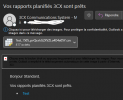
Today, i got a mail of my schedule report :

1715859579644.png

The mail used by the system to send me the notification was the same of the extension I create the schedule report.
Can 3CX admins can confirm if it works like that ?

If yes, it should be very useful to be able to override the value of the extension mail or even more usefull add mails for multiple send.
 
@MidiTelecom2
Can you please clarify are you referring to the email from address?
 
I only see the BETA . Am I missing something?
1715929243588.png
 
@MidiTelecom2
In the from header of the email, you should see the email that is configured for the SMTP. For example in outlook online in order to view the email of the sender i have to click on 3CX Communications where the email that the report was sent from will show (and/or view message details). Can you please verify that you are looking at the correct header
 

Attachments

  • 2024-05-17_10h06_08.png
    2024-05-17_10h06_08.png
    17.3 KB · Views: 11
@MidiTelecom2
In the from header of the email, you should see the email that is configured for the SMTP. For example in outlook online in order to view the email of the sender i have to click on 3CX Communications where the email that the report was sent from will show (and/or view message details). Can you please verify that you are looking at the correct header
I guess my poor english make the things difficult to understand, sorry about that.

The header is "[email protected]." the default 3CX SMTP, no problem with that.
But, i was talking about the mail who receive the report and it seems to be the one of the extension I used when I create the schedule report.
And my question was does this mail could be overwrite ? Add more mail to a shedule report ? The things that we had in V18 report menu.

Thank you.
 
@MidiTelecom2 Thank you for the clarification, this is changed on v20 and each user/extension will have to create its own reports where the reports will be send only to the user/extension that created the report
 
Just upgraded our on prem to V20 update 1 last night. have been running some testing since.

I have picked up that we have issues with our fanvil x3sp pro models. some were previously provisioned and others still in the boxes which i have been testing with.
I had to reset some already provisioned ones in order for the correct time zone to reflect. time zone was wrong before the upgrade but no amount of changing the time zone then re-provisioning the phone would fix that. may have been related to previous cases with SAST/CAT Timezone.

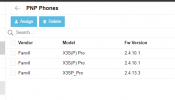
phones that came with V2.4.10.1 are unable to be provisioned in V20. it seems to be because the models are reported differently. error when trying to assign a user to these phones is " unable to find phone model in template"

as seen below:
v2.4.10.1(stock firmware) reports as X3S(P) Pro
V2.4.13.3 (3cx firmware) reports as x3sp_Pro


Capture.PNG


I also noticed that v2.4.10.1 doesnt pick up that it needs a firmware update (button was greyed out for already provisioned phones and doesnt seem to be an option to update phones in PNP). seems the only way is to manually update these phones is via their web interface in order to get them into 3cx now.

not particularly keen to manually do updates :( but not the end of the world as I only have around 20 to do.
 
Last edited:
Unfortunately, after upgrading, I get this error message in Dashboard, in Users and Phones:

View attachment 41451

I'm unable to get inside Users and Phones menu ............. :-(
I am also having this exact issue. What is the fix to resolve it? I get it on the Dashboard, Users and Phones in the admin interface.
 
I saw that, but am not sure how to change the ownership.
Linux or Windows?

Right click, security, advanced, ownership (change to phonesystem or whatever owns other files/directories)
chown phonesystem:phonesystem /path/to/files/to/change/ownership/of

 
Linux or Windows?

Right click, security, advanced, ownership (change to phonesystem or whatever owns other files/directories)
chown phonesystem:phonesystem /path/to/files/to/change/ownership/of
Linux appliance.
 
Linux appliance.
What does "ls -l /var/lib/3cxpbx/Instance1/Data/Http/Interface/provisioning/<random string>/firmware" return? Replace <random string> with whatever path you have?
 
  • Like
Reactions: jm34
I upgraded to v20 last night and this morning, after install completed, I can not log in as my admin user any longer. Does anyone know how I can get back in as my admin account and not extension account? Self hosted 3cx through digitalocean
 
That doesn't show the owner of the directory or files. You need the -l as shown in my example.

I upgraded to v20 last night and this morning, after install completed, I can not log in as my admin user any longer. Does anyone know how I can get back in as my admin account and not extension account? Self hosted 3cx through digitalocean
You can't. v20 is extension accounts only.
 
@[email protected] The "-l" shows the details of the files. (long format)

See this thread:
Update: found a Access to the path ../../CustomTemplates/fxs' is denied.
Code:
chown -R phonesystem:phonesystem CustomTemplates/fxs/
fixed this for me (at least the pages work again ;-))
 
  • Like
Reactions: jm34

Forum statistics

Threads
111,992
Messages
590,171
Members
164,929
Latest member
Cloudstar