V18 Beta 1 - Gearing up for release

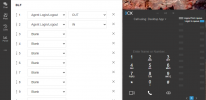
@Phone systems NZ , BLF Agent Login/Logout is not a toggle button.
You need to have two buttons, one configured to queue login and the other for queue logout.
1626764308741.png
 
  • Like
Reactions: Trust9
@Trust9 meet menu groups both Video Conference and Schedule Conferences (can be audio/video).

As a result even if you have disabled the option for Video Conference the meet option will be there.
 
  • Like
Reactions: Trust9
@Phone systems NZ , BLF Agent Login/Logout is not a toggle button.
You need to have two buttons, one configured to queue login and the other for queue logout.
View attachment 23040
Yes I know it's not a toggle button and I do have both buttons set up as in your screen shot. As mentioned it works fine on the desk phone just not on the new client.
Constantino's, do your blf buttons in your screen shot work when you click on them?
 
Last edited:
Yes I know it's not a toggle button and I do have both buttons set up as in your screen shot. As mentioned it works fine on the desk phone just not on the new client.
Constantino's, do your blf buttons in your screen shot work when you click on them?
Let's check via PM. In our case it works as expected.
 
Let's check via PM. In our case it works as expected.
sorry my mistake / error, I was expecting the keys to work like the buttons on the phone and dial the code and read out the prompt saying the extension is logged in or out. Just had another play and found there is no indication when clicking on the buttons and the only way to tell is going to the queue and checking the status.

Could 3CX possible consider some sort of indication on the buttons or a prompt being played when pressed. The way it is now a user could toggle themselves by mistake and they will have no indication or warning that they have done it. there is not even the "Q" up the top anymore that would quickly show them they have taken themselves out of the queue group. The only way I can see is by clicking into the "Panel" tab and going to one of the queue groups you are part of and checking there.

Thanks.
 
Good to hear that works as expected.

Let me though disagree with the following.
"there is not even the "Q" up the top anymore that would quickly show them they have taken themselves out of the queue group."

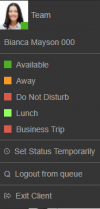
There is visual feedback whether the user is logged in on queue on "Team" page.
1626769359498.png
 
  • Like
Reactions: Jeremy Bero
@Trust9 In your screenshot you login/logout explicitly from a Queue.

BLF controls the Global Login/Logout status of queue.

Manually login/logout is something that you can do from avatar menu.

1626775191812.png
 
  • Like
Reactions: Evolute IT
Is there going to be a removal script for the chrome extension in light of the new windows app? Been using both side by side but don't want to uninstall manually upon release v18. Can self genereated scripts to execute but would be better if it were native to the windows app upon discovery of chrome extension.
 
  • Like
Reactions: davide.bonavita
I think that this statement needs more emphasis....
  • PBX with Bridge configuration: If you are using bridges to communicate between one PBX and another, both PBXs must be running on the exact same V18 version.

When I read this, I though "No problem, we're bridging to a v16 system".

This does not just mean that a bridge between v18a5 and v18b1 won't work; but also between v18b1 and v16 also no longer functions as before.

Also from testing, whilst some things are not passed across the bridges between the different versions (e.g. BLF's) calls can still be dialed across the bridge.
 
  • Like
Reactions: Evolute IT
@AlanRamsay ,
I think you missed one important thing from that statement - "on the exact same V18 version"
So it should be on v18 and the exact same build - example v18b1 with v18b1
 
@AlanRamsay ,
I think you missed one important thing from that statement - "on the exact same V18 version"
So it should be on v18 and the exact same build - example v18b1 with v18b1
Is there a specific reason why it's like that? Was the bridge function changed?

Calls do still work, just presence/chat that doesn't.
 
@AlanRamsay ,
I think you missed one important thing from that statement - "on the exact same V18 version"
So it should be on v18 and the exact same build - example v18b1 with v18b1
My point exactly - that you meant it one way - all systems must be running v18 and be on the same version of v18; but could be taken as all systems running v18 need to be on the same version, but not all systems need to be running v18.
 
We tried to upgrade our 3CX V16 up to V18 as described here https://www.3cx.de/blog/upgrade-debian-10-buster/.
The upgrading process got stuck in the middle of nowhere. Checking the VMware console it says: grub: and nothing happens. What did we do wrong? Seems to me as if the upgrade from Debian 9 to 10 failed because grub wasn´t installed as it should.
 
  • Like
Reactions: dandersonn
@Christof Lemke
Was this machine deployed using the 3CX ISO as per our guide? If it is a 3CX supported configuration that was deployed based on our guides you should've been able to upgrade with no issues.

Instead of investigating and trying to troubleshoot, it might actually be faster and easier to take a backup, move it away from the machine, redeploy using the 3CX ISO and restore the backup. You should then be able to upgrade to V18 with no issues.
 
I don't want to complain. I am only making suggestions for improvement. The new app is really great

Almost all my questions have been answered.

Two things:

1. phone book and mailbox must be in the main menu.
2. in the german version, the text for the queue is not recognisable.
the text should read "Anmelden Warteschleife" and "Abmelden Warteschleife" or the menu should be scalable.
View attachment 23041
I agree that the phonebook needs to be on the main view and not hidden away. Im not sure on anyone else but I generally sit on the People page and from there I can see whos on the phone, whos available and i'm easily able to search the address book from the search box in the top right. you've gone backwards with contacts in this web client.
 
  • Like
Reactions: CallingFromMars
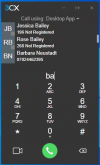
@kieferschild for this reason we extended the dialer both on WebClient + Desktop App to support search for people/contacts with their number/name.

2021-07-20_17h19_41.png
 
  • Like
Reactions: Evolute IT
Thanks 3CX... Nice progress and Teams is an unexpected bonus!

Checking on DNS Helper
  • Will it be active and available in v18
  • What versions will supported? - This is a critical Administrative Function all versions should be supported.
We have to move some On-Prem Servers and the DNS Helper feature is critical.
That will also resolve the continuous "In-Office / Out of Office" Confusion.
Please Advise ...
 
  • Like
Reactions: CallingFromMars
@Brian Buell - Thanks for the headsup! The DNS helper was aborted. The way to go is split DNS. If these customers have a DNS server its easy to configure, please follow our guide
@trust 9 - notifications for voice mail could be clearer, but the most people will have voice mail notifications via email. I think this works really well. We will look into a notification in the interface though that will be merged with missed calls.
 

Forum statistics

Threads
111,980
Messages
590,106
Members
164,908
Latest member
FarizQasimov