It's in Alpha, so next is probably a Beta period of 1-3 weeks or so, and then release a week or two after that if no problems are found. Usually.when we can expect this update 3 ?
Yes this is due to the new reports engine.Hi Team,
After upgrading to V20 U2, it appears that the recording link or the Play & Download button for recordings is no longer available when exporting call reports in either CSV or Print (HTML) formats. Has this feature been removed in V20?
The only workaround currently is to play and download recordings directly from the call report page.
Yes it is required.Thanks @ConceptsWeb @SteveITS for this info
Regarding Passive Server setup is it required to restore from backup of primary or use same FQDN & Key setup?
1. Set the backup schedule and failover on the active server.Thank u @ConceptsWeb
It will not conflict with the existing Active Server or start services of second server during Restore? we need to enable Failover and select all FQDN & key during backup?
Yes@ConceptsWeb
Which means
1. Need to schedule backup and Enable Failover on the Active Server.
2. Restore the backup of Active Server in Second Server and this second server will start all the 3cx services and FQDN active.
3. Needs to Enable Failover and set as a Passive on Second Server which will stop the services again?
4. Rebooting the Active Server will becomes active again with the same Failover Enabled?
Only restoreThanks for the confirmation @ConceptsWeb
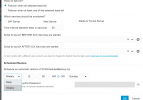
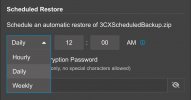
Do we need to setup Backup Schedule for second server or only Schedule Restore?
Yes so make sure it's a shared storage (not local disk)@ConceptsWeb
This Auto Schedule an Automatic Restore of Backup file will use same Location to Restore which is defined under Backup>Location ?
Founded in 2005, when VoIP was an emerging technology, 3CX has gone on to establish itself as a global leader in business communications.