





Better remote archiving & storage, E911 and Teams syncing.
V20 U3 ALPHA presents itself and is ready for try-outs. This release focuses on making the admin’s life easier with improved remote archiving and storage, multi user editing, emergency E911, bi-directional Teams status syncing and more. Read on to find out what’s been added for each feature in this ALPHA.
Easier Remote Storage & Archiving
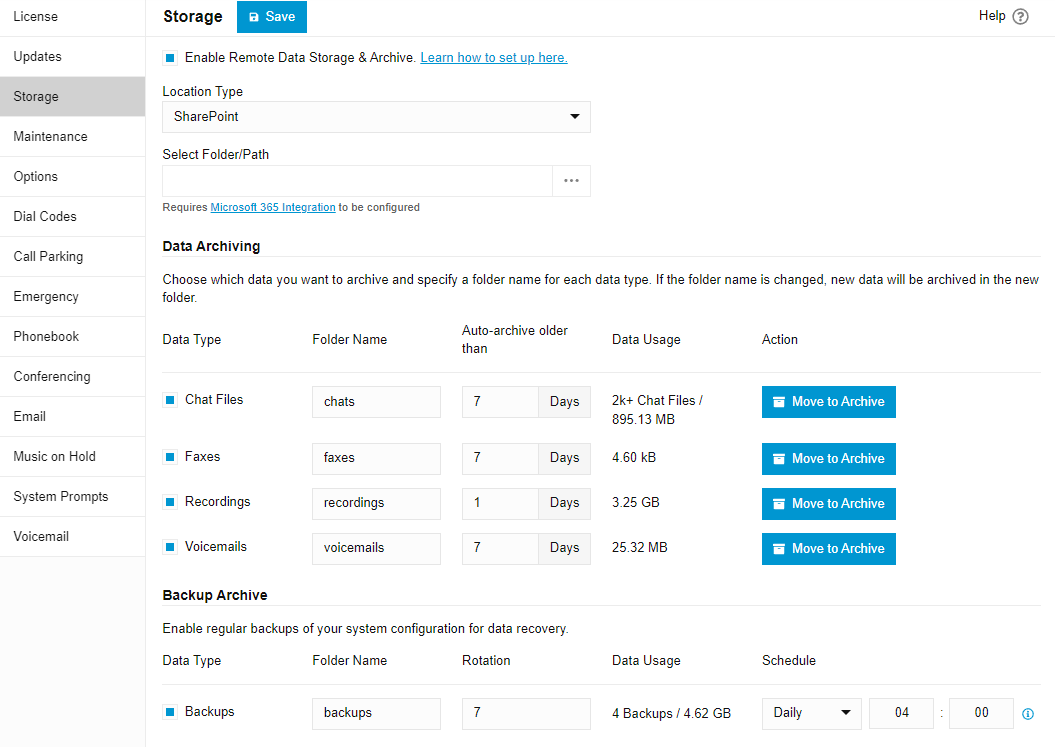
It is essential to store your recordings, voicemail, faxes and images off-instance for more efficient backup, storage and general running of the PBX. To make remote storage and archiving configuration easier we’ve made configuration much more straightforward across the board.
Recordings, chat and voicemails can now easily be backed-up off-instance - remotely in Google, Sharepoint, FTP/FTPS/SFTP. Backups are now saved in one central remote drive. As a result, backup and restore is much faster and purging the 3CX database is simpler.
Two-Way Syncing of 3CX & Teams Status
In Update 2 we included Teams status syncing - where users could set their status in Teams and have it reflected in 3CX. Update 3 ALPHA, makes the communication between 3CX and Teams bi-directional so users can set their status in 3CX and have it reflected in Teams and vice versa. It’s a two-way thing!
Emergency E911 with Geolocation
The Emergency E911 feature has been upgraded to include Geolocation, a location URL record transmitted during an emergency call. This feature is available for US users and requires proper configuration and support from your provider. When an extension dials an emergency number, 3CX will add the pre-assigned E911 geolocation url to the emergency notification, along with any other relevant data. This will inform emergency services of the exact extension and location of the emergency with precision. Please ensure your E911 settings are correctly configured to take full advantage of this feature.
CRM Integrations Add Call Transcriptions
The CRM integration now not only copies the recording link but also adds the Call Transcription along with its summary to the customer record. This makes it very easy to search for conversations within your CRM and skim through what was previously discussed with the customer.
Making the Admin’s Life Easier: Multi-Edit & More
We’ve added some extra features that aim to simplify the administrators’ workload, such as the much requested multi-edit feature. This allows admins to copy the configuration from one extension to other extensions. Configurations include call forwarding, BLF, voicemail, view, and options.
Additionally, user rights are now more granular - you can assign barge-in, listen or whisper to individual users independent of their role.
Additional features:
- Share reports to multiple emails.
- Users can now see their active connections and last activity.
- Hide abandoned queue calls/logs in recents for users, receptionist and department admins.
- Simplified outbound rules.
- Moved transcription to integrations.
- Ability to enable/disable 3CX Talk.
- Export BLF configuration.
- Added Hourly Trigger for Scheduled Restore.
- In the IP Phone Firmware option you can now choose 3CX Support Tested Firmwares or Untested-Unsupported firmwares.
- Added Onboard MCU for Enterprise Editions.
- Configure the status and DND an IP Phone should map to.
- Configure the status the scheduler should switch to - the auto-scheduler would switch the status to DND out of office hours. This is now configurable to any status you want, for example, away or custom.
Removing Restrictions for 3CX Hosted
Our intention is to remove all hosted by 3CX restrictions in future updates. In Update 3 we've removed the below restrictions, the removal of CFD will be added in Update 4.
- Allow Local MCU.
- Allow templates includes Phones, Dects/FXS Templates and Providers.
- Allow adding custom templates and select custom templates.
Inbuilt Call Routing Scripts
3CX now ships with a number of handy call routing scripts which can easily be enabled to perform a number of much requested functions.
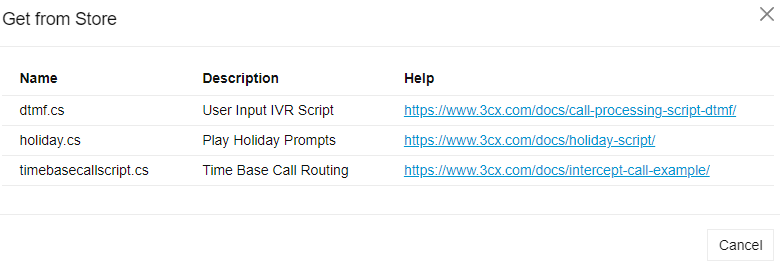
- DTMF - An IVR that can be scripted to support PIN code routing and unlimited destinations.
- Holiday - A script designed to handle holidays, play specific holiday prompts and manage call routing.
- Time-based routing - Configure unlimited patterns for in-office and out of office handling, offering a complete replacement for the legacy specific office hours.
More scripts are coming and these will be available via the Store button inside the Call Routing configuration dialog.
Upgrade to V20, Update 3
⚠ Important: The Alpha version should be installed for evaluation purposes only. It is not recommended for production systems.
From the admin console click on the latest update: "New 20.0 Update 3 Release - ALPHA"
For a fresh, on-premise installation:
3CX Windows Installer
3CX Windows Installation Guide
Download the 3CX ISO
3CX Linux Installation Guide
You can start a new cloud deployment here.
View the complete changelog here.









 Copyright © 2026